In the event the manual electronic override does not work, follow these steps which will
allow you to physically push/pull the slideout:
Physically Pushing in the Slideout
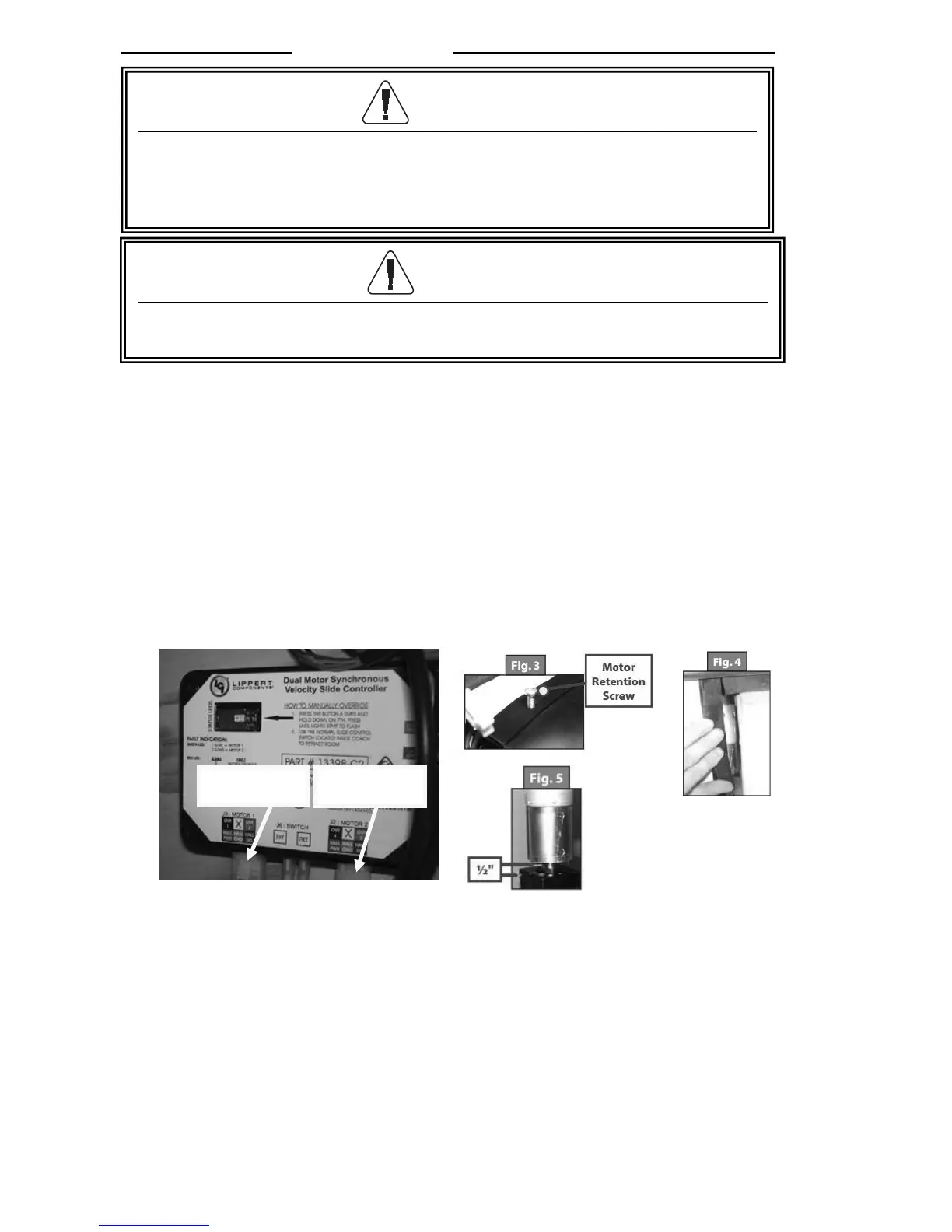
1. Locate the slideout system controller. Refer to previous Step 1 (locating the system
controllers).
2. Unplug Motor 1 and Motor 2 connectors at the bottom of the slideout controller. This
releases the motor brakes for each motor.
3. Now the room can be pushed or pulled as desired. Larger rooms may require several
people to push or pull them.
4. Keep both sides of the slideout relatively even while pushing/pulling.
5. When the room is completely in, plug both motor connectors back into the control
module. (this will apply the motor brakes for road travel).
Disengage motors, manually retract the room and travel lock.
6. Locate and remove the Motor retention screw which can be found near the top of each
vertical column (Fig 3 above).
7. Bend back the wipe seal and visually locate the motor (Fig 4 above).
8. Pull the motor up until it disengages (about 1/2 inch).
9. Repeat this process for both sides of the slide room.
10. Physically push or pull the room back into the opening, keep both sides relatively
even.
11. The room must be travel locked to keep the room in place for road travel.
CAUTION
During this override procedure the motors are not synchronized. Visually
watch the room, and if one side is moving significantly slower than the other
(or not at all), immediately stop and call your dealer or Jayco Customer
Service.




 To Next Page