disengages from the ceiling plate. Rotate the
knob for best picture.
Lowering the antenna
Rotate the antenna until the pointer on the
directional handle aligns with the pointer on
the ceiling plate. Turn the elevating crank
counterclockwise in the DOWN direction until
resistance is noted. The antenna is now locked
in the travel position.
TV SMART MOUNT™
Use caution when removing or installing your
bedroom 19” LCD flat screen TV on the
SmartMount™ wall plate. The SmartMount™
maximum load capacity is 80 lbs. (36.3 kg).
Installing and removing
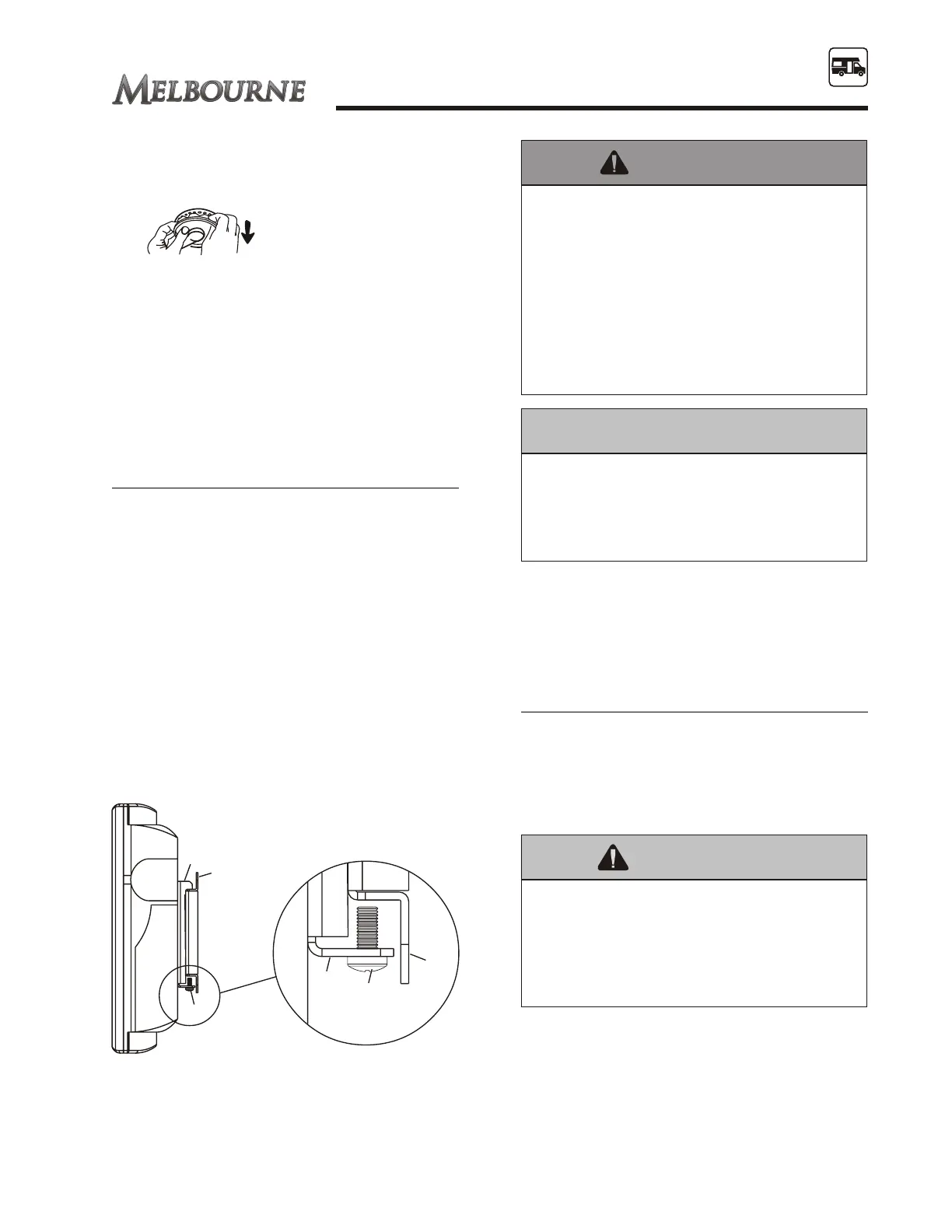
Sit the hook bracket (B) attached to the back of
the flat screen TV onto the wall plate (A). and
tighten the OEM supplied M5x12mm screws
(C) using the OEM supplied 4 mm allen
wrench.
To remove the flat screen TV, loosen the
screws (C) and lift the flat screen hook bracket
(B) off the wall plate (A) mount.
For more information
Please refer to the OEM operator’s manual. If
you have further questions, consult your RV
dealer, the OEM or Jayco Customer Service.
TELEPHONE JACK
To operate your interior phone the RV must be
connected to an external telephone service
provider. To use the phone, plug a telephone
cord with a RJ-11 plug (customer supplied) to
the exterior phone jack.
73
SECTION 8
CAMPING & OPERATING
Fig. 8.4
It is recommended the telephone cord be
disconnected from the external power
source in the event of a storm. The
telephone cord can carry voltage from the
external power source into the RV and
cause potential damage.
Fig. 8.5 TV Smart Mount™ diagram
Do not over tighten the screws with
excessive force. Over tightening can cause
damage to the SmartMount™. Tighten
scres to 20 in.-lb (2.26 N.M.) maximum
torque.
Do not lift more weight than you can handle.
Use additional manpower or mechanical
lifting equipment to safely handle
placement of the flat screen TV.
Failure to lock hook the bracket with the
screws can cause the TV screen to come
off the SmartMount™ if hit accidentally.
This type of damage is not covered by
warranty.





 To Next Page