EasyManua.ls Logo

jbc DDE - User Manual

jbc DDE
16 pages
Print Icon
To Next Page IconTo Next Page
Loading...
DDE
2-Tool Control Unit
INSTRUCTION MANUAL
Question and Answer IconNeed help?

Do you have a question about the jbc DDE and is the answer not in the manual?

Summary

Product Information

Packing List

Lists all included items in the package for the DDE control unit.

Key Features

Highlights the main capabilities and benefits of the DDE 2-Tool Control Unit.

Connection Example

DDE Unit Connections

Illustrates how to connect various tools, peripherals, and accessories to the DDE control unit.

Connecting to FAE

FAE Integration

Explains the process and requirements for connecting the DDE to FAE fume extractors.

Compatibility Guide

Modular System Compatibility

Details which stands, tools, cartridges, and peripherals are compatible with the DDE unit.

DDE Work Screen Overview

Menu Navigation

Describes the main menu options for configuring station and tool parameters.

Troubleshooting

Provides guidance on diagnosing and resolving common issues with the soldering station.

System Notifications

Status Bar Icons

Explains the meaning of various icons displayed on the DDE's status bar.

Peripheral Setup

Connecting Peripherals

Guides on how to connect, select, and configure peripheral modules for the station.

Operation Modes

Work Mode

Describes the primary operational state when the tool is in use.

Sleep Mode

Explains the sleep mode function for conserving energy and extending tip life.

Hibernation Mode

Details the hibernation mode for extended periods of tool inactivity.

USB Connector Usage

Software Update Process

Instructions for downloading and installing software updates via the USB port.

Maintenance and Care

Cleaning Procedures

Guidance on cleaning the station, tools, and cables to ensure optimal performance.

Fuse Replacement

Step-by-step instructions for safely replacing a blown fuse in the unit.

Safety Precautions

General Safety Guidelines

Essential safety rules to prevent electric shock, injury, fire, or explosion.

Specifications

Technical Data

Lists detailed technical specifications including power, temperature, dimensions, and weight.

Warranty Information

Product Warranty Terms

Details the warranty coverage, duration, and procedures for registration and claims.

Overview

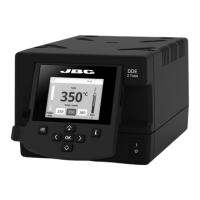
The JBC DDE 2-Tool Control Unit is a versatile soldering and desoldering station designed for professional use, offering an intuitive user interface and advanced functionalities. It is compatible with a wide range of JBC tools and peripherals, allowing users to select the best equipment for their specific soldering or desoldering needs.

Function Description:

The DDE 2-Tool Control Unit works simultaneously with up to two tools and can be connected to one module and one pedal for each tool (requiring one peripheral module per tool). It provides quick access to station parameters through its 2.8" color TFT screen, which can be tilted for easy reading. The unit's revolutionary technology enables rapid tip temperature recovery, allowing users to work at lower temperatures and improve soldering quality. It also features Sleep and Hibernation modes, which further reduce tip temperature during inactivity, extending tip life by up to five times.

The DDE can be connected to JBC FAE1 and FAE2 fume extractors to manage fume extraction during soldering. This requires the DDE control unit to be updated with program version 8886784 (or later), which can be downloaded from JBC's website. Once updated, the station connects to the fume extractor using an RJ12 cable (supplied with FAE1/FAE2) via the "FAE/Robot" connector on the control unit and any "Station" connector on the fume extractor. Fume extractor settings are managed through the FAE's own interface.

Advanced functionalities include detailed graphics of tip temperature and power delivery in real-time during solder joint formation. This feature aids in analyzing and adjusting the soldering process to achieve optimal quality. The unit also supports JBC Net, allowing users to manage their entire soldering process remotely in real-time for enhanced quality and control in production. Station software updates can be performed by downloading the JBC Update File from the website and inserting it into the USB flash drive connected to the station.

Important Technical Specifications:

The DDE 2-Tool Control Unit is available in three models:

  • DDE-9C (100V 50/60Hz, Input fuse: T5A, Output: 23.5V)
  • DDE-1C (120V 50/60Hz, Input fuse: T4A, Output: 23.5V)
  • DDE-2C (230V 50/60Hz, Input fuse: T2A, Output: 23.5V)

Key specifications include:

  • Output Peak Power: 150W per tool
  • Temperature Range: 90 - 450 °C / 190 - 840 °F
  • Idle Temp. Stability (still air): ±1.5°C / ±3°F, meeting and exceeding IPC J-STD-001F standards.
  • Temp Accuracy: ±3% (using reference cartridge)
  • Temp Adjustment: ±50°C / ±90°F, adjustable through station menu settings.
  • Tip to Ground Voltage/Resistance: Meets and exceeds ANSI/ESD S20.20-2014 and IPC J-STD-001F standards.
  • Ambient Operating Temp: 10 - 50 °C / 50 - 122 °F
  • Connections: USB-A, USB-B, Peripherals connectors, RJ12 connector for Robot.
  • Control Unit Dimensions/Weight (L x W x H): 148 x 232 x 120 mm / 3.82 kg (5.8 x 9.1 x 4.7 in / 8.41 lb)
  • Total Package Weight: 258 x 328 x 208 mm / 4.3 kg (10.15 x 12.9 x 8.1 in / 9.5 lb) The unit complies with CE standards and is ESD safe.

Usage Features:

The DDE's work screen provides an intuitive interface with several menu options:

  • Status Bar: Displays system notifications such as USB flash drive connection, PC control, robot control, software update prompts, warnings, and error messages.
  • Power Indicator: Shows the current power usage (e.g., 45%).
  • Temperature Levels: If activated, displays preset temperature levels (e.g., 250, 350, 380 °C).
  • Tool in Use: Indicates the active tool (e.g., T245).
  • Station Information: Provides details about the station.
  • Change Port: Allows switching between tool ports.
  • Menu Options:
    • Station: Set station parameters.
    • Peripherals: Set peripheral links with station ports.
    • Tools: Set tool parameters.
    • Reset: Restore station parameters to default values.
    • Counters: Display hours worked in each cycle.

The DDE supports three operational modes:

  1. Work: When the tool is lifted from the stand, the tip heats up to the selected Work temperature (adjustable from 90 to 450 °C in steps of ±5 °C/°F).
  2. Sleep: When the tool is in the stand, the temperature falls to a preset Sleep temperature. Users can change the Sleep temperature and set a Sleep delay from 0 to 9 minutes, or disable Sleep mode.
  3. Hibernation: After longer periods of inactivity, the power is cut off, and the tool cools down to room temperature. The Hibernation delay can be set from 0 to 60 minutes, or Hibernation can be disabled.

The unit also allows for the activation of "Temp. Levels" within the Tool Settings, enabling quick selection between predefined temperature settings.

Maintenance Features:

Regular maintenance ensures optimal performance and longevity of the DDE unit:

  • Cooling: Always allow the equipment to cool before carrying out maintenance or storage.
  • Cleaning:
    • Clean the station screen with a glass cleaner or a damp cloth.
    • Use a damp cloth to clean the casing and the tool. Alcohol can be used only for metal parts.
    • Periodically check and clean the metal parts of the tool and stand to ensure proper tool status detection.
    • Maintain the tip surface clean and tinned prior to storage to prevent tip oxidation, which can reduce heat transfer.
  • Cables and Tubes: Periodically check all cables and tubes for wear or damage.
  • Fuse Replacement:
    1. Pull off the fuse holder and remove the blown fuse. A tool may be used to lever it off if necessary.
    2. Press the new fuse into the fuse holder and replace it in the station.
  • Parts Replacement: Replace any defective or damaged pieces with original JBC spare parts only.
  • Repairs: Repairs should only be performed by a JBC authorized technical service.

Safety Guidelines:

It is imperative to follow safety guidelines to prevent electric shock, injury, fire, or explosion:

  • Use the units only for soldering or rework; incorrect use may cause fire.
  • Plug the power cord into approved, properly grounded bases. Hold the plug, not the wire, when unplugging.
  • Do not work on electrically live parts.
  • Place the tool in the stand when not in use to activate sleep mode. The soldering tip/nozzle, metal part of the tool, and stand may remain hot even when the station is off; handle with care.
  • Do not leave the appliance unattended when it is on.
  • Do not cover ventilation grills, as heat can ignite flammable products.
  • Avoid flux contact with skin or eyes to prevent irritation.
  • Be careful with fumes produced during soldering.
  • Maintain a clean and tidy workplace. Wear appropriate protection glasses and gloves.
  • Exercise utmost care with liquid tin waste, which can cause burns.
  • This appliance can be used by children over eight and individuals with reduced physical, sensory, or mental capabilities, or lack of experience, provided they are supervised and understand the hazards. Children must not play with the appliance.
  • Maintenance must not be carried out by children unless supervised.

jbc DDE Specifications

General IconGeneral
Brandjbc
ModelDDE
CategoryControl Unit
LanguageEnglish