EasyManua.ls Logo

jbc DIU - Control Process

jbc DIU
12 pages
Print Icon
To Next Page IconTo Next Page
To Previous Page IconTo Previous Page
Loading...
0
c
P o w er 10%
350
Selected temp
350
o
C
A c t u al t e m p . 180
o
C
Sleep
Tool in the stand
A c t u a l t emp . 20
o
C
Tool in the stand after
sleep, No heat
Hibernation
0
c
Selected temp.
350
o
C
P o w e r 10%
350
4 Counters
5
Program version
Stat ion setti ngs
1 Temp unit
Celsius
2
Maximum temp 400
0
C
3
Minimum temp 200
0
C
4 Nitrogen mode OFF
Tool 245
Tool setting s
1 Fix one temp
----
2
Temp levels set OFF
3
Sleep delay 0 min
Ba ck
5 Help text OFF
6
Beep ON
7
Change PIN
Tool 245
Back
4 Sleep temp 180
0
C
5
Hibern delay 30 min
6
Temp adjust +0
0
C
Ma in menu
Exit
1 Reset settings
2
Station settings
3
Tool settings
Tool 245
Count ers
1 Plugged hours
0
2
Working hours 0
3
Sleep hours 0
4 Hibernation hours 0
Ba ck
5 No tool hours 0
6
Sleep cycles 0
7
Desold cycles 0
Menu
Enter
Menu
Enter
Menu
Enter
Menu
Enter
Fixed temp.
350
o
C
Levels ºC
270 350 400
Tool 245
Tool setting s
1 Fix one temp
----
2
Temp levels set OFF
3
Sleep delay
Tool 245
Back
4 Sleep temp 180
0
C
5
6
Temp adjust +0
0
C
4 Counters
5
Program version
Hibern delay
Ma in menu
Exit
1 Reset settings
2
Station settings
3
Tool settings
Pedal Set Up P305
0 min
30 min
0
c
P o w er 10%
350
Selected temp
350
o
C
A c t u al t e m p . 180
o
C
Sleep
Tool in the stand
A c t u a l t emp . 20
o
C
Tool in the stand after
sleep, No heat
Hibernation
0
c
Selected temp.
350
o
C
P o w e r 10%
350
4 Counters
5
Program version
Stat ion setti ngs
1 Temp unit
Celsius
2
Maximum temp 400
0
C
3
Minimum temp 200
0
C
4 Nitrogen mode OFF
Tool 245
Tool setting s
1 Fix one temp
----
2
Temp levels set OFF
3
Sleep delay 0 min
Ba ck
5 Help text OFF
6
Beep ON
7
Change PIN
Tool 245
Back
4 Sleep temp 180
0
C
5
Hibern delay 30 min
6
Temp adjust +0
0
C
Ma in menu
Exit
1 Reset settings
2
Station settings
3
Tool settings
Tool 245
Count ers
1 Plugged hours
0
2
Working hours 0
3
Sleep hours 0
4 Hibernation hours 0
Ba ck
5 No tool hours 0
6
Sleep cycles 0
7
Desold cycles 0
Menu
Enter
Menu
Enter
Menu
Enter
Menu
Enter
Fixed temp.
350
o
C
Levels ºC
270 350 400
Tool 245
Tool setting s
1 Fix one temp
----
2
Temp levels set OFF
3
Sleep delay
Tool 245
Back
4 Sleep temp 180
0
C
5
6
Temp adjust +0
0
C
4 Counters
5
Program version
Hibern delay
Ma in menu
Exit
1 Reset settings
2
Station settings
3
Tool settings
Pedal Set Up P305
0 min
30 min
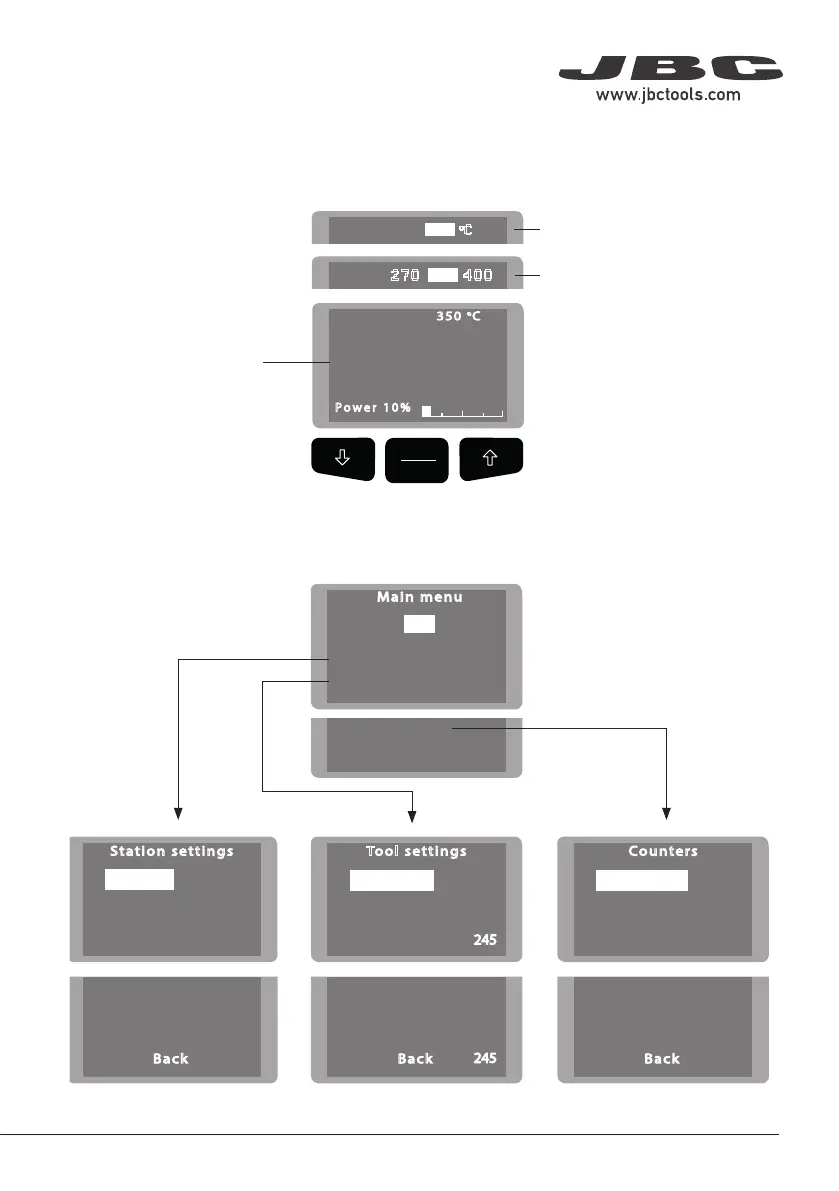
Menu Screen
Original PIN: 0105
The work screen provides
useful information of tool
status in real time.
Displays a specific fixed temp.
Shown once you have selected
temp. levels.
Work Screen
Control Process
7
40 mm
50 mm
60 mm
80 mm
100 mm
130 mm
130 mm
para manuales - color gris
200 mm
300 mm

Related product manuals