Toensureproperpolarity,connecteach“+”terminalonthebackoftheamplierorreceivertotherespective“+”(red)
terminaloneachspeaker.Connectthe“–”(black)terminalsinasimilarway.Seeyourreceiveroramplier’sowner’s
manualtoconrmitsconnectionprocedures.
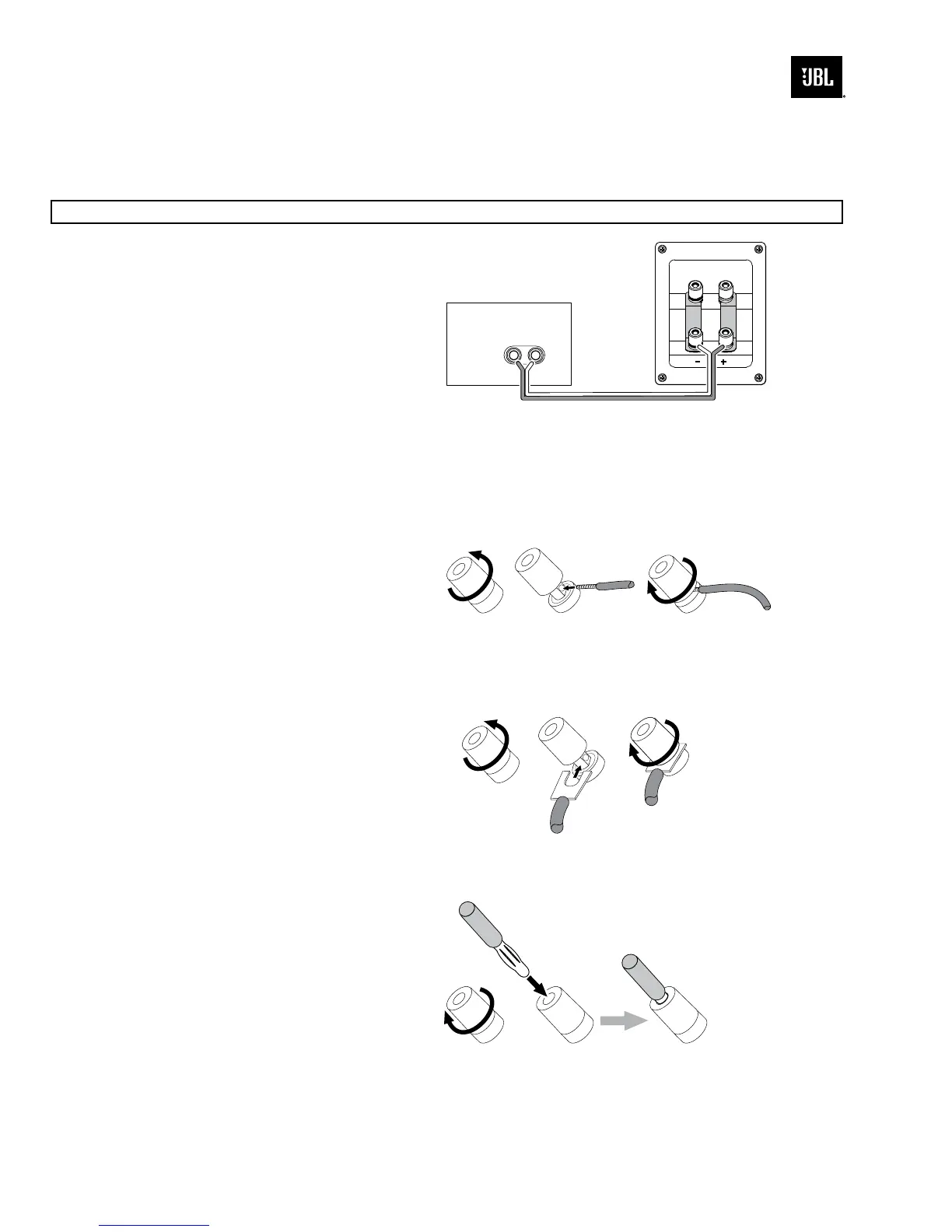
5. Basic Single-Wire Connection
Connecttheampliertoeachspeakerasshownin
the illustration on the right. You can use either set of
terminalsonthespeaker.NOTE:Donotremovethe
metal jumpers from between the two sets of terminals
when connecting the speaker wires.
IMPORTANT:Donotreversepolarities(i.e.,“+”to
“–”or“–”to“+”)whenmakingconnections.Doing
so will cause poor stereo imaging and diminished
bass performance.
The4319’sgold-platedspeakerterminalscanacceptavarietyofwireconnectortypes:barewire,spadeconnectors,
pin connectors and banana connectors.
Using Bare Wire or Pin Connectors:
IMPORTANT:Makesurethatthe(+)and(–)wires
or pins do not touch each other or the other terminal.
Touching wires can cause a short circuit that can
damageyourreceiveroramplier.
Using Spade Connectors:
IMPORTANT:Makesurethe(+)and(–)spade
connector blades do not touch each other or the other
terminal. Touching blades can cause a short circuit
thatcandamageyourreceiveroramplier.
Using Banana Connectors:
+–
Speaker
Connector Panel
Receiver or Amplifier
(one channel shown)
A. Unscrew
Cap
B. Insert Bare Wire or
Pin Connector
through Hole in Post
C. Tighten Cap
to Secure
. Unscrew
Cap
B. Insert Spade Connector
Blades around Post
C. Tighten
Cap
A. Tighten
Cap
B. Insert Banana Connector
into Hole in Cap


 To Next Page