
 Need help?
Do you have a question about the JBL Harman BAR 1300X and is the answer not in the manual?
How to connect the soundbar to TVs and digital devices using HDMI or optical cables.
Steps to connect the soundbar to Bluetooth devices like smartphones and tablets.
Instructions for connecting the soundbar to your home network via Wi-Fi or Ethernet.
Instructions for enjoying TV audio through the soundbar speakers and remote control setup.
How to play video and audio from digital devices connected via HDMI IN.
Streaming audio from Bluetooth devices to the soundbar for playback.
Synchronizing audio and video to eliminate sound delay for a better viewing experience.
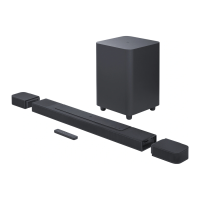
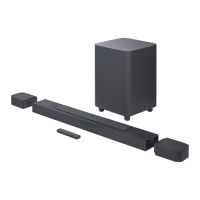
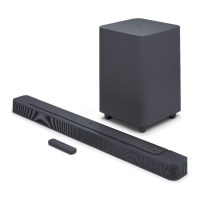
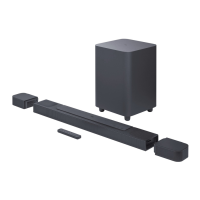
The JBL Bar 1300X is a comprehensive home entertainment sound system, comprising a soundbar, detachable speakers, and a subwoofer, designed to deliver an extraordinary audio experience. This manual provides detailed instructions for setup, operation, and maintenance, ensuring users can maximize the product's features and support.
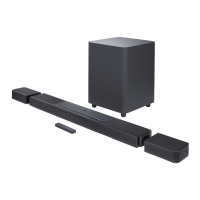
The JBL Bar 1300X is an advanced sound system that enhances your TV and digital device audio. It features a soundbar as the central unit, two detachable speakers that can function as rear surrounds or standalone Bluetooth speakers, and a powerful wireless subwoofer. The system supports various audio inputs, including HDMI ARC/eARC, optical, and Bluetooth, making it compatible with a wide range of devices such as TVs, set-top boxes, DVD/Blu-ray players, and game consoles.
A key feature of the JBL Bar 1300X is its ability to deliver immersive 3D surround sound, including Dolby Atmos and DTS:X, thanks to its up-firing speakers and detachable surround design. This allows for an expanded soundstage, even for legacy channel-based audio formats like 5.1 and 7.1 content.
The system is also smart-enabled, integrating with the JBL One app for easy Wi-Fi setup, software updates, and personalized audio settings. Through the app, users can connect to various music streaming services, discover new music, and access preset playlists and speaker settings with a single button. The soundbar supports Chromecast built-in, AirPlay, and Alexa Cast, enabling seamless audio streaming from Android and iOS devices.
Power and Standby: The soundbar can be switched on by pressing any button on the unit or the remote control. It features an auto-standby mode, activating after 10 minutes of inactivity, and an auto-wakeup function that turns on the soundbar when connected to a powered-on TV via HDMI ARC or when audio is streamed through its network connections.
Source Selection: Users can easily switch between sound sources (TV, Bluetooth, HDMI IN) using the remote control or buttons on the soundbar. The HDMI OUT (TV ARC/eARC) connection is prioritized for TV audio input when both HDMI and optical cables are connected.
Volume Control and Mute: Volume can be adjusted using the +/- buttons on the soundbar or remote control. Pressing and holding these buttons allows for continuous adjustment. The mute function is accessible via the remote control.
JBL One App Control: The JBL One app offers comprehensive control over the soundbar, including Wi-Fi setup, audio calibration, personalized audio settings, device management, and music service integration. The "Moment" button on the remote control provides quick access to personalized playlists and speaker settings configured in the app.
Multi-Room Playback: The system supports multi-room music streaming to multiple Chromecast-enabled, AirPlay, or Alexa-enabled speakers through the Google Home app or Amazon Alexa app, respectively.
Software Updates: For optimal performance, the JBL Bar 1300X supports software updates via the Internet or a USB storage device. Online updates occur automatically when available and connected to the home network. USB updates require saving the update file to a FAT32 formatted USB device (max 64 GB) and connecting it to the soundbar.
Charging Detachable Speakers: The detachable speakers have rechargeable batteries. They can be charged by docking them onto the soundbar or by connecting them to power using a USB-C cable. A full charge takes approximately 4 hours. The status indicator on the speakers and the soundbar display battery status and charging progress.
Sound Calibration: The system includes a sound calibration feature to optimize the 3D surround sound experience for your unique listening environment. This involves placing the detachable rear speakers beside your seating position and initiating calibration via the remote control. The process ensures proper speaker positioning and sound balance.
Factory Reset: To remove all personalized settings and restore the soundbar to its default factory settings, a factory reset can be performed by pressing and holding specific buttons on the soundbar for more than 5 seconds.
Troubleshooting: The manual provides a comprehensive troubleshooting guide for common issues related to power, sound, Bluetooth connectivity, Wi-Fi connectivity, and playback. It advises users to check basic connections, settings, and battery status before seeking professional services. For instance, if the remote control is not working, users should check and replace batteries, and reduce the distance and angle between the remote and the main unit. For Wi-Fi issues, checking network settings and router status is recommended.
Safety Instructions: The manual emphasizes important safety instructions, including verifying line voltage before use, avoiding extension cords, handling the AC power cord gently, and not opening the cabinet to prevent shock hazards and voiding the warranty. In case of water ingress, immediate disconnection from power and consulting an authorized service center are advised.
 General
| Total Power Output | 1170W |
|---|---|
| Number of Channels | 11.1.4 |
| Dolby Atmos | Yes |
| DTS:X | Yes |
| Detachable Speakers | Yes |
| Wi-Fi | Yes |
| HDMI Input | 3 |
| HDMI Output | 1 |
| HDMI In | 3 |
| HDMI eARC | Yes |
| Multi-Room Audio | Yes |
| Subwoofer | 10" Wireless |
| Bluetooth | Yes |
| HDR Pass-through | Yes |
| Frequency Response | 33Hz - 20kHz |
| Voice Assistant | Yes |
| Dimensions (Soundbar) | 1376 x 60 x 139 mm |
| Dimensions (Subwoofer) | 305 x 440.4 x 305 mm |
| Weight (Subwoofer) | 10 kg |


 To Next Page