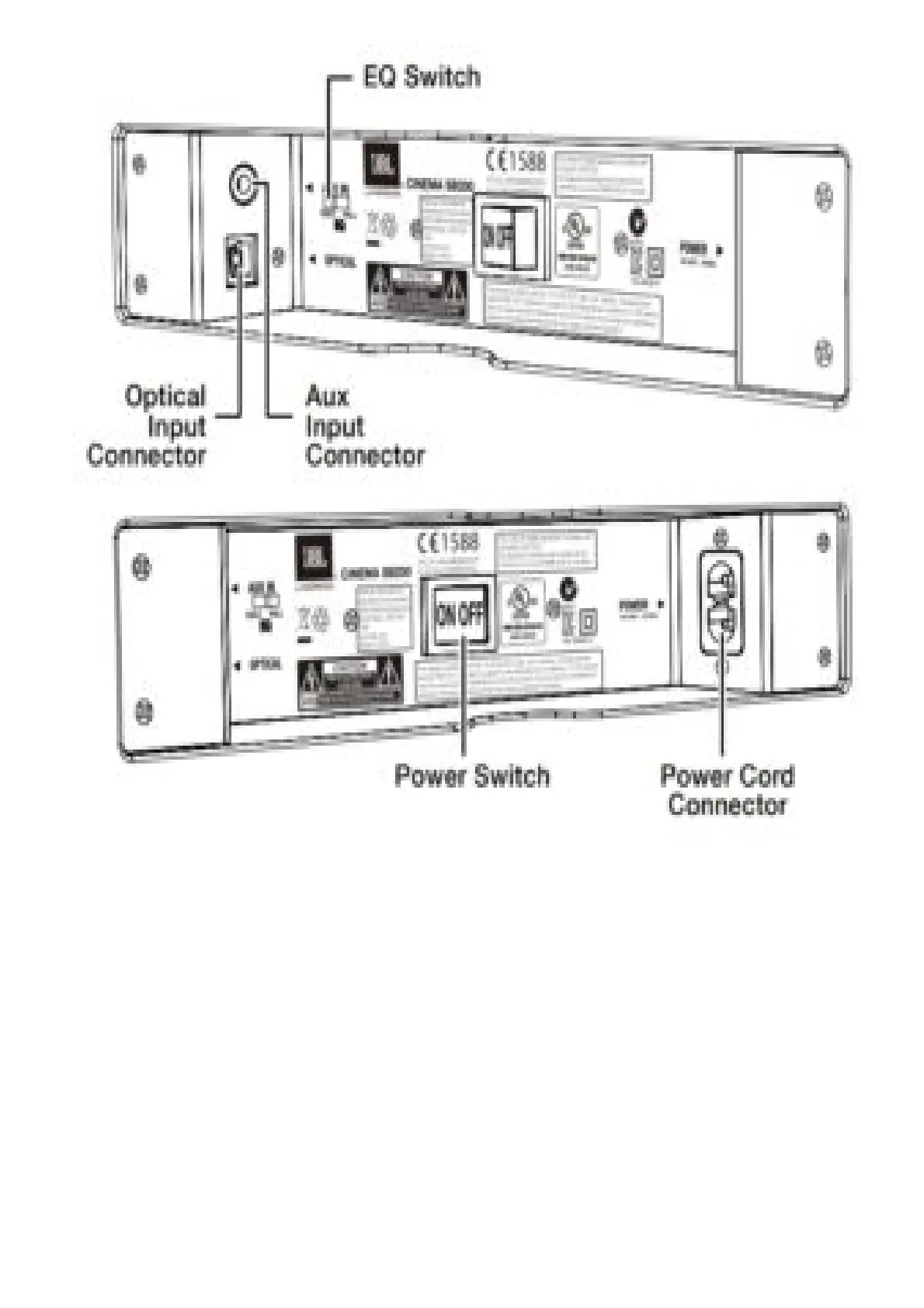
EQ switch: Use this switch to adjust the soundbar’s bass for either wall or table mounting. If you’re
mounting the soundbar on a wall with the included wall-mount bracket, set the EQ switch to the “Wall”
position for the most natural-sounding bass performance. If you are placing the soundbar on a table,
set the EQ switch to the “Table” position for the most natural-sounding bass performance.
Optical Input connector (digital): If your TV, disc player or cable/satellite tuner has an optical
digital output, use the included optical cable to connect it here.
NOTE: You can connect different source components to the analog and digital connections.
Aux Input connection (analog): Use the included stereo 3.5mm to stereo RCA audio cable to
connect the stereo analog outputs of your TV, disc player or cable/satellite tuner here.
Power switch: Set this switch to the “On” position to activate the soundbar. In normal operation, this
switch will be left in the “On” position. See Turning the Soundbar On and Off, on page 5, for more
information.
Power Cord Connector: Connect the included power cord here. See Power Connections, on page 5,
for more information.
IMPORTANT: Do not connect the power cord to an AC outlet until you have made and verified all



 To Next Page