EasyManua.ls Logo

JBL VMA160 - User Manual

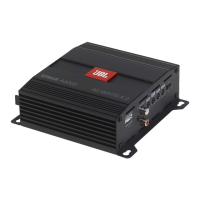
JBL VMA160
28 pages
Print Icon
To Next Page IconTo Next Page
Loading...
VMA160
VMA1120
VMA1240
VMA260
VMA2120
Commercial Series
1 Channel & 2 Channel Mixer-Amplifier
Operation Manual
1
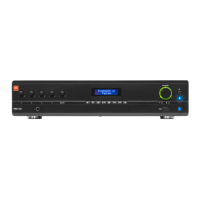
VMA 160
1 2 3 4 MUSIC
USB
MASTER
1
USB
4
VMA 260
1 2 3 MUSIC 1 4 5 6 MUSIC 2
MASTER 2MASTER 1
VMA Series

Questions and Answers

  • I
    isandovalJul 27, 2025
    Why is my JBL VMA160 Amplifier sound distorted?
    • M
      michaelfaulknerJul 27, 2025
      If you're experiencing distorted sound with your JBL Amplifier, there are a few potential causes. First, the input signal level might be too high, so try turning down the input level controls. Alternatively, the Master Volume could be set too high; reduce it to see if that resolves the issue. Lastly, if you're using a line-level source, ensure the MIC/LINE switch is set to the LINE position.
  • H
    Heather MurphyAug 10, 2025
    What to do if my JBL VMA160 Amplifier has no sound?
    • R
      Robert HunterAug 10, 2025
      If your JBL Amplifier has no sound or low sound, check the following: * Verify that an input signal is present and at an adequate level. * Make sure the Master Volume control is turned up. * If a CSR-V is connected, ensure it is also turned up. * Check that the mixer channel inputs are turned up. * Confirm that the Priority switch is open, not muting the inputs. * If using 70V or 100V outputs, verify the 70V/100V switch is ON.

Summary

Important Safety Information

General Safety Warnings and Precautions

Key warnings regarding electrical shock, moisture, user servicing, and general operation.

Power Cord and Grounding Safety

Guidelines for connecting the power cord, including wire color coding and grounding requirements.

Electromagnetic Compatibility and Compliance

FCC and Canada compliance statements, interference correction, and RF exposure limits.

Installation and Environmental Considerations

Advice on placement, magnetic fields, ventilation, and proper product disposal.

EC - Declaration of Conformity

EMC and Safety Standards

List of EMC and safety standards relevant to the audio-visual equipment.

Contact Information for Representatives

Contact details for the European representative and technical documentation.

Welcome and Features

1.0 Welcome

Introduction to JBL VMA Series Mixer-Amplifiers for installed sound applications.

1.1 Features

Overview of key features including inputs, outputs, controls, and warranty.

Front Panel Controls and Indicators

VMA 160 Front Panel Controls

Description of controls and indicators on the front panel of the VMA 160.

VMA 260 Front Panel Controls

Description of controls and indicators on the front panel of the VMA 260.

Rear Panel Controls and Connectors (VMA160, VMA1120, VMA1240)

Rear Panel Controls and Connectors (VMA260 & VMA2120)

Setup and Installation

2.1 Unpacking Your Amplifier

Procedure for unpacking and inspecting the amplifier for transit damage.

2.2 Installing Your Amplifier

Guidance on installing the amplifier, including rack mounting and placement for cooling.

Cooling and Input Wiring

2.3 Ensuring Proper Cooling

Recommendations for maintaining adequate airflow and ventilation for the amplifier.

2.4 Choosing Input Wire & Connectors

Guidance on selecting appropriate input cables and connectors for audio sources.

2.5 Output Wiring & Connectors

2.6 Wiring Your Audio System

AC Connection and Startup

2.7 Connecting to AC Mains

Procedure for connecting the amplifier to the AC power source, including safety warnings.

2.8 Protecting Your Speakers

Advice on preventing speaker damage from clipping, subsonic signals, and using HI-Z mode.

2.9 Startup Procedure

Step-by-step guide for the initial power-up and operation of the amplifier.

3.0 Operation and Precautions

3.1 Operational Precautions

Essential precautions for optimal performance and safety during operation.

3.2 Input Routing

3.3 Configuration Settings

3.3.1 70 V;100 V Output Selection

Configuring the amplifier for high impedance 70V or 100V speaker systems.

3.3.2 Chime Function

Enabling a chime sound for announcements when priority muting is active.

3.3.3 Line;Mic Gain Switch

Adjusting input sensitivity for microphone or line level sources.

3.3.4 Phantom Power

Applying phantom power to microphone inputs for condenser microphones.

3.4 VOX, Priority Muting, and Remote Control

3.4 VOX Function

Voice-activated ducking feature and sensitivity adjustment.

3.5 Priority Muting

Setting up priority channels to mute other inputs during announcements.

3.6 Remote Volume Control

Connecting and using the CSR-V controller for remote volume adjustments.

3.7 Media Player Operation

3.7.1 Bluetooth Operation

Steps to connect and operate the media player via Bluetooth.

3.7.2 USB Operation

Instructions for playing media files from a USB drive.

Media Player Details and Firmware Upgrade

3.7.3 Additional Media Player Information

Details on Bluetooth priority, default volume, and hidden media player functions.

3.7.4 Firmware Upgrade Procedure

Step-by-step guide to upgrade the unit's firmware using a USB drive.

Troubleshooting Common Issues

No Power to Amplifier

Troubleshooting steps when the mixer-amplifier does not power on.

No Sound or Low Sound

Diagnosing and fixing issues related to lack of audio output or low volume.

Distorted Sound

Identifying causes and solutions for distorted audio output.

Appendix A: Performance Specifications

Appendix B: Block Diagrams (VMA260 & VMA2120)

Appendix C: Contact Information

JBL VMA160 Specifications

General IconGeneral
Frequency Response20Hz - 20kHz
Signal-to-Noise Ratio> 100 dB
EQNo
Input Impedance20k ohms
TypePower Amplifier
Power Output160W per channel
Total Harmonic Distortion<0.05%
InputsXLR

Related product manuals