1. Functions Introduction
Functions Introduction and Settings
Functions Introduction and Settings
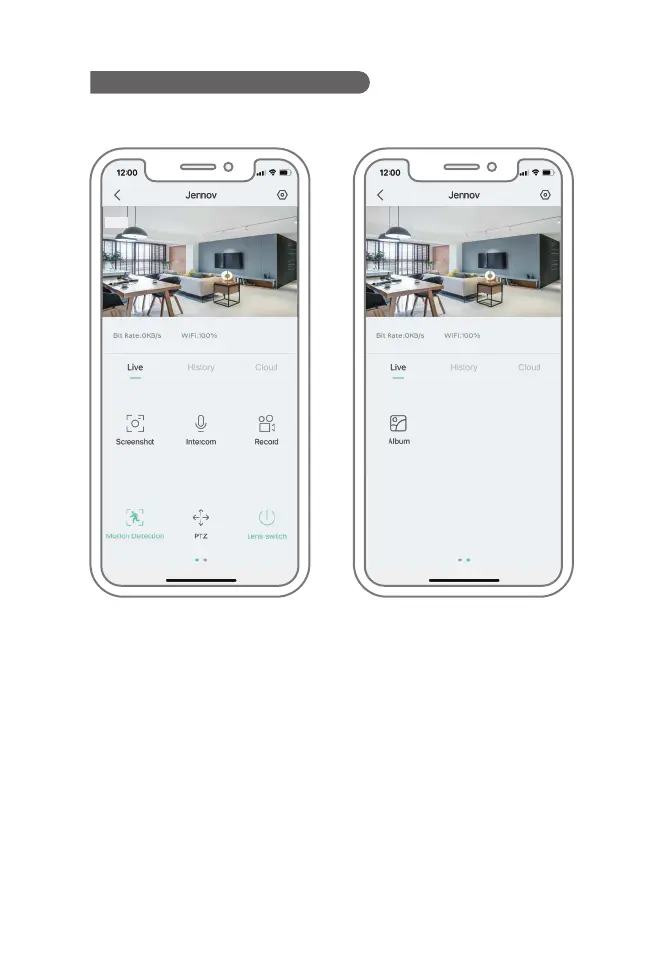
Screenshot: Save the screenshot of the current picture in the mobile phone.
Intercom: Press and hold intercom to realize two-way audio.
Video Recording: This video needs to be recorded into the mobile phone memory.
Motion Detection: When this function is enabled, the video or mobile phone will get
message alarm push when any moving object is detected.
PTZ: It controls the camera to rotate up, down, left and right.
Lens Switch: Turn on and off the viewable monitoring screen
(usually used to share users).
Photo Album: The contents of screenshots can be viewed here.
- 11-


 To Next Page
 Loading...