Note: The audible and visual alarm is valid only at night.
3. Alarm Management
21 3
Alarm On:
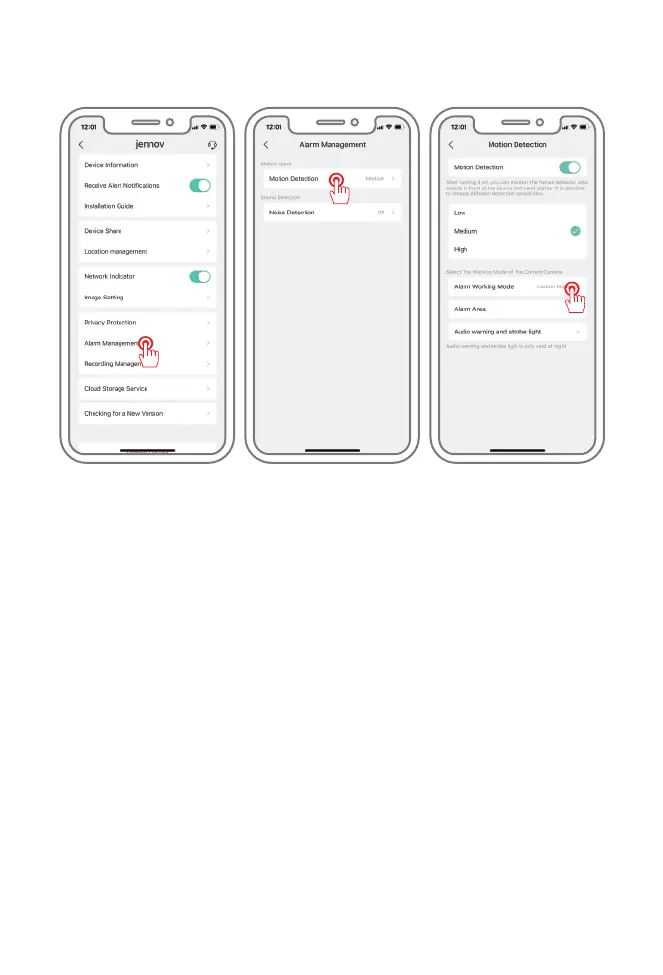
Enter system settings - alarm management - motion detection - enable motion
detection, select the appropriate sensitivity, and it is recommended to default.
Alarm working mode:
The saving time of alarm video is 1 minute by default. (three modes of 1, 2, 3 and
minute can be set)
Alarm Area:
Alarm Area: You can select the area need to be alarm. If checked, the alarm will be
triggered when an object enters or exits the set alarm area.
Audible And Visual Alarm On:
1. Audible Alarm: When moving or human shape is detected, the camera will give an
audible alarm.
2. White Light Alarm: When moving or human shape is detected, the camera will give a
light alarm.
3.Audible And Visual Alarm: When moving or human shape is detected, the camera will
give audible and visual alarm.
- 13-


 To Next Page
 Loading...