OPERATIONCAR68
12
Media Player Operation
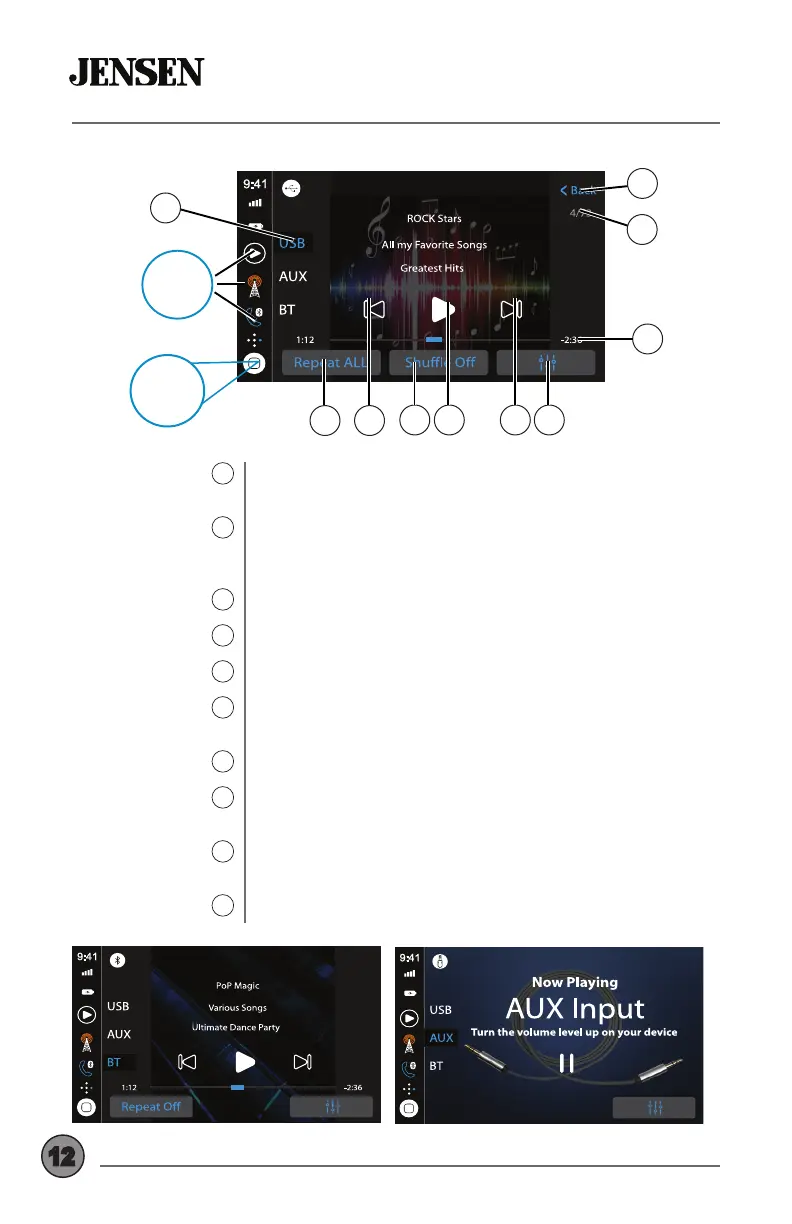
Source Selector
1
File/Folder List
2
Track Number
3
Elapsed Time
4
Audio
5
Tune/Track Up
6
Play/Pause
7
Shue
8
Tune/Track Down
9
Repeat
10
Press desired option to select between audio sources for
the media player: USB, Auxiliary Input or Bluetooth Music.
Press to display all les/folders on the device (Music or
Pictures). Press any le to begin playback. File/folder list is
only available for USB playback.
Displays the current track number/total number of tracks.
Displays the elapsed and total time for the current track.
Press to access and adjust audio settings.
Press to advance to the next track. Press and hold to fast
forward through the current track.
Press to pause or resume playback.
Press to turn the Shue feature On or O. Shue feature is
for USB playback only.
Press to return to the previous track. Press and hold to fast
reverse through the current track.
Press to select one of the following repeat options: Repeat
Track, Repeat Folder or Repeat All.
1
Top 3
Sources
8 567
4
10 9
1
2
3
Home
Source
Menu
Media Player - Bluetooth Music
Media Player - Auxiliary Input
Media Player
USB Playback



 To Next Page