23
Rear RCA Input
Front and Rear Camera Operation - (Optional)
Connect an optional audio/video source into the RCA (rear) input.
Adjust volume on the external audio source as needed (if connected
to the headphone output of the device).
Connect an optional camera to the front or rear Camera Input. Refer
to the wiring diagram for details.
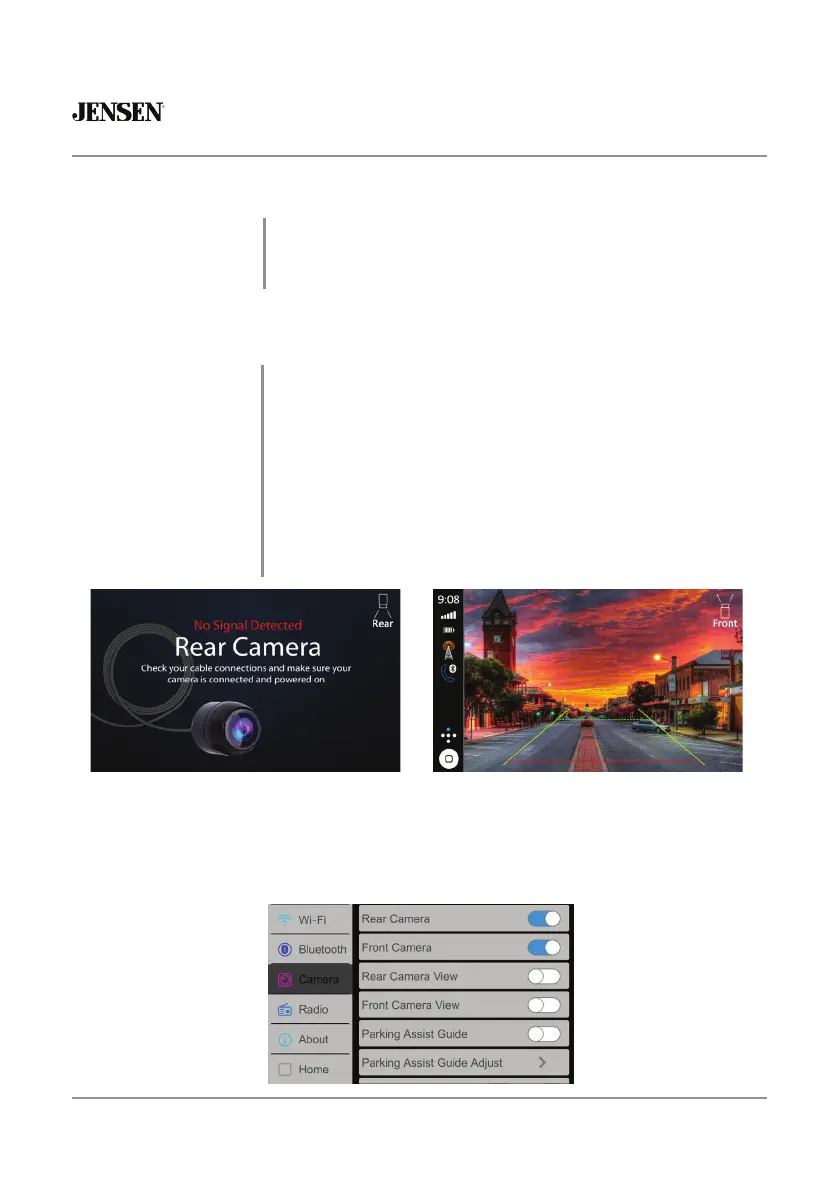
The unit will automatically select camera mode when connected to
the reverse lamp circuitry.
Touch the CAMERA icon on the Main Menu (when enabled) to select
camera mode. Touch the top left area of the screen to return to the
Main Menu to turn this feature off.
Note: The manual mode is for dedicated cameras that are connected
to the 12VDC+ ignition wire and are always on while driving, it is not
meant for cameras that are connected to the vehicle's reverse light.
A/V IN
Using the Cameras
Auto Selection
Adjusting Front and Rear Camera Screen Image
If your front or rear cameras appear to have a reversed image on the radio’s display, go into the
Camera section in the Settings menu to reverse the image of the camera. To do this, toggle the "Rear
Camera View Reverse" or "Front Camera View Reverse" function to correct the viewing angle of the
camera(s).


 To Next Page