EasyManua.ls Logo

Jensen JBS-200 - User Manual

Jensen JBS-200
19 pages
Print Icon
To Next Page IconTo Next Page
Loading...
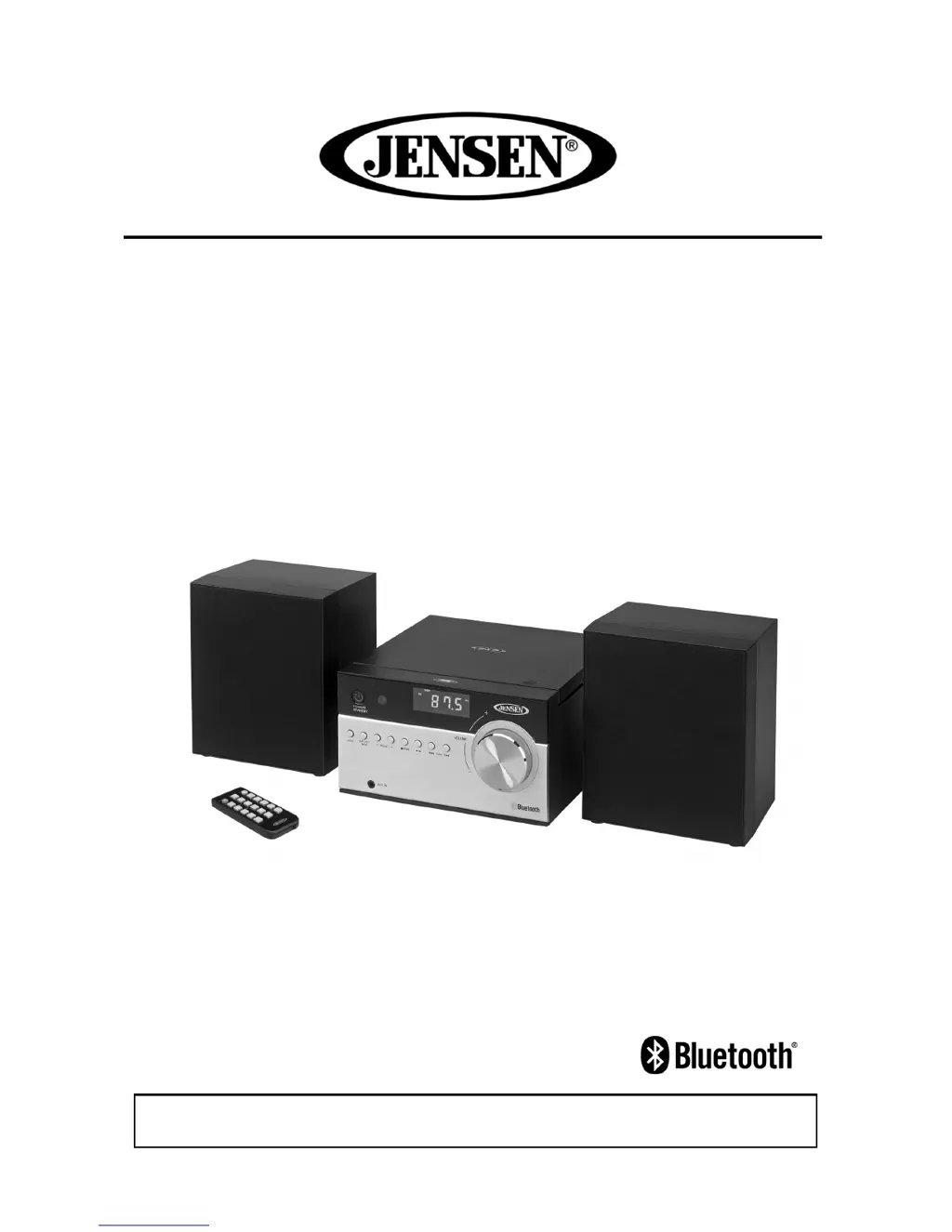
Bluetooth CD Music System with
Digital AM/FM Stereo Receiver
MODEL:
JBS-200
USER
MANUAL
PLEASE READ THIS USER MANUAL COMPLETELY BEFORE OPERATING THIS UNIT AND
RETAIN THIS BOOKLET FOR FUTURE REFERENCE.

Questions and Answers

  • R
    Russell NealAug 16, 2025
    Why is the sound distorted on my Jensen JBS-200 Media Converter?
    • J
      Justin RodriguezAug 16, 2025
      If the Jensen Media Converter's sound is distorted, it could be due to the volume being too high. Try decreasing the volume. Alternatively, the sound source itself might be distorted. In this case, try using a different sound source. If you're using an external device like an older iPod, reduce its output volume and try turning bass boost OFF or changing the EQ setting.
  • B
    brianholmesAug 19, 2025
    What to do if my Jensen JBS-200 Media Converter CD skips?
    • K
      Kyle Morgan MDSep 12, 2025
      If your Jensen Media Converter CD player skips, the disc may be dirty or scratched. Try wiping the CD with a clean cloth or using a different disc.
  • M
    Mary TurnerAug 21, 2025
    How to turn up the volume on Jensen JBS-200 Media Converter?
    • S
      sampsonelizabethAug 22, 2025
      If there's low or no volume on your Jensen Media Converter, the volume might be set too low. Adjust the VOLUME control knob on the main unit or VOLUME+ on the remote control to increase the sound level.
  • S
    ssummersAug 25, 2025
    Why is the AM band so noisy on my Jensen JBS-200 Media Converter?
    • M
      Michael BrowningAug 26, 2025
      If the AM band on your Jensen Media Converter is too noisy, the station's reception might be weak. Try slightly rotating the unit to find the best reception.
  • W
    William SimpsonAug 28, 2025
    What to do if my Jensen JBS-200 CD player will not play?
    • H
      Holly DavisAug 28, 2025
      If your Jensen Media Converter's CD player won't play, first ensure the unit is in CD function mode. If it is, check that the CD is inserted correctly with the label facing the CD door. If you're using a self-compiled CD, the media might not be compatible. Try using better quality blank media and retest.
  • K
    Kathleen BlackAug 30, 2025
    Why does my Jensen JBS-200 Media Converter CD Player have intermittent sound?
    • M
      michelledavisAug 31, 2025
      If you experience intermittent sound from the CD Player of your Jensen Media Converter, the disc might be dirty or defective. Try cleaning or replacing the disc. Another cause may be a dirty pick up lens; use a CD-lens cleaning disc to clean it. Also, the player might be subject to excessive shock or vibration. Relocate the player away from such disturbances.
  • D
    davidmarkSep 3, 2025
    How to troubleshoot a Jensen JBS-200 Media Converter that won't turn on?
    • L
      Linda WeberSep 3, 2025
      If your Jensen Media Converter is not responding and has no power, it might be disconnected from the AC outlet. Reconnect it. If it's already connected, the AC outlet might not have power. Try the unit on another outlet.
  • R
    robinsonjoelSep 6, 2025
    Why is the FM broadcast distorted on my Jensen JBS-200?
    • J
      Jacob MiddletonSep 6, 2025
      If you're experiencing noise or distorted sound on FM broadcast with your Jensen Media Converter, the station might not be tuned properly, or the FM wire antenna might not be fully extended. Fine-tune the FM broadcast station and fully extend the FM wire antenna.
  • U
    uharperSep 9, 2025
    Why is there no sound from my Jensen Media Converter Bluetooth speaker?
    • M
      mrichmondSep 9, 2025
      If there is no sound from the Bluetooth speaker of your Jensen Media Converter, ensure the Bluetooth speaker is linked with the cell phone by going through the “Bluetooth Operations” process. Also, make sure the speaker is within Bluetooth operating range.
  • C
    caldwellbrittanySep 12, 2025
    Why does my Jensen JBS-200 Media Converter get warm when playing at high volume?
    • A
      andrearossSep 12, 2025
      It is normal for the Jensen Media Converter to get warm after extended play at high volume. Turn the unit off for a period of time or lower the volume.

Summary

JBS-200 User Manual

Product Title and Overview

Displays the product's main title and brief description.

Safety Precautions

General Safety Instructions

Essential safety guidelines for operating the unit, including warnings.

Cautionary Symbols and Notes

Explains warning symbols and provides cautionary advice for safe usage.

Additional Safety Guidelines

Service and Damage Conditions

Details circumstances requiring professional service and conditions for damage.

Environmental and Operational Safety

Covers safe operation regarding environment, liquids, and ventilation.

Product Warnings and Compliance

Laser Safety Warnings

Advises on safe handling of the laser product and potential hazards.

FCC Compliance Information

Outlines compliance with FCC rules regarding radio frequency emissions.

Furniture Protection

Protecting Furniture Surfaces

Recommends using felt pads to prevent marks from the unit's rubber feet.

Main Unit Controls

Control Panel Identification

Identifies all buttons and indicators on the main unit's front and rear panels.

Remote Control and Connections

Remote Control Layout

Details the buttons and functions of the remote control.

System Connection Ports

Shows how to connect speakers and antenna to the main unit.

Getting Started

Setup and Power Connection

Guides on unboxing, connecting power, and initial setup.

Battery Installation

Instructions for installing batteries for backup and the remote control.

Basic Operations

Powering Unit On;Off

Steps to turn the system on, off, and into standby mode.

Setting the Clock

Procedure for setting the current time on the unit's display.

Alarm and Snooze Functions

Setting and Operating the Alarm

How to set wake-up alarms using radio, CD, or beep.

Snooze Functionality

Explains how to temporarily silence the alarm.

Radio Functions

Tuning and Reception Tips

Guides on tuning stations, stereo/mono, and improving reception.

Preset Radio Station Management

Instructions for saving and recalling favorite radio stations.

CD Player Functions

Playing and Navigating CDs

Steps for playing, pausing, skipping tracks, and searching within tracks.

CD Playback Modes

Describes available playback modes like Repeat, Random, Normal.

Advanced CD and Bluetooth Features

Programmed Track Sequence

How to create a custom playback order for CD tracks.

Bluetooth Pairing Process

Step-by-step guide to connect Bluetooth devices to the system.

External Device Connectivity

NFC Bluetooth Connection

Instructions for pairing Bluetooth devices using NFC technology.

Auxiliary Input Usage

How to connect external audio devices via the AUX input jack.

Audio and Display Settings

Equalizer, Mute, and Sleep Timer

Controls for sound enhancement, muting, and setting a sleep timer.

Headphones and Display Brightness

Information on using headphones and adjusting screen brightness.

System Maintenance and Troubleshooting

Resetting and Cleaning Procedures

Guides on system reset and proper cleaning methods.

Troubleshooting Common Issues

Solutions for common problems like no power, no sound, or radio noise.

Product Specifications

Warranty and Service

Limited Warranty Terms

Details the warranty period, coverage, and exclusions.

How to Obtain Service

Instructions on returning the unit for repair or replacement.

Jensen JBS-200 Specifications

General IconGeneral
BrandJensen
ModelJBS-200
CategoryMedia Converter
LanguageEnglish

Related product manuals