EasyManua.ls Logo

Jensen JIMS-285 - User Manual

Jensen JIMS-285
23 pages
Print Icon
To Next Page IconTo Next Page
Loading...
®
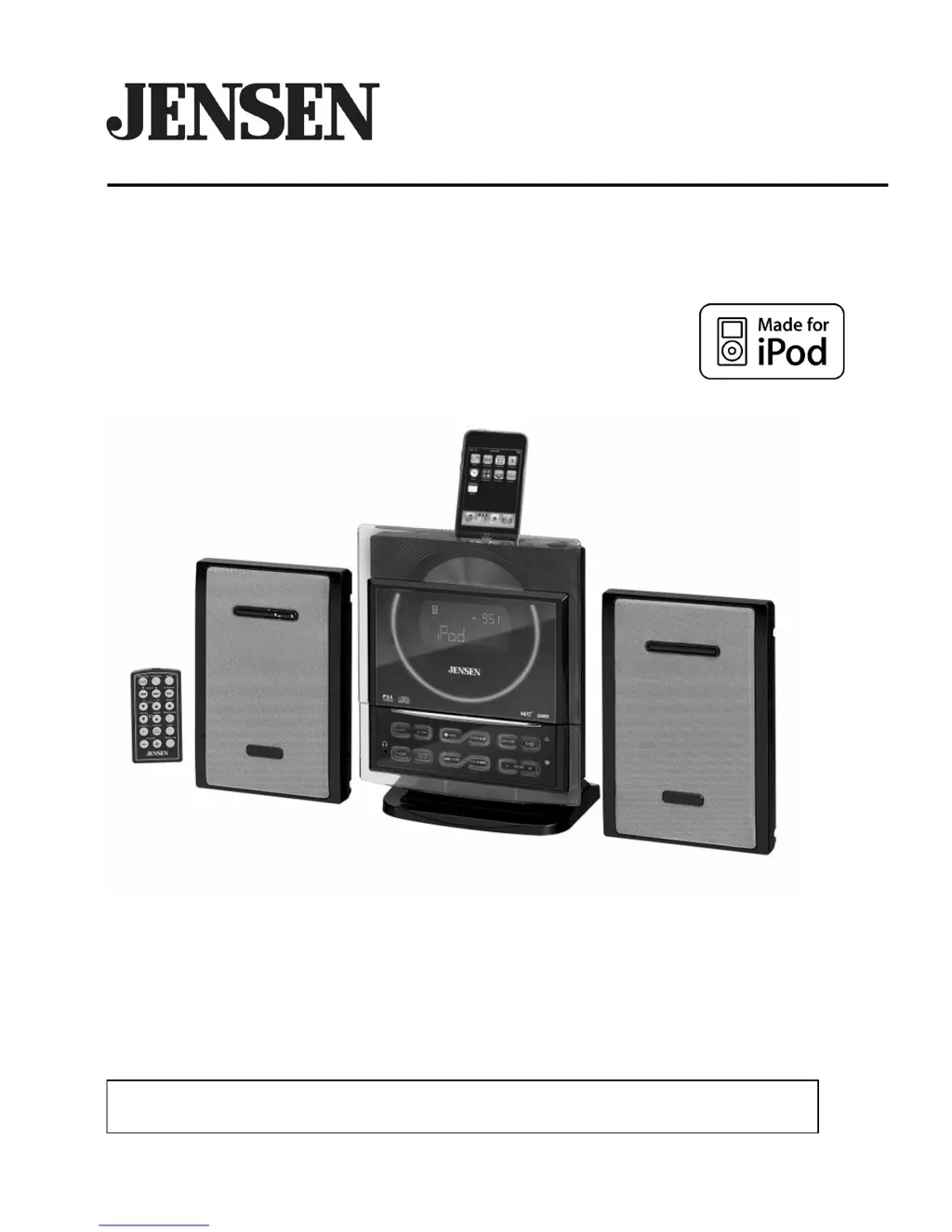
WALL MOUNTABLE MUSIC SYSTEM
WITH CD FOR iPod
OWNER’S MANUAL
JiMS-285
(iPod Not Included)
PLEASE READ THIS OPERATING MANUAL COMPLETELY BEFORE OPERATING THIS
UNIT AND RETAIN THIS BOOKLET FOR FUTURE REFERENCE.

Questions and Answers

  • D
    dennis23Aug 14, 2025
    How to fix low volume on my Jensen JIMS-285 Media Converter?
    • W
      Wayne HendersonAug 15, 2025
      If your Jensen Media Converter is on but the volume is low or non-existent, the volume control might be turned all the way down. Try turning the volume control to a higher output level.
  • S
    Samantha OneillAug 18, 2025
    Why won't my Jensen JIMS-285 CD player play?
    • E
      Emily HahnAug 18, 2025
      If the CD player on your Jensen Media Converter won't play, make sure the unit is in CD function mode. Also, ensure the CD is inserted correctly with the label side up. If you're using a self-compiled CD, the media might not be compatible with the player; try using better quality blank media.
  • K
    Keith CollinsAug 21, 2025
    Why is my iPod not charging on my Jensen Media Converter?
    • J
      joshuacontrerasAug 21, 2025
      If your iPod isn't charging on the Jensen Media Converter, ensure the unit is not in TUNER (Radio) mode; select another mode for iPod charging. Also, remove your iPod from the dock, check for any obstructions on the connectors in the dock and on your iPod, and then reseat it. If the issue persists, your iPod might be locked up or have a battery problem; ensure your iPod is working properly before docking it into the system.
  • L
    Laura NorrisAug 25, 2025
    Why is the sound distorted on my Jensen JIMS-285 when using AM/FM?
    • C
      calvarezAug 25, 2025
      If you're experiencing noise or distorted sound on AM or FM broadcast with your Jensen Media Converter, the station might not be tuned properly. For FM, ensure the FM wire antenna is fully extended. For AM, reposition the loop antenna until you get the best reception. Retune the AM or FM broadcast station.
  • M
    Megan Rowe DDSAug 28, 2025
    What to do if my iPod doesn't respond to the Jensen JIMS-285?
    • M
      michael52Aug 28, 2025
      If your iPod isn't responding to the Jensen Media Converter, first, ensure you're using the correct iPod adapter for your model. Also, remove your iPod from the dock and check for any obstructions on the connectors, then reseat it. Finally, make sure your iPod is working properly before docking it into the system.
  • J
    Jose WrightAug 31, 2025
    How to stop my Jensen JIMS-285 Media Converter CD player from skipping?
    • C
      Courtney GrantSep 1, 2025
      If the CD skips while playing on your Jensen Media Converter, the disc might be dirty or scratched. Try wiping the CD with a clean cloth or using another disc.
  • J
    Jennifer OneillSep 4, 2025
    Why doesn't 'FM ST' appear on my Jensen JIMS-285 Media Converter display?
    • C
      cantujohnSep 4, 2025
      If 'FM ST' doesn't appear on the display of your Jensen Media Converter, you may have tuned to a mono station, the station might be too weak, or FM MONO MODE is set. Try selecting another FM station or extend or rotate the wire antenna for best reception. Set the FM MODE Switch to STEREO.
  • M
    Mackenzie WhiteSep 7, 2025
    Why is there intermittent sound from my Jensen JIMS-285 CD Player?
    • M
      Melanie OwensSep 7, 2025
      If you're experiencing intermittent sound from the CD player on your Jensen Media Converter, the disc might be dirty or defective; try cleaning or replacing it. Also, the pick-up lens could be dirty, so use a CD-lens cleaning disc. Finally, the player might be subject to excessive shock or vibration; relocate it away from such disturbances.
  • C
    Cheryl HughesSep 12, 2025
    What to do if the CD door on my Jensen JIMS-285 Media Converter won't open?
    • G
      gregorymeghanSep 12, 2025
      If the CD door on your Jensen Media Converter won't open, ensure the system is in CD function mode. Turn on the system, select CD mode, and then press the CD door Open / Close button on the main unit.

Summary

Safety and Listening Advice

Establishing a Safe Listening Level

Guidelines for setting volume to prevent hearing damage and distortion.

Important Safety Instructions

Laser Product Safety Precautions

FCC Compliance Information

Installation Guide

Table Top Setup

Instructions for attaching the stand and speakers for table top placement.

Control Locations

Remote Control Functions

Getting Started and Setup

Speaker and Antenna Connection

Steps for connecting speakers and antennas for optimal audio and reception.

Power and AC Connection

Details on power supply requirements and connecting the AC power cord.

CD Operations

iPod Integration

Connecting Your iPod

Guidance on selecting the correct adapter for various iPod models.

iPod Playback and Charging

Controlling iPod playback, charging, and using control keys.

Alarm Settings

Setting Dual Alarms

How to configure wake-up alarms for CD, Tuner, iPod, or buzzer.

User Care and Maintenance

Troubleshooting

Common Problems and Solutions

A guide to diagnose and resolve issues with the unit's functions.

Specifications

Jensen JIMS-285 Specifications

General IconGeneral
BrandJensen
ModelJIMS-285
CategoryMedia Converter
LanguageEnglish

Related product manuals