EasyManua.ls Logo

Jensen JBS-500 - User Manual

Jensen JBS-500
23 pages
Print Icon
To Next Page IconTo Next Page
Loading...
BLUETOOTH CD MUSIC SYSTEM WITH
DIGITAL FM STEREO RECEIVER AND
REMOTE CONTROL
MODEL: JBS-500
USER MANUAL
PLEASE READ THIS USER MANUAL COMPLETELY BEFORE OPERATING
THIS UNIT AND RETAIN THIS BOOKLET FOR FUTURE REFERENCE.
Limited Edition Model

Questions and Answers

Summary

WARNINGS

IMPORTANT SAFETY INSTRUCTIONS

Essential safety guidelines for using the apparatus, covering usage, cleaning, placement, and electrical safety.

CAUTION

ON PROTECTION AGAINST LASER ENERGY EXPOSURE

Precautions to avoid hazardous laser radiation exposure when operating the unit.

ON SAFETY

General safety advice for connecting and using the unit, including power cord handling and long-term storage.

ON AC VOLTAGE

Check voltage compatibility before operating the unit to prevent damage.

ON CONDENSATION

Advice on handling condensation for normal operation and preventing malfunction.

COMPLIANCE WITH FCC REGULATIONS

PROTECT YOUR FURNITURE!

Advice on protecting furniture from the unit's rubber feet by using felt pads.

LOCATION OF CONTROLS - Main unit

Remote control

CONNECTIONS

GETTING STARTED

Initial steps for unpacking and setting up the system, including included items.

TURNING THE UNIT ON;OFF

STANDBY MODE

Description of the unit's standby state and its conditions.

SETTING THE CLOCK

Procedure for setting the unit's internal clock accurately.

CHECKING THE CLOCK

How to view the current time when the unit is on.

ALARM OPERATION

SETTING THE ALARM CLOCK

How to set the alarm time, source (BEEP, CD, USB, FM), and volume.

ACTIVATE; DE-ACTIVE ALARM FUNCTION

Instructions on how to turn the alarm function on and off.

SNOOZE FUNCTION

How to use the snooze feature to temporarily silence the alarm.

LISTENING TO RADIO

FM;FM Stereo Reception

How to switch between stereo and mono FM reception for optimal sound.

HINTS FOR BEST RECEPTION

Tips for improving FM signal reception using the wire antenna.

PRESET RADIO STATIONS

How to find and save favorite radio stations for quick access.

CD;MP3 OPERATION

PLAYING A CD

Steps for inserting and playing an audio CD, including tray operation.

SKIP AND SEARCH MODE

How to skip tracks or search within a track for CDs and MP3s.

DIFFERENT PLAY MODES

Explanation of repeat (1, all, folder) and random playback options.

PLAY TRACK SEQUENCE PROGRAMMING

How to program a custom playback sequence of tracks from CDs or MP3s.

USB OPERATION

BLUETOOTH OPERATION

PAIRING BLUETOOTH DEVICE

Steps to connect a Bluetooth device for wireless audio playback.

AUXILIARY INPUT OPERATION

PRESET EQ; XBASS

MUTE BUTTON

SLEEP OPERATION

USE HEADPHONES

ADJUST DISPLAY BRIGHTNESS

RESETTING THE UNIT

CHARGING YOUR SMART PHONE OR PORTABLE DEVICE

CARE AND MAINTENANCE

TROUBLESHOOTING GUIDE

SPECIFICATIONS

90 DAY LIMITED WARRANTY AND SERVICE

Summary

WARNINGS

IMPORTANT SAFETY INSTRUCTIONS

Essential safety guidelines for using the apparatus, covering usage, cleaning, placement, and electrical safety.

CAUTION

ON PROTECTION AGAINST LASER ENERGY EXPOSURE

Precautions to avoid hazardous laser radiation exposure when operating the unit.

ON SAFETY

General safety advice for connecting and using the unit, including power cord handling and long-term storage.

ON AC VOLTAGE

Check voltage compatibility before operating the unit to prevent damage.

ON CONDENSATION

Advice on handling condensation for normal operation and preventing malfunction.

COMPLIANCE WITH FCC REGULATIONS

PROTECT YOUR FURNITURE!

Advice on protecting furniture from the unit's rubber feet by using felt pads.

LOCATION OF CONTROLS - Main unit

Remote control

CONNECTIONS

GETTING STARTED

Initial steps for unpacking and setting up the system, including included items.

TURNING THE UNIT ON;OFF

STANDBY MODE

Description of the unit's standby state and its conditions.

SETTING THE CLOCK

Procedure for setting the unit's internal clock accurately.

CHECKING THE CLOCK

How to view the current time when the unit is on.

ALARM OPERATION

SETTING THE ALARM CLOCK

How to set the alarm time, source (BEEP, CD, USB, FM), and volume.

ACTIVATE; DE-ACTIVE ALARM FUNCTION

Instructions on how to turn the alarm function on and off.

SNOOZE FUNCTION

How to use the snooze feature to temporarily silence the alarm.

LISTENING TO RADIO

FM;FM Stereo Reception

How to switch between stereo and mono FM reception for optimal sound.

HINTS FOR BEST RECEPTION

Tips for improving FM signal reception using the wire antenna.

PRESET RADIO STATIONS

How to find and save favorite radio stations for quick access.

CD;MP3 OPERATION

PLAYING A CD

Steps for inserting and playing an audio CD, including tray operation.

SKIP AND SEARCH MODE

How to skip tracks or search within a track for CDs and MP3s.

DIFFERENT PLAY MODES

Explanation of repeat (1, all, folder) and random playback options.

PLAY TRACK SEQUENCE PROGRAMMING

How to program a custom playback sequence of tracks from CDs or MP3s.

USB OPERATION

BLUETOOTH OPERATION

PAIRING BLUETOOTH DEVICE

Steps to connect a Bluetooth device for wireless audio playback.

AUXILIARY INPUT OPERATION

PRESET EQ; XBASS

MUTE BUTTON

SLEEP OPERATION

USE HEADPHONES

ADJUST DISPLAY BRIGHTNESS

RESETTING THE UNIT

CHARGING YOUR SMART PHONE OR PORTABLE DEVICE

CARE AND MAINTENANCE

TROUBLESHOOTING GUIDE

SPECIFICATIONS

90 DAY LIMITED WARRANTY AND SERVICE

Overview

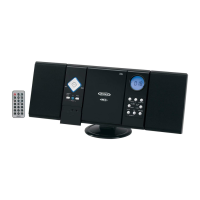
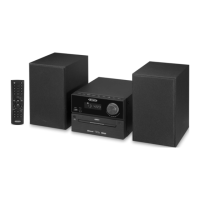
The JENSEN JBS-500 is a Bluetooth CD music system with a digital FM stereo receiver and remote control, designed for home audio entertainment.

Function Description:

This system serves as a versatile audio player, offering multiple modes for music playback. It includes a CD player for standard audio CDs and MP3-CDs, a USB port for playing MP3 files from a thumb drive and for charging devices, a digital FM stereo receiver for radio listening, Bluetooth connectivity for wireless audio streaming from compatible devices, and an auxiliary input for connecting external audio sources. The unit features a main control panel and a full-function remote control for convenient operation. It also incorporates an alarm clock function, allowing users to wake up to a beeping alarm, CD, USB, or FM radio. A sleep timer is available to automatically turn off the unit after a designated period.

Important Technical Specifications:

  • Power Requirement:
    • AC Adaptor: Input: AC 120V~ 60Hz, Output: DC 12V 2A
    • Remote Control: 2 x 1.5V “AAA” (UM-4) batteries
  • Frequency Range:
    • Radio Band: FM 87.5-108 MHz
  • Bluetooth: Version 5.0
  • USB Output: DC 5V 1.0A (1000mA) for charging and playback.
  • Supported USB File System: FAT32 (up to 128GB memory)
  • Supported Audio Format (USB/CD): MP3
  • Speakers: Two external speakers connect via dedicated speaker connectors.
  • Display: LCD display with adjustable brightness.
  • Headphone Jack: Stereo headphone jack for private listening.
  • Auxiliary Input: 3.5mm stereo jack for external audio devices.

Usage Features:

  • Power On/Off: The unit can be turned on or off (standby mode) using the POWER/STANDBY button on the main unit or remote control.
  • Mode Selection: Users can select between CD, USB, Bluetooth, FM, and AUX modes using the MODE button.
  • Clock Setting: The clock can be set to 12-hour or 24-hour format, with easy adjustment of hours and minutes via the CLOCK button and navigation buttons.
  • Alarm Function (Remote Control Only):
    • Set alarm time and wake-up source (BEEP, DISC, USB, or FM).
    • Adjust alarm volume level.
    • Activate/deactivate the alarm.
    • Snooze function temporarily stops the alarm for 10 minutes.
  • FM Radio:
    • Manual and automatic tuning for radio stations.
    • Mono/Stereo selection for FM reception.
    • Auto search and program preset channels (up to 40 FM stations).
    • Recall preset stations using PRESET+ or numeric keys on the remote.
  • CD/MP3-CD Playback:
    • Motorized CD tray for loading discs.
    • Play/Pause, Stop, Skip (next/previous track), and Search (within track) functions.
    • Repeat modes: Repeat 1, Repeat All, Repeat Folder (for MP3-CD/USB), and Random play.
    • Program Play: Allows users to program a sequence of tracks (up to 32 CD tracks or 99 MP3 tracks).
  • USB Playback and Charging:
    • Plays MP3 files from USB thumb drives (FAT32, up to 128GB).
    • 1A USB charging port for smart phones and portable devices, active in Standby and USB modes.
  • Bluetooth Connectivity:
    • Pairing (linking) with Bluetooth-enabled devices (e.g., cell phones, tablets, computers).
    • Wireless audio streaming from paired devices.
    • Skip (next/previous song) and Play/Pause functions via the unit or remote.
  • Auxiliary Input: Connect external audio devices using a 3.5mm audio cable.
  • Volume Control: Adjustable via a rotary knob on the main unit or VOLUME ∧/∨ buttons on the remote control.
  • Sound Enhancement (Remote Control Only):
    • Preset EQ modes: Classic, Rock, Pop, Jazz, Flat.
    • XBASS function for enhanced bass effects.
  • Mute Function (Remote Control Only): Temporarily mutes sound output.
  • Sleep Operation (Remote Control Only): Sets a timer (10 to 120 minutes) for the unit to automatically turn off.
  • Display Brightness (Remote Control Only): Adjusts LCD display brightness (Medium, DIM, Bright).

Maintenance Features:

  • General Care: Avoid excessive force, shock, dust, or extreme temperatures. Do not tamper with internal components.
  • Cleaning: Clean the unit with a dry cloth. For dusty cabinets, use a soft dry dust cloth; for fingerprints on the front panel, use a soft cloth slightly dampened with mild soap and water solution. Do not use solvents, detergents, wax, polish sprays, or abrasive cloths.
  • CD Cleaning: If CD playback issues occur, clean the disc's bottom surface from the center outwards with a soft cleaning cloth.
  • Troubleshooting Guide: Provides solutions for common issues such as no power, no Bluetooth sound, no radio sound, CD player malfunctions, audio disc skipping, intermittent sound, and distorted sound.
  • Resetting the Unit: In case of erratic operation, unplug the AC-DC adaptor for 60 seconds, then plug it back in. The clock and alarm will need to be reset after a reset.

Jensen JBS-500 Specifications

General IconGeneral
BrandJensen
ModelJBS-500
CategoryCD Player
LanguageEnglish

Related product manuals