Need help?
Do you have a question about the Jensen CD-555 and is the answer not in the manual?
Advises against disassembling the unit and direct exposure to the laser beam.
Guides on where to place the unit for optimal performance and safety.
Instructions for handling condensation to prevent unit malfunction.
Details compliance with FCC Part 15 and user guidance for interference correction.
Recommends felt pads to prevent marks from rubber feet.
Identifies and lists all controls and indicators on the front of the unit.
Identifies ports and connections found on the rear and sides of the unit.
Instructions for using batteries and the AC adapter, including warnings.
Steps for selecting FM stations and adjusting volume for listening.
How to play, pause, skip tracks, stop, and repeat on CDs.
Guide to creating custom playback sequences for CD tracks.
Step-by-step guide to connect Bluetooth devices for wireless audio.
Instructions for playing music from a paired Bluetooth device.
How to connect and play audio from devices via the AUX IN jack.
How to turn the X-BASS feature on and off for deeper bass.
How to connect headphones and important volume safety advice.
Guidelines for cleaning, environmental advice, and key product technical details.
A guide to diagnosing and solving common operational issues with the unit.
Information on the company's commitment to environmental practices and recycling.
Details the 90-day limited warranty terms, conditions, and exclusions.
Instructions on how to obtain service, including contact and shipping details.
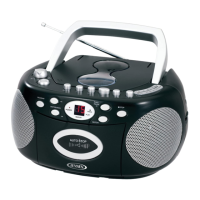
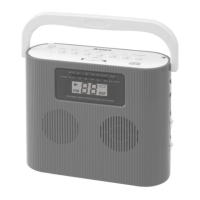
The JENSEN CD-555 is a portable music system designed to offer versatile audio playback options, including CD, FM radio, Bluetooth, and auxiliary input. Its compact design and handle make it easy to transport, allowing users to enjoy their music in various settings. The unit can be powered by either an AC adapter for home use or six 'C' size batteries for portability, providing flexibility for indoor and outdoor listening.
The CD-555 serves as a multi-source audio player. Its primary function is to play audio CDs, including both commercial discs and self-compiled CD-R/RW formats. The CD player features standard controls such as play, pause, stop, skip/search forward, and skip/search backward. It also includes a repeat function, allowing users to repeat a single track or the entire CD, and a program function for creating custom playback sequences of up to 20 tracks. The LED display provides clear feedback on track numbers and programming status.
Beyond CD playback, the unit incorporates an FM radio tuner. Users can select FM mode using the function selector and tune into their desired stations using the tuning control. An external FM wire antenna is provided to optimize radio reception.
For wireless audio streaming, the CD-555 is equipped with Bluetooth connectivity. This allows users to pair their Bluetooth-enabled devices, such as smartphones, tablets, or computers, to stream music wirelessly through the system's built-in speakers. The pairing process is straightforward, with a dedicated pairing indicator to show connection status. Once paired, users can control playback (play/pause, skip tracks) either from their Bluetooth device or directly from the CD-555.
An auxiliary input (AUX IN) jack expands the system's versatility, enabling connection to external audio sources like iPods, MP3 players, or other digital audio players. By connecting an audio cable from the external device's headphone or line-out jack to the CD-555's AUX IN, users can play music from these devices through the system's speakers.
The system also includes an X-BASS button, which enhances the bass effect of the music, providing a richer audio experience. A headphone jack is available for private listening, automatically disconnecting the speakers when headphones are plugged in.
Operating the CD-555 is designed to be intuitive. The power on/off button controls the unit's overall power, indicated by a power indicator light. A function selector allows users to easily switch between CD, FM, Bluetooth, and AUX modes. Volume control is managed by a rotary knob, enabling precise adjustment of the sound level.
For CD playback, the CD door opens to reveal the CD compartment, where discs are placed label side up. The LED display shows the total number of tracks and the current track being played. The program function is particularly useful for users who wish to create a personalized playlist from their CDs, offering flexibility in track order. The repeat function adds convenience for continuous listening of favorite songs or albums.
In Bluetooth mode, the pairing indicator guides users through the connection process. The system can be put into pairing/discoverable mode to link with new devices, and once connected, the indicator remains steadily lit. Users are advised to adjust volume levels on both the CD-555 and their Bluetooth device for optimal sound. The system also intelligently pauses music playback during incoming calls on a connected phone and resumes automatically once the call ends.
When using the AUX IN, users simply connect their external device and select the AUX function. Volume adjustments may be needed on both the CD-555 and the external device, depending on whether it's connected to a headphone or line-out jack.
The X-BASS feature is a simple toggle button, allowing users to activate or deactivate the bass enhancement as desired, catering to different musical preferences. For private listening, the headphone jack is conveniently located, ensuring that the main speakers are muted when headphones are in use.
Maintaining the CD-555 involves a few simple steps to ensure its longevity and optimal performance. Regular cleaning of the unit is recommended using a damp (never wet) cloth, avoiding solvents or detergents that could damage the surface.
Proper placement of the unit is crucial. It should be kept away from extreme temperatures (hot or cold), excessive dust, and high humidity. Good ventilation is also important; the unit should not be placed in areas where airflow is restricted, such as on carpets or covered with cloths. This helps prevent overheating and ensures proper operation.
Condensation can affect the unit's functionality, especially when moved from a cold to a warm, humid environment. If condensation occurs, it's advised to let the unit stand for 1 to 2 hours to dry out before turning it on.
For CD playback, if drop-outs or interruptions occur, or if a CD fails to play, the disc's bottom surface should be cleaned. Wiping the disc from the center outwards with a soft cleaning cloth can resolve many playback issues.
Battery care is also an important aspect of maintenance for portable use. When operating on batteries, it's essential to install them correctly, observing polarity. Only the specified size and type of batteries should be used, and mixing old with new, or different types of batteries (alkaline, carbon-zinc, rechargeable), should be avoided. If the unit will not be used for an extended period, batteries should be removed to prevent leakage and potential damage. Recharging non-rechargeable batteries is strictly prohibited due to the risk of overheating or rupture.
In case of any operational difficulties, a troubleshooting guide is provided in the manual, offering solutions for common issues like no sound, distorted radio reception, or CD playback problems. For more complex issues, users are directed to contact customer service.
 General
| Type | Portable CD Player |
|---|---|
| Playback Formats | CD, CD-R, CD-RW |
| Channels | 2 (Stereo) |
| Frequency Response | 20Hz - 20kHz |
| Signal-to-Noise Ratio | 80dB |
| Total Harmonic Distortion | 0.1% |
| Features | headphone jack |
| Output | Headphone jack |
| Dimensions | 5.5 x 5.5 x 1 inches |
| Weight | 0.5 lbs |


 To Next Page