5. You may repeat steps 1 - 4 to program as many as 20 tracks.
6. You may repeat the current programmed track or all programmed tracks by pressing
the REPEAT Button (#7) once or twice.
7. Press STOP Button (#10) once to stop playback.
8. To cancel programmed play, press the STOP Button (#10) again in STOP mode.
9. When you wish to turn off the CD PLAYER, press the POWER Button again. The
POWER INDICTOR will light off.
NOTES ON CD-R/RW DISCS
• Because of non-standardized format definition/production of CD-R/RW, playback
quality & performance are not guaranteed.
• Manufacturer is not responsible for the playability of CD-R/RW due to recording
conditions such as PC performance, writing software, media ability, etc.
• Do not attach a label or seal to either side of the CD-R/RW disc. It may cause a
malfunction.
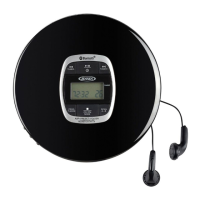
Pairing a Bluetooth enabled device with the CD-555.
1. Press the POWER Button (#1) to turn on CD-555.
2. Slide the FUNCTION SELECTOR (#14) to the position to enter Bluetooth mode.
3. The PAIRING INDICATOR (#13) will flash.
4. Turn on the Bluetooth function for the device you want to link to, and enable the search
or scan function to find the CD-555.
5. Select "CD-555" from the device list when it appears on your device screen. If
required, enter the pass code “0000” to pair (link) CD-555 with your device.
6. If you are pairing (linking) your computer to the speaker using Bluetooth, you may
need to set the CD-555 as your computer’s default sound device.
7. After successfully pairing the CD-555 with your Bluetooth device, The PAIRING
INDICATOR (#13) will stop flashing and remain lit.
8. If you want to pair (link) the CD-555 with another Bluetooth device, press and hold
Play/Pause
(#11) a few
seconds. The PAIRING INDICATOR (#13) will flash. The
CD-555 will go into Pairing/Discoverable mode. Repeat steps 4 & 5.
Now you can play music from your Bluetooth device wirelessly to the CD-555.
1. Select your favorite song, press the
Play/Pause Button (#11)
on your Bluetooth
device or the
Play/Pause Button (#11)
on the CD-555 to play or pause the song
from your Bluetooth device.
2. Press the Skip Forward Button (#12) or Skip Backward Button (#9) to
select the Next or Previous track.
(The SEARCH function does not apply to Bluetooth operation )
E-7
BLUETOOTH OPERATION



 To Next Page