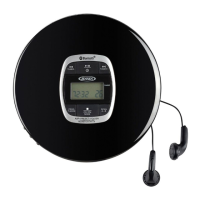
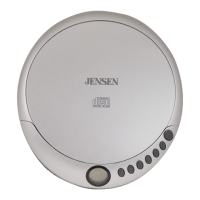
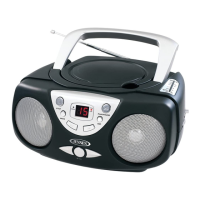
This document describes the JENSEN CD-60C Personal Compact Disc Player, a portable audio device designed for playing commercial CDs, as well as self-compiled CD-R/CD-RW discs. The player emphasizes user safety and optimal listening experience through various features and recommendations.
Function Description
The JENSEN CD-60C is a personal compact disc player that allows users to listen to audio CDs on the go. It operates on two 1.5V DC "AA" size (UM-3) alkaline batteries or an optional 4.5V DC 700mA AC-DC adaptor. The device features a top-loading CD door for disc insertion and an LCD display that provides information about the current track, elapsed time, and various playback modes.
The core function of the player is to provide high-quality audio playback from compact discs. It includes an anti-skip protection system, which utilizes an electronic buffer to prevent sound interruptions during shock, vibration, or rolling movements. This system automatically activates when a disc is playing, indicated by a flashing ESP icon on the display. Once the buffer is full, it provides approximately 60 seconds of protection against sound interruption, ensuring a continuous listening experience even in motion.
For enhanced audio, the player incorporates a Bass Boost System (BBS) switch, which can be set to the ON position to increase bass performance. The effect of the bass boost may vary depending on the volume level.
Usage Features
The CD-60C offers a range of user-friendly features to control playback and customize the listening experience:
- Power On/Off: The unit does not have a separate power on/off switch. To turn it on, simply press the PLAY/PAUSE button after inserting a disc and installing batteries or connecting the AC adaptor. The LCD display will show "60 SEC" (anti-skip message) and then the disc information. To turn off the unit, press the STOP button once in CD stop mode, or twice in CD playing mode. The player also has an Auto Power Off function, which automatically switches off the power approximately 30 seconds after a disc finishes playing or when the CD lid is opened, helping to maximize battery life.
- Disc Loading: To play a disc, open the CD door using the OPEN switch, insert a CD with the label side facing upward, and then close the door.
- Playback Control:
- Play/Pause: Press the PLAY/PAUSE (►II) button to start playback. During playback, pressing it again will pause the track, and the elapsed time will flash. Pressing it once more resumes playback.
- Stop: Press the STOP (■) button to stop playing.
- Volume Control: A VOLUME CONTROL KNOB allows for adjustment of the audio level.
- Track Navigation:
- Skip Tracks: In Play or Pause mode, tap the SKIP Forward (►►|) or SKIP BACKWARD (◄◄) buttons to move to the next track or return to the beginning of the current track.
- Search Within Track: In Play or Pause mode, press and hold the SEARCH Forward (►►|) or SEARCH BACKWARD (◄◄) buttons to search within the current track with audible high-speed playback.
- Playback Modes: The MODE button cycles through various playback options, displayed on the LCD:
- Repeat 1: Repeats the current track.
- Repeat All: Repeats all tracks on the disc.
- Intro: Plays the first 10 seconds of each track on the disc.
- Random: Plays all tracks on the disc in a random sequence.
- To cancel any of these repeat or special functions, press the MODE button repeatedly until the corresponding icon disappears from the display.
- Programmed Play: This feature allows users to create a custom playlist of up to 20 tracks. In CD stop mode, press the PROG button. The PROG icon and "00" will flash. Use the SEARCH/SKIP buttons to select the desired track, then press PROG again to register it. Repeat for additional tracks. Press PLAY/PAUSE to start the programmed play. To erase the program, press the STOP button in STOP mode.
- LCD Display Information:
- Initial Start-up: Shows "60 SEC", then "- -", followed by the total number of tracks and total playing time. Once playback starts, it displays the first track number and instant playing time. Pressing STOP once will show the total number of tracks and total playing time.
- Play Mode: Displays the current track number and elapsed time.
- Pause Mode: The elapsed time flashes when playback is paused.
- Battery Low Indicator: A dedicated icon will appear on the display when the batteries need to be changed.
- Headphone Connection: Stereo earbuds (included) connect to the PHONES socket for private listening.
Maintenance Features
Proper care and maintenance are crucial for the longevity and optimal performance of the JENSEN CD-60C:
- Cleaning the Unit: The unit should be cleaned with a soft, damp (never wet) cloth. Solvents or detergents should not be used. It is important to prevent water or other liquids from entering the unit during cleaning.
- Disc Cleaning: If music drop-outs, interruptions, or playback failures occur, the bottom surface of the CD may need cleaning. Wipe the disc from the center outwards with a lint-free, soft cleaning cloth. Avoid attaching labels or seals to either side of CD-R/RW discs, as this can cause malfunctions.
- Battery Care:
- Always use the same or equivalent type of battery for replacement.
- Do not mix old and new batteries, or different types of batteries (alkaline, carbon-zinc, nickel-cadmium).
- Remove batteries if the unit will not be used for an extended period to prevent damage from leaks and to avoid voiding the warranty.
- Do not attempt to recharge batteries not intended for recharging, as they can overheat and rupture. Always follow the battery manufacturer's directions.
- Dispose of batteries properly; do not dispose of them in fire, as they may leak or explode.
- Environmental Considerations:
- Avoid operating the unit in direct sunlight, hot, humid, or dusty places to reduce the risk of fire or electric shock.
- Keep the unit away from heating appliances and sources of electrical noise like fluorescent lamps or motors.
- For better display clarity, avoid operating the unit under direct sunlight or in strongly illuminated rooms.
- General Safety:
- Never attempt to disassemble the casing, as the laser beam is harmful to the eyes.
- If any liquid or solid object falls into the cabinet, immediately stop operation, unplug the unit, and have it checked by qualified personnel.
- Do not touch or poke the lens, as this can damage it and impair player operation.
- Do not insert anything into the safety slot, as this will turn on the laser diode even when the lid is open.
- Unplug the unit from the electrical power outlet immediately in case of malfunction.
- Never wrap the earbuds cord around animals or people, and take special care with long wires.
- Avoid excessive volume levels for prolonged periods when using headphones, as this can impair hearing.
- Do not use earbuds while operating a motorized vehicle, as it can create a traffic hazard and is illegal in many areas.
The manufacturer emphasizes the importance of setting a safe volume level to protect hearing and recommends avoiding prolonged exposure to excessive noise to ensure a lifetime of musical enjoyment. The product also complies with FCC regulations and contains a Class 1 laser device, with warnings regarding invisible laser radiation when open.



 To Next Page
 General