EasyManua.ls Logo

Jensen AWM910 - User Manual

Jensen AWM910
12 pages
Print Icon
To Next Page IconTo Next Page
Loading...
JENSEN
AUX IN
RADIO CD COMPACT MUSIC SYSTEM
RDM
SCAN
RPT
1
2
3
4
5
6
AUX
MUTE
COMPACT DISC PLAYER
PUSH
M
H
BAND
CD
SPK
A
SPK
B
SPK
A+B
AUD
ALARM
SET ON/OFF
EQ
T/F
AWM910
PUSH PWR
VOL
AWM910
Owner’s Manual
Question and Answer IconNeed help?

Do you have a question about the Jensen AWM910 and is the answer not in the manual?

Summary

Jensen AWM910 Features

Key System Features

Lists core functionalities like dimming display, tuner, EQ, clock, CD mechanism, and audio outputs.

Installation and Wiring Guide

Mounting Location and Preparation

Instructions on selecting a mounting spot and preparing the opening for the unit.

Wiring Connections Diagram

Details electrical connections and pin assignments for proper unit operation.

Basic Operation and Controls

Power, Volume, and Mute

How to turn unit on/off, adjust volume, and mute audio output.

Display and Audio Adjustments

Explains LCD display and how to adjust audio settings like bass, treble, and balance.

Auxiliary Input, Clock, Alarm, Speaker Control

Details using auxiliary input, setting clock/alarm, and controlling speaker output.

Tuner Operation Guide

Band Selection and Tuning

Switch between AM/FM bands and tune stations manually or by seeking.

Preset Stations and Equalizer Settings

Storing/recalling radio stations, and selecting EQ sound profiles.

Headphone Operation

How to connect and use headphones, which disables speakers.

CD Operation Guide

CD Loading and Playback Control

Inserting, ejecting, playing, pausing, and selecting tracks on a CD.

CD Playback Modes

Explains repeat, intro scan, and random shuffle modes for CD playback.

Technical Specifications

General and Tuner Specifications

Power requirements, dimensions, weight, and FM/AM tuner details.

CD Player and Amplifier Details

Frequency response, signal-to-noise ratio, compatible formats, and amplifier output specs.

Overview

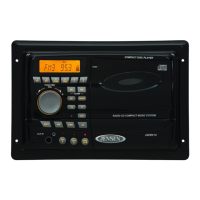
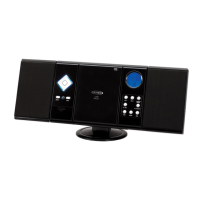
The Jensen AWM910 is a mobile audio system designed for various applications, offering a range of features for entertainment and convenience. This device functions as a radio, CD player, and auxiliary input system, providing multiple options for audio playback.

Function Description:

The core function of the AWM910 is to provide audio entertainment in a mobile setting. It integrates an electronic AM/FM tuner, allowing users to access a wide range of radio stations. The unit also includes a vertical CD mechanism, capable of playing standard audio CDs, CD-R, and CD-RW discs, offering flexibility for physical media playback. For modern connectivity, a front auxiliary audio input (3.5mm stereo jack) is provided, enabling users to connect portable audio devices such as MP3 players, iPods, or other media players. The system delivers amplified audio output through its 4-channel amplifier, with a total output of 50W, supporting speaker configurations for a comprehensive sound experience. Additionally, a 1/4" headphone output on the front panel allows for private listening.

Usage Features:

The AWM910 is designed with user-friendly controls and display features. It includes an auto-dimming LCD display with backlighting, ensuring visibility in various lighting conditions. The controls themselves are also backlit, enhancing usability in low-light environments.

Basic Operation:

  • Power/Volume Control: The unit is turned on or off by pressing the power button, which also functions as a rotary volume control knob. Rotating it clockwise increases volume, while counterclockwise rotation decreases it.
  • Mute/Loudness: A dedicated MUTE button allows users to momentarily silence the audio output in tuner, CD, or auxiliary input modes. Pressing it again resumes the previous volume level.
  • Liquid Crystal Display (LCD): The LCD panel displays essential information such as frequency, time, and activated functions. It's noted that in cold temperatures, the LCD may take longer to illuminate and its visibility might decrease, but it returns to normal operation as the temperature rises.
  • Audio Adjustment: The AUD button allows users to cycle through various audio adjustment options, including Volume, Bass, Treble, Balance (left to right), Speaker (A to B), and Fader (front to back). Once an option is displayed, the volume control knob is used to make adjustments. The unit automatically resumes normal operation if no adjustments are made for three seconds.
  • Auxiliary Input Function: The AUX button provides direct access to the auxiliary input mode. Portable audio devices can be connected via the "AUX IN" jack on the front or rear panel using a standard 3.5mm cable adapter.
  • Time/Frequency Display: The T/F button momentarily displays the time while in tuner, CD, or auxiliary input mode.
  • Setting the Clock: To set the clock, users press T/F to display the clock, then press and hold T/F until the display flashes. While holding T/F, the H button adjusts the hour, and the M button adjusts the minute. The new time is saved after five seconds of no adjustments.
  • Setting the Alarm: The alarm can be set by pressing and holding ALARM SET until the alarm time flashes. While holding ALARM SET, the H button adjusts the hour, and the M button adjusts the minute. The new alarm time is saved after five seconds. The ALARM ON/OFF button toggles the alarm function on or off.
  • Speaker Output: Three speaker output buttons (SPK A, SPK B, and SPK A+B) control which speakers are active. Pressing a button illuminates a red light above it, indicating that the corresponding speaker is turned on.

Tuner Operation:

  • Select a Band: The BAND button allows users to switch between two AM bands (AM1, AM2) and three FM bands (FM1, FM2, FM3).
  • Manual Tuning: The tune up and tune down buttons enable users to manually adjust the frequency one step higher or lower.
  • Seek Tuning: Pressing and holding the tune up or tune down buttons initiates an automatic seek function, tuning to the next strong station.
  • Preset Stations: Six numbered preset buttons are available to store and recall stations for each AM and FM band. To store a station, users select the desired band and station, then hold a preset button for three seconds. The current station and its preset number will appear on the display. To recall a station, users select the band and then momentarily press the desired preset button.
  • Equalizer Selector: The EQ button cycles through preset sound effects: Rock, Pop, Classic, and USER. The Bass and Treble settings are saved in USER mode.

CD Operation:

  • Insert and Eject CD: The PUSH button opens the CD door for disc insertion (label-side out) and closes it. Pressing PUSH again ejects the CD and stops playback.
  • Play: The CD button initiates disc playback.
  • Pause: The play/pause button suspends and resumes disc playback.
  • Track Select: Briefly pressing the tune up or tune down buttons moves to the next or previous track. Pressing and holding these buttons enables fast forward or fast reverse through the current track, stopping when released.
  • Repeat (RPT): During disc play, the RPT button continuously repeats the selected track. Pressing it again stops the repetition.
  • Intro Scan (SCAN): The INT button plays the first 10 seconds of each track on the current disc. Pressing INT again ends the scan and plays the selected track.
  • Random Shuffle (RDM): The RDM button plays all tracks on a CD in random, shuffled order. Pressing RDM again stops random play.

Maintenance Features:

  • Reset: A reset button is provided, accessible with a ballpoint pen or thin metal object. This is used after initial installation/wiring, if function buttons stop working, or if an error symbol appears on the display. This feature helps in troubleshooting and restoring the unit's functionality.

The Jensen AWM910 is designed to be a robust and versatile audio solution for mobile environments, combining traditional radio and CD playback with modern auxiliary input capabilities, all managed through an intuitive interface.

Jensen AWM910 Specifications

Power IconPower
power supply requirementsDC 12 Volts, Negative Ground
operating voltage10-16VDC
total system power50 Watts Maximum
FM Tuner IconFM Tuner
tuning range87.5-107.9FM
sensitivity<5uV
stereo separation at 1 kHz>30dB
AM Tuner IconAM Tuner
tuning range530-1710
sensitivity<30uV
CD Player IconCD Player
frequency response20Hz to 20kHz
signal to noise65dB
compatible CD formatsAudio CD, CD-R, R/W
Amplifier IconAmplifier
output power25 Watts per Channel
output wiring2/4 Speaker and Headphone System
output impedanceCompatible with 4-8 Ohm Speakers, 4 Ohm Load Minimum
Weight and Dimensions IconWeight and Dimensions
overall dimensions10-7/16"(W) x 7"(H) x 6-1/4"(D)
mounting dimensions9-3/8"(W) x 6-1/8"(H) x 6-1/4"(D)
weight3.5 lbs.(1.7 Kg)

Related product manuals