Need help?
Do you have a question about the Jensen JMC-180 and is the answer not in the manual?
Essential warnings on electrical hazards, water exposure, and proper handling.
Guidelines for installation, placement, power sources, and cord protection.
Instructions on unplugging, servicing, liquid exposure, and object entry.
Guidance on main plug usage, battery exposure, and sound pressure limits.
Guidelines for safe operation of the Class 1 laser product to prevent eye exposure.
Information regarding compliance with FCC rules for digital devices and radio frequency energy.
Advice on setting volume levels to prevent hearing damage and enjoy audio.
Recommendations for protecting furniture from potential marks from the unit's feet.
Identification and labeling of buttons and features on the main system unit.
Illustration and labeling of the remote control unit's buttons.
Instructions on how to install the detachable speakers.
Instructions for assembling and attaching the unit's stand.
Steps and diagrams for securely mounting the unit on a wall.
Recommendations on where to avoid placing the unit for optimal performance and longevity.
Information on AC power requirements, voltage, and battery backup for the clock.
Instructions for inserting backup batteries into the main unit and remote control.
Recommendations for battery usage, mixing, and disposal.
Steps for plugging in and powering the unit using AC power.
Tips for effective use of the remote control, including sensor location and distance.
Step-by-step guide to set the current time accurately, including AM/PM indication.
Instructions for turning on the radio, selecting bands, tuning stations, and adjusting volume.
Guidance on enabling FM stereo and improving reception quality.
Advice on optimizing antenna placement for AM and FM signals.
Notes on playing commercial CDs and self-compiled CD-RW discs, including potential issues.
Steps to load a CD and start playback, including indicator symbols.
How to pause and resume CD playback using the dedicated buttons.
Instructions for using the repeat function for a single track or the entire disc.
How to navigate between tracks and search within a track during playback.
How to enable and disable random playback of tracks on a CD.
Guide to creating a custom playback order for tracks on a CD.
How to start, navigate, and cancel programmed CD playback sequences.
Instructions for connecting and playing external audio devices via the AUX input.
Guidance on using headphones for private listening, which automatically mutes speakers.
Steps for setting wake-up times and activating alarm functions for radio, CD, or buzzer.
How to turn the alarm function on or off, indicated by the alarm indicator light.
How to view the set wake-up time without changing it.
Instructions for setting the alarm to wake the user with the radio.
Instructions for setting the alarm to wake the user with a CD playback.
Instructions for setting the alarm to wake the user with a buzzer.
Guidelines for cleaning the unit and avoiding damaging environmental factors.
Common issues, possible causes, and solutions for radio and CD player operation.
Details of the 90-day limited warranty, conditions, and exclusions.
Instructions on how to get warranty service, including packing and contact information.
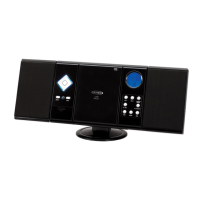
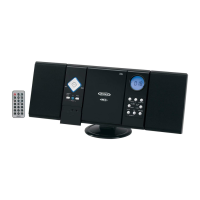
The JENSEN JMC-180 is a versatile wall-mountable CD system with an AM/FM stereo receiver, designed to offer a comprehensive audio experience in a compact form factor. This unit combines traditional radio functions with modern CD playback and auxiliary input capabilities, making it suitable for various listening preferences.
The JMC-180 serves as a multi-source audio system, allowing users to enjoy music from several different inputs. At its core, it features a CD player that supports both commercial compact discs and self-compiled CD-RW discs. This provides flexibility for users who wish to play their own mixed CDs. The CD player includes essential playback controls such as play/pause, skip/search forward and backward, and a stop function. It also offers advanced playback modes like repeat (single track or all tracks) and random play, enhancing the listening experience by allowing users to customize how their music is played. A program play mode is also available, enabling users to create a custom sequence of up to 20 tracks from a CD.
In addition to CD playback, the unit incorporates an AM/FM stereo receiver. This allows users to tune into their favorite radio stations, with an LCD display showing the current frequency. The system supports both FM stereo and monaural reception, with an FM wire antenna for improved signal quality. For AM reception, an internal antenna is used, and users can adjust the unit's position to optimize the signal. A band selector allows for easy switching between AM, FM, and FM Stereo modes.
An auxiliary input (AUX IN) jack is provided, allowing the JMC-180 to connect to external audio sources such as iPods, MP3 players, or other digital audio devices. This expands the system's utility, transforming it into a speaker system for virtually any portable music player. A stereo headphone jack is also included for private listening, automatically disconnecting the speakers when headphones are plugged in.
Beyond entertainment, the JMC-180 includes a clock and alarm function. The clock displays the current time, with an AM/PM indicator, and can be easily set using dedicated hour and minute buttons. The alarm function allows users to set a wake-up time and choose between waking up to the radio, a CD, or a buzzer alarm. This makes the unit a practical addition to a bedroom or any space where a clock and alarm are needed.
The system is designed for wall mounting, offering a space-saving solution, but can also be used with a stand for tabletop placement. A remote control unit is included, providing convenient operation of the CD player functions from a distance.
Operating the JMC-180 is straightforward, with clearly labeled controls on both the main unit and the remote.
For CD playback, users simply open the CD door, load a disc with the label side facing upward, and close the door. Playback typically starts from track 1 automatically. The play/pause button allows for temporary interruption and resumption of playback, while the skip/search buttons enable navigation between tracks or fast-forwarding/rewinding within a track. The repeat button cycles through "repeat 1" (current track), "repeat all" (entire disc), and off. The random play feature shuffles the track order, and the program button allows for creating a custom playlist.
Radio operation involves selecting the "RADIO" function, choosing the desired band (AM, FM, or FM ST), and using the tuning control to find a station. The LCD display shows the frequency, and an "ST" indicator lights up for FM stereo reception. Volume is adjusted using dedicated +/- buttons.
To use the auxiliary input, users slide down the protective door to access the AUX IN jack, connect their external audio device with an audio cable, and select the "AUX" function. The system then plays audio from the connected device, with volume control available on both the JMC-180 and the external player.
Setting the clock and alarm is intuitive. The clock is set by holding the TIME button and pressing the HOUR and MINUTE buttons. The alarm time is set similarly using the AL SET button. Users can then choose their desired wake-up source (radio, CD, or alarm) and activate the alarm function using the AL.ON/OFF button. The alarm indicator on the LCD display confirms whether the alarm is active.
The remote control simplifies CD player operation, allowing users to control playback, skip tracks, and activate repeat or random modes without directly interacting with the main unit. It's important to point the remote at the infrared sensor on the main unit for effective communication.
Maintaining the JMC-180 is relatively simple, focusing on general care and proper handling to ensure longevity and optimal performance.
For cleaning, the manual recommends using a damp (never wet) cloth and avoiding solvents or detergents. This helps protect the unit's finish and internal components. It's also advised to keep the unit away from direct sunlight, hot, humid, or dusty places, as well as heating appliances and sources of electrical noise, which can affect performance and lifespan.
Regarding CD playback, if drop-outs or interruptions occur, or if a CD fails to play, cleaning the disc's bottom surface with a soft cloth, wiping from the center outwards, is recommended. For persistent issues, using a CD lens cleaning disc can help maintain the optical pickup lens. If the problem persists, it may indicate a dirty or defective disc, or a need for professional servicing.
Battery care is crucial for both the system's clock backup and the remote control. The manual advises against mixing old and new batteries, or different types of batteries (alkaline, standard, rechargeable). If the unit or remote will not be used for an extended period, removing the batteries is recommended to prevent leakage and potential damage.
The unit's wall-mountable design requires careful consideration of placement. It should be mounted only if recommended by the manufacturer and in locations free from excessive heat, direct sunlight, and dust. If using the stand, the system is equipped with non-skid rubber feet to prevent movement. However, users are advised to apply self-adhesive felt pads to these feet if placing the unit on fine wooden furniture, as certain polishes or sprays could cause the rubber to soften and leave marks.
In case of operational difficulties, a troubleshooting guide is provided to help users identify and resolve common issues such as distorted radio sound, no sound, CD skipping, or alarm malfunctions. This guide offers practical solutions like re-tuning radio stations, checking volume levels, cleaning CDs, or repositioning the unit. For more complex problems, the manual directs users to contact customer service for support.
 General
| Brand | Jensen |
|---|---|
| Model | JMC-180 |
| Category | CD Player |
| Type | Portable |
| Power Source | AC/DC |
| Display | LCD |
| Headphone Jack | Yes |
| AM/FM Radio | Yes |
| Output Power | 2 x 1.5W |
| AM/FM Tuner | Yes |
| USB Port | No |
| Auxiliary Input | Yes |
| Bluetooth | No |
| Remote Control | No |
| Playback Formats | CD, CD-R, CD-RW |

 To Next Page