EasyManua.ls Logo

Jensen JCR-375 - User Manual

Jensen JCR-375
17 pages
Print Icon
To Next Page IconTo Next Page
Loading...
DUAL ALARM CLOCK RADIO WITH STEREO CD PLAYER
AND DIGITAL FM TUNER
MODEL: JCR-375
USER MANUAL
PLEASE READ THIS USER MANUAL COMPLETELY BEFORE OPERATING THIS UNIT
AND RETAIN THIS BOOKLET FOR FUTURE REFERENCE
Please contact Spectra Customer Service at 1-800-777-5331 if you have any questions
about operating this product

Questions and Answers

Summary

Safety and Compliance

Important Safety Instructions

Provides essential safety guidelines for operating the unit, covering usage, maintenance, and environmental considerations.

Warnings and Cautions

Highlights potential hazards like electric shock and advises on proper precautions and symbol meanings.

FCC Regulations and Laser Safety

Details compliance with FCC rules and provides critical safety information regarding laser product operation.

Controls and Power

Location of Controls

Identifies all buttons, indicators, and ports on the device via diagrams and numbering.

Power Source and Connection

Explains the AC power adapter usage and the function of the battery backup system for clock settings.

Clock and Alarm Operations

Setting the Clock

Step-by-step guide for setting the current time and date on the device display.

Alarm Operations

Details how to set, manage, and activate dual alarms with various wake-up sources.

Snooze Function

Explains the operation of the snooze feature, allowing temporary silencing of alarms.

Media Playback and Input

Radio Operation

Guides users on tuning, listening, and saving radio stations with best reception tips.

CD;MP3 CD Operation

Instructions for playing CDs, including playback modes, repeat, random, and program functions.

Auxiliary Input

Connects external audio devices like MP3 players and smartphones for playback.

Additional Functions and Maintenance

Sleep and Dimmer Operations

Manages automatic shut-off timer and adjusts the display brightness settings.

USB Charging and Headphone Use

Details charging external devices via USB and using headphones for private listening.

Care and Maintenance

Provides guidance on cleaning, handling, and protecting the unit from damage.

Troubleshooting and Warranty

Troubleshooting Guide

Lists common issues, their possible causes, and recommended solutions for operation problems.

Technical Specifications

Details power requirements, frequency range, and other technical data for the unit.

Warranty Information

Outlines the 1-year limited warranty terms, coverage, and procedure for obtaining service.

Summary

Safety and Compliance

Important Safety Instructions

Provides essential safety guidelines for operating the unit, covering usage, maintenance, and environmental considerations.

Warnings and Cautions

Highlights potential hazards like electric shock and advises on proper precautions and symbol meanings.

FCC Regulations and Laser Safety

Details compliance with FCC rules and provides critical safety information regarding laser product operation.

Controls and Power

Location of Controls

Identifies all buttons, indicators, and ports on the device via diagrams and numbering.

Power Source and Connection

Explains the AC power adapter usage and the function of the battery backup system for clock settings.

Clock and Alarm Operations

Setting the Clock

Step-by-step guide for setting the current time and date on the device display.

Alarm Operations

Details how to set, manage, and activate dual alarms with various wake-up sources.

Snooze Function

Explains the operation of the snooze feature, allowing temporary silencing of alarms.

Media Playback and Input

Radio Operation

Guides users on tuning, listening, and saving radio stations with best reception tips.

CD;MP3 CD Operation

Instructions for playing CDs, including playback modes, repeat, random, and program functions.

Auxiliary Input

Connects external audio devices like MP3 players and smartphones for playback.

Additional Functions and Maintenance

Sleep and Dimmer Operations

Manages automatic shut-off timer and adjusts the display brightness settings.

USB Charging and Headphone Use

Details charging external devices via USB and using headphones for private listening.

Care and Maintenance

Provides guidance on cleaning, handling, and protecting the unit from damage.

Troubleshooting and Warranty

Troubleshooting Guide

Lists common issues, their possible causes, and recommended solutions for operation problems.

Technical Specifications

Details power requirements, frequency range, and other technical data for the unit.

Warranty Information

Outlines the 1-year limited warranty terms, coverage, and procedure for obtaining service.

Overview

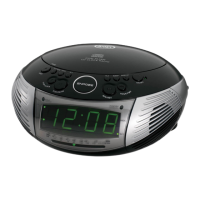
This document describes the JENSEN JCR-375, a dual alarm clock radio with a stereo CD player and digital FM tuner. It serves as a comprehensive user manual, providing instructions for operation, safety, and maintenance.

The device functions primarily as a clock radio with dual alarm capabilities, allowing users to set two independent alarms. These alarms can be configured to wake the user to a CD, a traditional beeping alarm, or a selected FM radio station. The alarm settings include options for adjusting the wake-up volume, and the unit features a snooze function that temporarily silences the alarm for 9 minutes. If an alarm is not manually turned off, it will sound for 60 minutes before automatically shutting off. The clock itself can be set to either a 12-hour or 24-hour display format, and it includes a battery backup system to preserve time and alarm settings during power outages.

Beyond its alarm clock functions, the JCR-375 incorporates a stereo CD player that supports both commercial CDs and self-compiled CD-R/CD-RW discs. For MP3 CDs, the manual specifies important considerations regarding disc burning and finalization to ensure proper playback. The CD player offers standard playback controls such as play, pause, stop, skip, and search. It also includes repeat modes (Repeat 1 for the current track, Repeat All for the entire disc, and Repeat Folder for MP3 CDs) and a random play function. A program play mode allows users to create a custom sequence of up to 20 tracks for CDs or 99 tracks for MP3 CDs.

The digital FM tuner enables users to listen to radio broadcasts. It supports both manual and automatic tuning methods to find desired stations. For optimal reception, users are advised to fully extend and adjust the FM antenna. The unit can store up to 20 FM radio stations as presets, which can be easily recalled. The display shows the radio frequency while tuning and then reverts to showing the time after 10 seconds.

An auxiliary input (AUX IN JACK) is provided, allowing the connection of external audio devices such as MP3 players, CD players, smartphones, and iPods (excluding 3rd generation iPod shuffle). This feature enables users to play audio from their external devices through the JCR-375's speakers. The volume for auxiliary input can be controlled via the main unit.

For convenience, the device includes a USB charging port (DC 5V === 2.1A) specifically designed for charging cell phones and other small portable devices. It's important to note that this port is for charging only and does not support data transfer or connection to a computer. Users are cautioned to use the correct charging cable for their device and avoid connecting the unit's USB port to another USB charger to prevent damage.

The JCR-375 also features a sleep timer, which allows users to set the unit to automatically turn off after a predetermined period (ranging from 10 to 90 minutes). This is useful for falling asleep to music from the CD player, FM radio, or an auxiliary input device. Additionally, a dimmer function is available to adjust the brightness of the LED display to either a low or high setting.

Headphone usage is supported through an EARPHONES JACK, which mutes the built-in speakers when headphones are connected. Users are advised to avoid excessive volume levels to protect their hearing.

Maintenance instructions emphasize keeping the unit clean with a dry cloth, avoiding solvents or detergents, and protecting it from excessive force, shock, dust, extreme temperatures, and direct sunlight. For CD playback issues, cleaning the disc with a soft cloth is recommended. The unit is equipped with non-skid rubber feet to prevent movement and protect furniture, with a recommendation to apply felt pads for fine wooden surfaces.

The manual also includes important safety instructions, FCC compliance information, and a warning regarding laser radiation from the CD player, advising against disassembling the casing. A troubleshooting guide is provided to help users resolve common issues related to noise, sound distortion, CD playback, and charging.

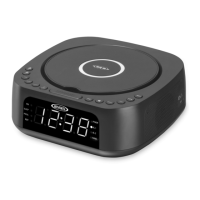
Jensen JCR-375 Specifications

General IconGeneral
BrandJensen
ModelJCR-375
CategoryClock Radio
Display TypeLED
AlarmYes
Snooze FunctionYes
Sleep FunctionYes
Radio BandsAM/FM
Battery BackupYes
Presets10
Power SourceAC
Alarm TypeBuzzer

Related product manuals