EasyManua.ls Logo

Jensen JHD12 - Page 2

Jensen JHD12
3 pages
Print Icon
To Next Page IconTo Next Page
To Previous Page IconTo Previous Page
Loading...
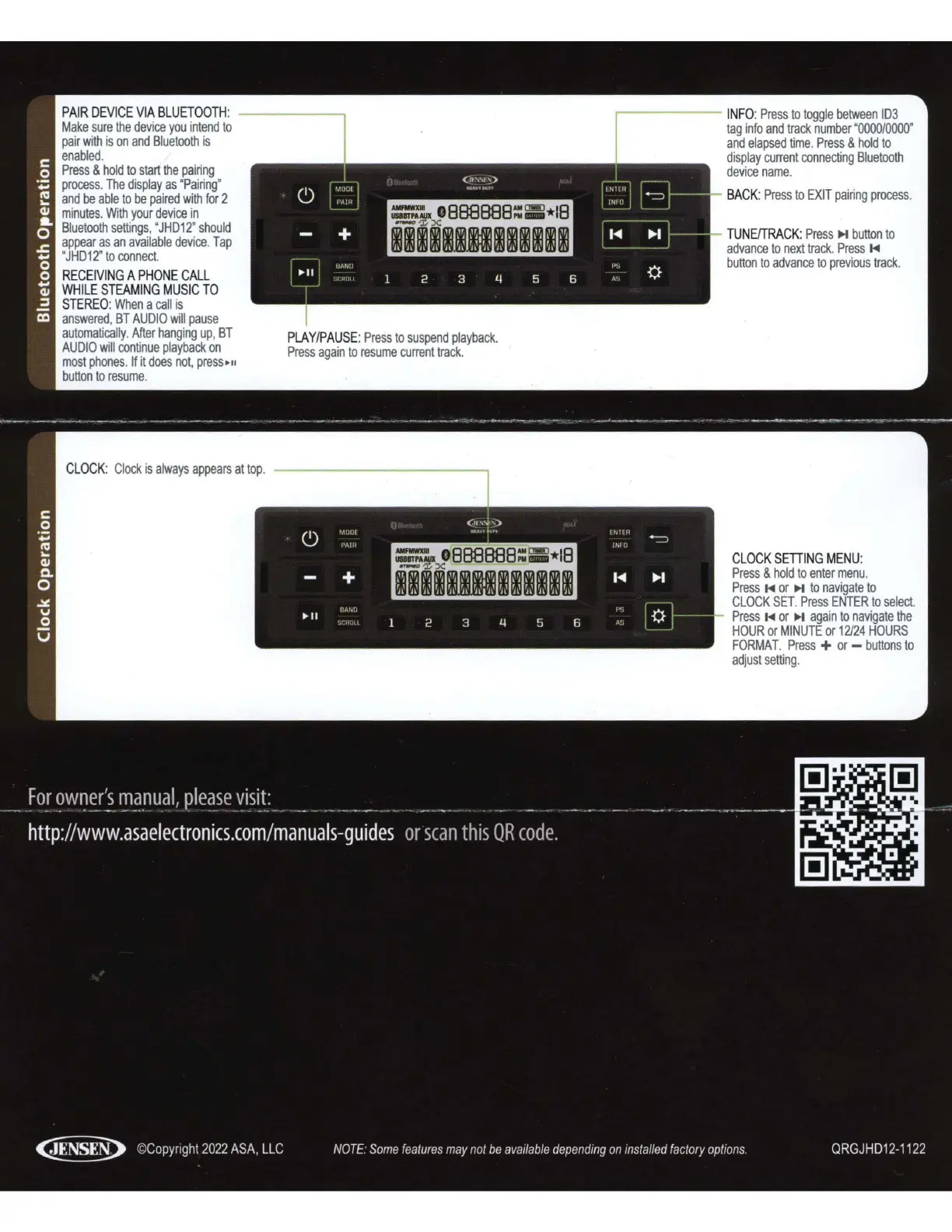
PAIR
DEVICE
VIA
BLUETOOTH
:
------.
Make
sure
the
device
you
intend
to
pair
with
is
on
and
Bluetooth
is
enabled.
Press
&
hold
to
start
the
pairing
process
.
The
display
as
"
Pairing
"
and
be
able
to
be
paired
with
for
2
minutes
. Wi
th
your
device
in
Bluetooth
settings
, "
JHD12
'
should
appear
as
an
available
device
.
Tap
"
JHD12
"
to
connect.
RECEIVING
A
PHONE
CALL
WHILE
STEAMING
MUSIC
TO
STEREO
:
When
a
call
is
answered
,
BT
AUDIO
will
pause
automatically
.
After
hanging
up
,
BT
AUDIO
will
continue
playback
on
most
phones.
If
it
does
not
,
press
11
button
to
resume
.
C
LOCK
:
Clock
is
always
appears
at
top
.
PLAY
/
PAUSE
:
Press
to
suspend
playback
.
Press
again
to
resume
current
track
.
.-------
INFO
:
Press
to
toggle
between
103
tag
info
and
track
number
"
0000/0000
"
and
elapsed
time
.
Press
&
hold
to
display
current
connecting
Bluetooth
device
name
.
BACK
:
Press
to
EXIT
pai
r
ing
process
.
TUNE/TRACK
:
Press
M
button
to
advance
to
next
track
.
Press
M
button
to
advance
to
previous
track
.
CLOCK
SETTING
MENU
:
Press
&
hold
to
enter
menu
.
Press
M
or
M
to
navigate
to
CLOCK
SET.
Press
ENTER
to
select
.
Press
M
or
M
aga
in
to
navigate
the
HOUR
or
MINUTE
or
12/24
HOURS
FORMAT.
Press
+
or
-
buttons
to
adjust
sett
i
ng
.

Related product manuals