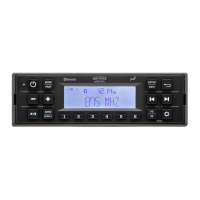
The JENSEN JHD962BT is a heavy-duty AM/FM/RBDS/WB/USB/BT/DAB+ radio designed for mobile audio systems. It offers a robust set of features for entertainment and information, particularly suited for demanding environments.
Function Description:
The JHD962BT serves as a comprehensive audio hub for vehicles, providing access to various radio bands, USB media playback, and Bluetooth audio streaming. It includes Weatherband (WB) for NOAA weather alerts, RBDS (Radio Broadcast Data Service) for FM station information, and DAB+ (Digital Audio Broadcasting) for high-quality digital radio programs and data services in supported regions. The unit is designed with a water and UV resistant front panel (IPX6) for durability. It also features an App Control Ready function, allowing for remote control via a mobile application.
Important Technical Specifications:
- Power Output: 50 watts max power (25W x 2); 20 watts RMS (10W x 2).
- Bluetooth: Streaming audio (A2DP/AVRCP) and hands-free calling (HFP) compatible with JMICHFP and JMICHFP2 microphones (sold separately). Bluetooth operates in the 2.4 GHz frequency range, transmitting voice and data at speeds up to 2.1 Mbit/s over a range of up to 10 meters.
- USB: Rear USB port for device charging (1 amp output).
- Pre-amp Output: Stereo pre-amp line level output (2V RMS).
- Amplifier Remote Trigger: 12VDC.
- Display: Full dot matrix LCD.
- Power: 2-wire power with non-volatile memory and clock support.
- Operating Voltage: DC 12-Volts.
- Grounding System: Negative.
- Ground Speaker Impedance: 4-8 ohms per channel.
- Tone Controls: Bass (at 100Hz) ±10dB; Treble (at 10kHz) ±10dB.
- RMS Power Output: 10W x 2.
- Idle/Standby Current: <50mA.
- Fuse Rating: 10 Ampere.
- Max Dimensions: 131.5 (W) x 57.5 (D) x 86.1 (H)mm.
- FM Radio:
- Frequency Coverage (USA): 87.5-107.9MHz.
- Frequency Coverage (Europe/Russia/Japan): 87.5-108MHz/87.5-108MHz/76.0-90.0MHz.
- Sensitivity (S/N=30dB): ≤14dBµV.
- Stereo Separation: >25dB.
- AM/MW:
- Frequency Range (USA): 530-1710kHz.
- Frequency Range (Europe/Russia/Japan): 522-1620kHz/522-1620kHz/522-1629kHz.
- Sensitivity (S/N=20dB): ≤25dBµV.
- Weatherband Frequencies: 162.400, 162.425, 162.450, 162.475, 162.500, 162.525, 162.550 MHz.
Usage Features:
- Power On/Off and Standby: Press the POWER button (1) to turn the unit on. Hold to enter standby mode.
- Dimmer Control: A short press of the POWER button (1) toggles the dimmer on/off. Brightness is full when off, dimmed when on. Dimmer brightness level is adjustable in system settings.
- Volume Control: Use the + (20) and – (19) buttons to adjust volume.
- Play/Pause/Mute: Press the ►II button (18) to pause or mute audio output. Press again to unmute.
- Mode Selection: Press the MODE button (2) to cycle through available modes: FM > AM > Weatherband > BT Audio. DAB+ Digital Radio mode is skipped if the Region menu is set to “USA/Russia/Japan.” Weatherband mode is skipped if the Region menu is set to “Europe/Russia/Japan.”
- Reset Function: The RESET button (10) should be pressed after initial installation, if function buttons don't operate, or if an error symbol appears. Use a ballpoint pen or thin metal object to activate.
- Audio Menu: Access with the SETTINGS button (11) to adjust Loudness (on/off), Bass Level (-7 to +7), Treble Level (-7 to +7), and Balance (Left 7 to Right 7).
- System Menu: Press and hold the SETTINGS button (11) for over 2 seconds to enter. Navigate with ◄ or ►► buttons (9, 8) and adjust with + or - buttons (20, 19). Items include:
- LCD Dimmer (1-10): Adjusts backlight.
- LCD Contrast (1-10): Adjusts contrast.
- Bluetooth Devices: Manage paired devices (Lock/Unlock, Connect/Disconnect, Delete). Locked devices are protected from being overwritten.
- Call Auto Answer (On/Off): Toggles automatic call answering.
- Call Volume (0-40): Adjusts call volume (default 30).
- Clock Set: Sets time (HH:MM) and hour format (12/24).
- LV ALARM (On/Off): Low Voltage Alarm. Sounds an alarm (8 beeps every 30 sec) and displays "LOW VOLTAGE" if voltage drops to 10.5V (+/- 0.3V).
- LVAO (On/Off): Low Voltage Auto Off. Automatically turns off radio power if battery voltage is low.
- P--O TUNE (On/Off): Preset-Only Tune. Recalls only presets from all bands in sequence.
- Tuning Region (USA/EURO/RUSSIA/JAPAN): Sets frequency spacing.
- DAB+ Sub-menu: Includes Announcements (New Flash, Transport Flash, Area Weather Flash, Warning/Service, Event Announcement).
- Antenna Power (On/Off): Controls power to the DAB antenna.
- Clock Sync (On/Off): Synchronizes clock display.
- Key Beep (On/Off): Toggles audible beep for button presses.
- Reset System Defaults: Returns unit to factory settings.
- System Info: Displays firmware version.
- Work Timer: Activate via ENTER/TIMER button (6). Press again to start/stop. Hold to reset. Press RETURN button (5) to exit. "TIMER" flashes every 10 seconds when running.
- Tuner Operation:
- Select a Band: Press BAND/PTY button (3) to switch between FM1, FM2, FM3, AM1, AM2, DAB+1, DAB+2, DAB+3.
- Manual Tuning: Hold ◄ or ►► buttons (9, 8) to seek stations step-by-step.
- Auto Seek Tuning: Press ◄ or ►► buttons (9, 8) to automatically seek the next strong station. (Not available for Weatherband; manual tuning required for WB).
- Preset Stations: Store up to 6 stations per band by holding a preset button (1-6) for 2 seconds. Recall by pressing a preset button. Preset buttons are pre-assigned for Weatherband.
- Automatically Store/Preset Scan (AS/PS): Hold AS•PS button (5) for 2 seconds to automatically find and store strong stations. Press AS•PS to scan stored presets (pauses 10 seconds per station).
- RBDS Operation: Displays Radio Broadcast Data Service information. Hold BAND/PTY button (3) for 2 seconds to access Program Type (PTY) options (e.g., News, Rock, Country). Select PTY and press ENTER/TIMER (6) to search.
- Weatherband Operation: Access by repeatedly pressing MODE button (2). Displays "WB" and channel (WB-1 to WB-7). Tune manually or use presets.
- DAB+ Digital Radio Operation:
- Service List Update: Hold AS•PS/RETURN (SLU) button (5) to update the service list.
- Select a Service: Hold BAND/PTY(SL) button (3) to display the Service list menu. Navigate with ◄ or ►► buttons (9, 8) and select with ENTER/TIMER (6).
- Search for An Ensemble: Hold ◄ or ►► buttons (9, 8) to automatically search for available ensembles, services, or components. Press ◄ or ►► buttons (9, 8) to manually select. Confirm with ENTER/TIMER (6).
- Store/Recall Service: Store up to 6 services per band using preset buttons (1-6).
- Bluetooth Pairing:
- Enter Bluetooth menu via SETTINGS button (11).
- On your device, search for "JHD962BT" and pair. Enter "0000" if prompted for a password.
- The unit can store up to 5 devices. Lock devices to prevent them from being bumped.
- Bluetooth Audio Streaming (A2DP): Play music from a paired device. The ►II icon will appear on the LCD.
- Bluetooth Hands-Free Calling (HFP):
- Incoming Calls: The phone number will appear on the LCD.
- Answer Call: Press the "CALL" button (7). If Auto Answer is "On," calls answer automatically after 5 seconds.
- End Call: Press the "CALL" button (7).
- Reject Incoming Call: Press and hold the "CALL" button (7).
- Outgoing Call: Press the "CALL" button (7) to call the last dialed number.
- Transfer Call: During a call, press and hold the "CALL" button to transfer between unit and mobile device.
- App Operation: Compatible with ASA Audio App Controller (available on App Store and Google Play Store) for wireless remote control of primary stereo functions (power, volume, mute, source mode, playback, tuning, audio menu controls).
Maintenance Features:
- General Care: Keep the product away from dust and dirt to prevent premature wear. Handle gently to avoid damage to circuit boards and cases.
- Cleaning: Wipe the product with a dampened cloth occasionally. Avoid harsh chemicals, cleaning solvents, or strong detergents.
- Environmental Conditions: Use and store the product only in normal temperature environments. High temperatures can shorten the life of electronic devices, damage batteries, and distort or melt plastic parts.
- Troubleshooting: A dedicated section in the manual provides solutions for common issues like no power, no sound, non-functional keys, and tuning problems. The RESET button is a key troubleshooting tool.
- Interference Mitigation: The manual provides guidance on addressing ignition system noise (using suppression wires/resistors, additional noise suppressors) and environmental radio reception issues (AM signals are affected by bridges, high voltage lines, terrain).
- LCD Display: Notes that LCD panels may respond slower or have decreased character visibility in cold temperatures, returning to normal when temperatures increase.

 Need help?

 To Next Page
 General