5
INSTALLATION
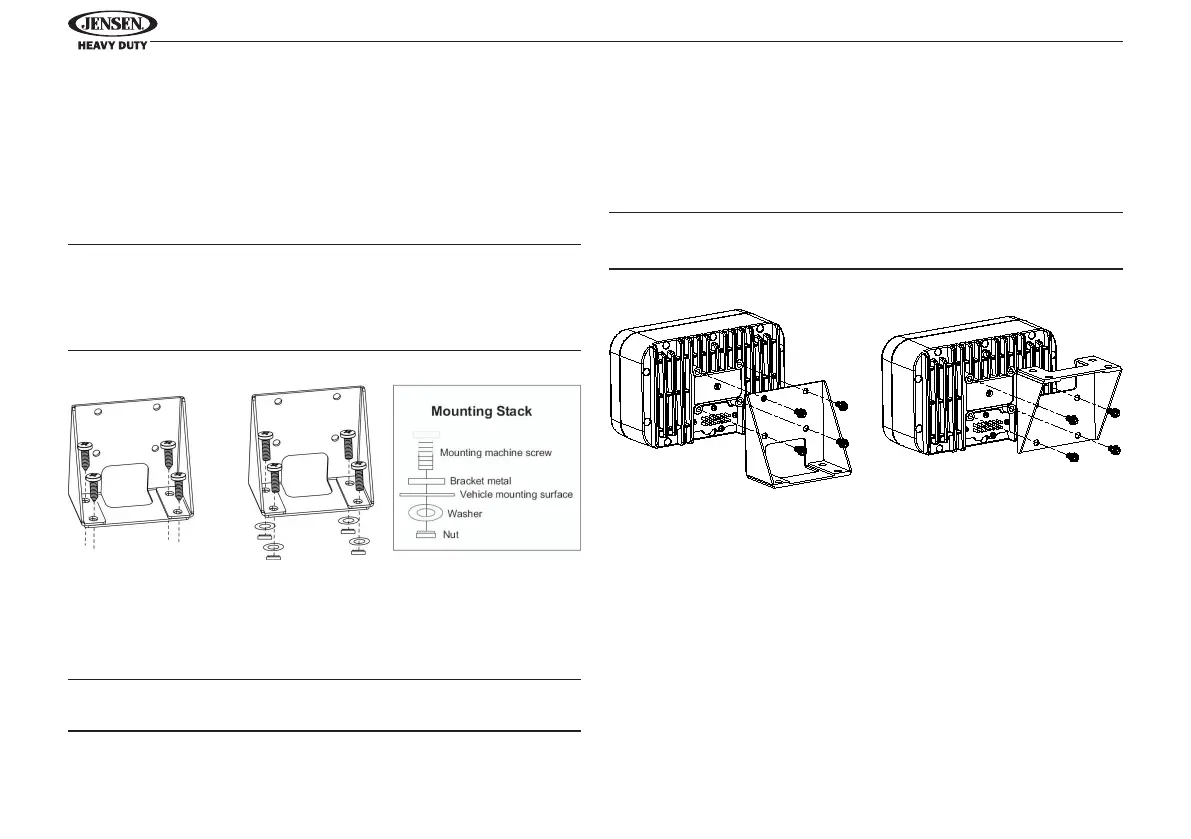
Mounting the Bracket
Two options are provided for mounting the bracket (self-
tapping screws or machine screws with nuts) to ensure a
mounting option ideal for your mounting location. Avoid
obstructing airow to the rear cooling ns on the radio.
Notes: Mounting holes should be drilled to 7/32”. Before
drilling the mounting holes, make sure the area behind the
panel where the holes are desired is clear of wires and fuels,
vacuum and or brake lines.
Self-Tapping
Screws
(Hole size 7/32”)
Machine Screws
With Nuts
(Hole size 7/32”)
Attaching the Radio
Once the bracket is securely mounted, use the four included
M4 machine screws to fasten the bracket to the back of the
radio. Alternatively, the radio can be mounted directly to the
instrument panel if access to the rear of the instrument panel.
CAUTION! Do not over tighten the 4 mounting screws. Hand
tighten only.
Regular Mounting Overhead Mounting
Warning : To disconnect the vehicle battery before wiring
the unit.


 To Next Page