20
Smart Functions
Media
Playing Media contents
> My Apps > Media
By default, there are Content Sharing displayed on the Media screen. If your mobile device
is connected to the TV, its name also appears on the Media screen.
Note:
• For more information about Content Sharing, refer to its detailed introduction.
> My Apps > Media > connected device
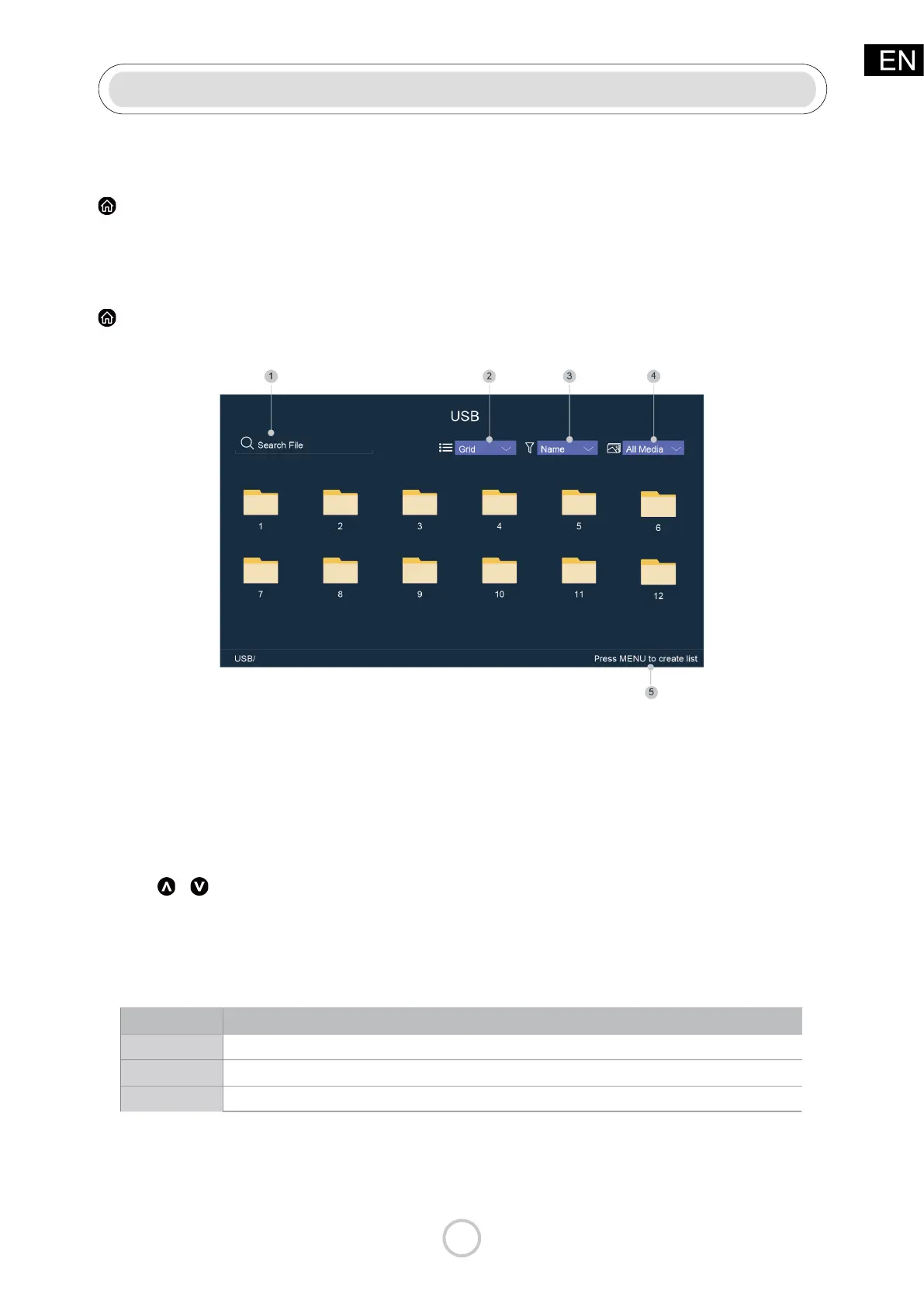
Select the content you want to play on the screen, like pictures, videos and music.
1 Input the content name you want to play.
2 Arrange the content list by Grid, List.
3 Arrange the content list by Name, Date Modied, Size.
4 Filter the content list by All Media, Photo, Video, Music.
5 Create a photo, music, or video playlist.
Playing background music during viewing pictures
You need to:
• Choose a picture to playback.
• Press
/ button to call out playbar.
• Select Background Music and choose your music to create a Music Playlist.
• Play the background music during viewing pictures.
Note:
• The TV may be support the following le formats:
• For more information about connection to PC/mobile device, refer to the detailed
introduction of each part.
Medium File Format
Video
.AVI, .WMV, .MP4, .MOV, .3GP, .MKV, .MPG, .MPEG, .VOB, .FLV, .OGM
Picture
.jpeg, .bmp, .PNG, .GIF
Music
.mp3, .aac, .wma, .wav



 To Next Page