9
Remote Control
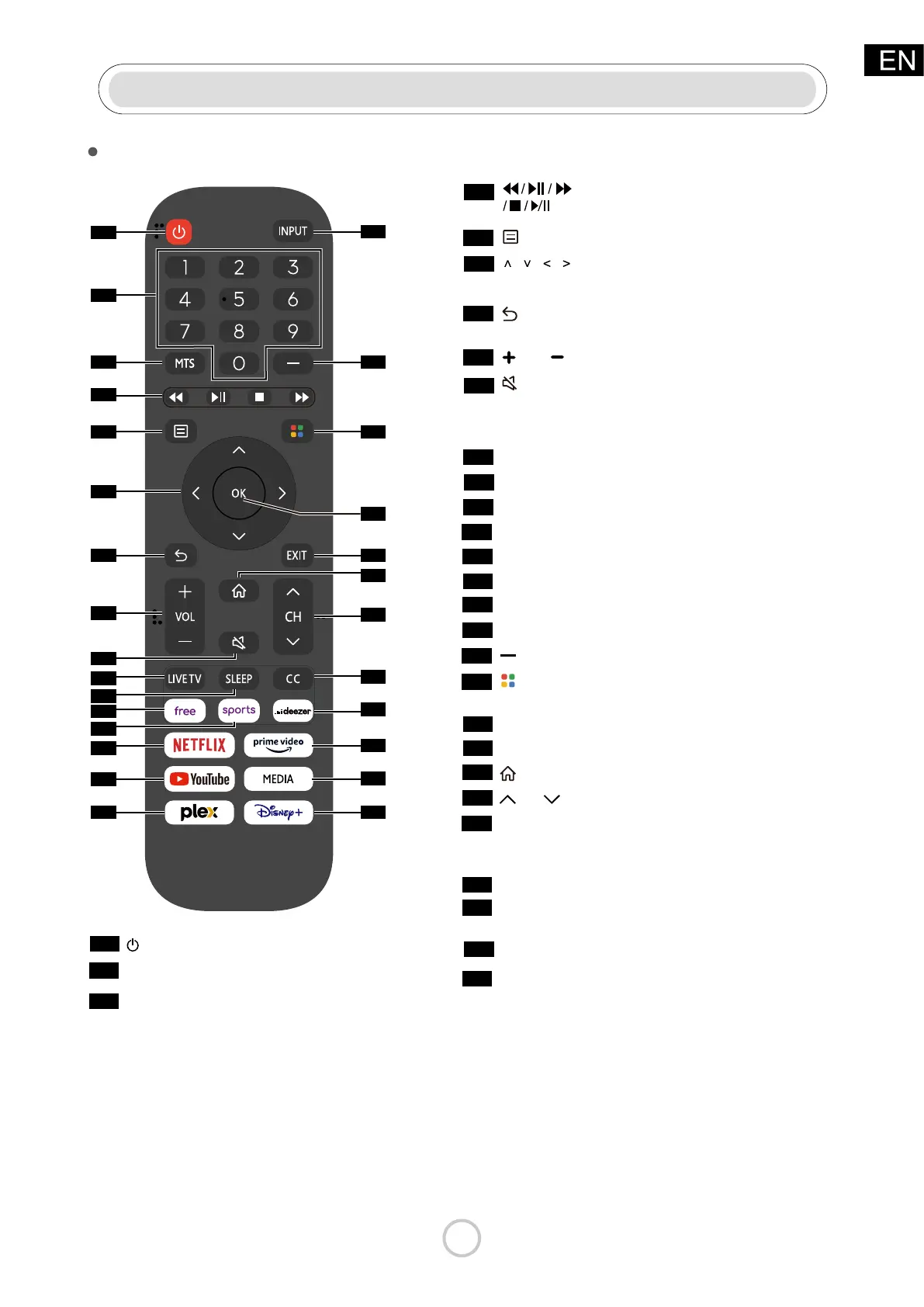
Funtions of remote control buttons
1
Power on/o
Enter Channels/input numbers
Number
MTS
Set the audio language (MTS)
Menu
Media content control function
buttons
D-pad (up/down/left/right
navigation buttons)
Return to the previous place in the
menu or app
Volume (up/down)
Mute and restore sound (quick press)
Press 3 times successively to call out
system info (for service purpose)
Enter Live TV source
Adjust sleep timer setting
Quick access to VIDAA Free
Quick access to VIDAA SPORTS
Quick access to VIDAA NETFLIX
Quick access to VIDAA YouTube
Quick access to VIDAA plex
Change TV input source
Select a digital sub-channel
Special function buttons
(Red/Green/
Yellow/Blue)
2
3
5
4
6
7
8
9
10
11
12
13
14
15
16
17
18
19
Battery Installation: Using the Remote control:
Remove the battery cover on the rear of the remote
control. Put two AAA batteries inside the battery
compartment with their + and - ends aligned as
indicated. Do not mix old and new batteries or dierent
types of batteries. Close the battery cover and press it
down until it clicks into place.
Unless stated otherwise, the remote
control can operate all the features
of the TV.
Always point the remote control
directly at the remote sensor in the
front of the TV.
1
2
3
4
5
6
7
8
9
10
11
12
13
14
15
16
17
18
19
20
21
22
23
24
25
26
27
28
///
VOL
LIVE TV
SLEEP
free
sports
NETFLIX
YouTube
plex
INPUT
Conrmation button
Exit the menu or app
Display the Home screen
Channel (up/down)
20
21
22
23
OK
EXIT
CH
Turn Closed Caption On/Off and
turn Closed Caption on when
mute
Quick access to VIDAA deezer
Quick access to VIDAA
prime
video
24
25
26
CC
deezer
prime video
Quick access to Media
Quick access to VIDAA Disney
27
28
MEDIA
Disney



 To Next Page