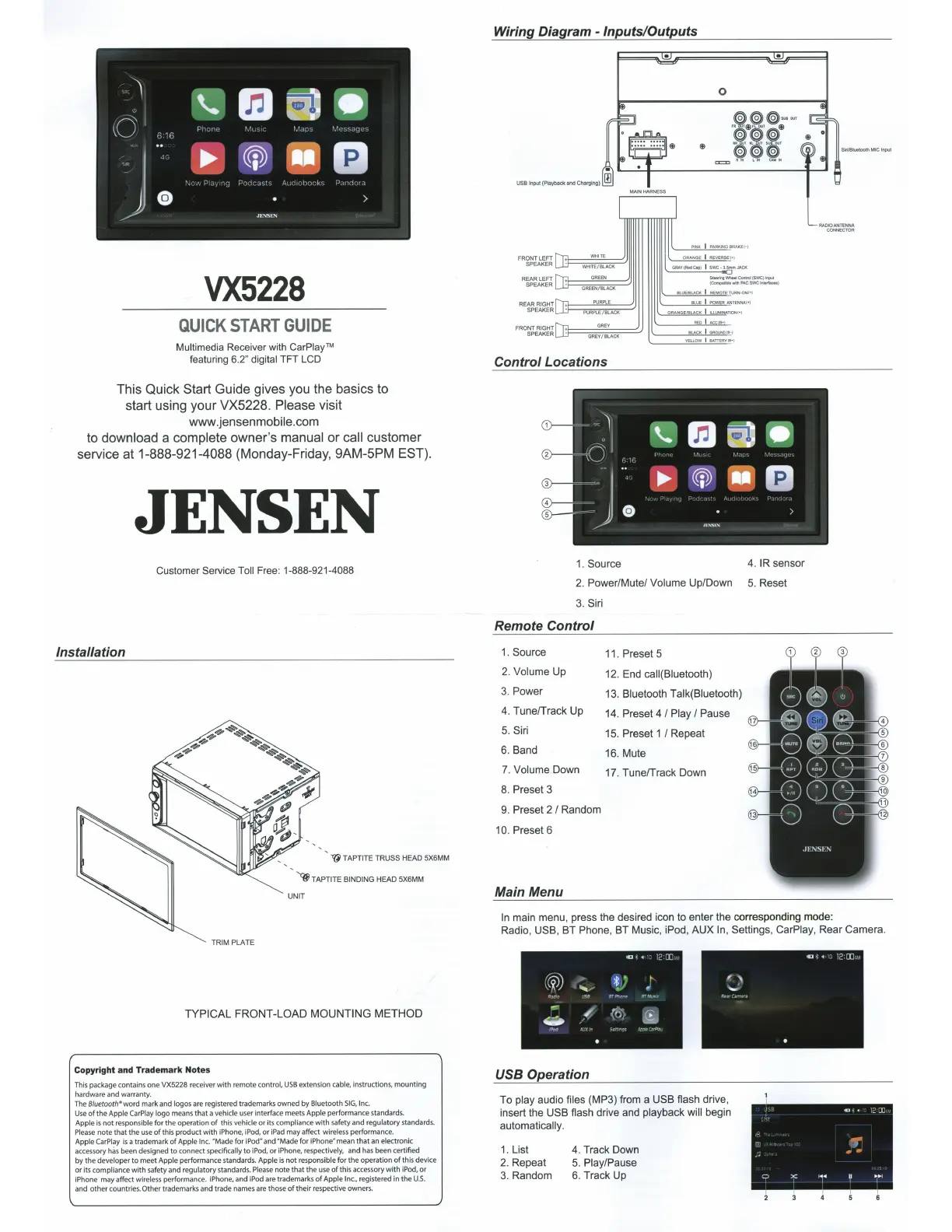
VX5228
QUICK
START
GUIDE
Multimedia Receiver with CarPiay™
featuring
6.2"
digital
TFT
LCD
This Quick
Start
Guide gives you the basics to
start using your VX5228.
Please
visit
www.jensenmobile.com
to download
a
complete
owner's
manual
or
call
customer
service at 1-888-921-4088 (Monday-Friday, 9AM-5PM
EST).
Installation
JENSEN
Customer Service
Toll
Free:
1-888-921-4088
TRIM
PLATE
~
TAPTITE
TRUSS HEAD 5X6MM
~TAPTITE
BINDING
HEAD 5X6MM
UNIT
TYPICAL
FRONT-LOAD
MOUNTING
METHOD
Copyright
and
Trademark
Notes
This package contains one
VX5228
receiver
with
remote
control,
USB
extension
cable,
instructions,
mounting
hardware and warranty.
The
8/uetooth• word
mark and
logos
are
registered trademarks owned by
Bluetooth
SIG
, Inc.
Use
of
the
Apple
CarP
lay
logo
means
that
a
vehicle
user interface meets
Apple
performance standards.
Apple
is
not
responsible
for
the
operation
of
thi
s
vehicle
or
its
compliance
with
safety and
regulatory standards.
Ple
as
e
note
that
the
use
of
this
product
with
iPhone, iPod,
or
iPad
may affect
wireless
performance.
Apple CarPiay
is
a trademark
of
Apple Inc.
"Made for
iPod"
and "Made for
iPhone"
mean
that
an
electronic
ac
cessory
ha
s been designed
to
connect
specifically
to
iPod,
or
iPhone, respectively,
and
has
been
certified
by the
developer
to
meet
Apple
performance standards.
Apple
is
not
responsible
for
the
operation
of
this device
or
its
compliance
with
safety and
regulatory standards.
Please
note
that
the
use
of
thi
s accessory
with
iPod,
or
iPhone
may affect
wireless
performance.
iPhone,
and
iPod
are trademarks
of
Apple Inc.,
registered in
the
U.S.
and
other
countries.
Other
trademarks and trade names are those
of
their respective owner
s.
Wiring Diagram -
Inputs/Outputs
F
RO
NT
LEFT
SPEAKER
PINK I PARKINGBRAI<E(- )
ORANGE I REVERSEI•I
REAR LEFT
SPEAKER
St-'rlg
WhHI Control
{SWC)
Input
(Compatible-.ith
PACSWCintetftteel)
REAR
R
IG
HT
SPEAKER
BLUE/BlACK
I
REMOTETURN-ON(•J
BLUE
I
POWERANTENNA!•l
FRONT RIGHT
SPEAKER
Control
Locations
1.
Source
BLACK
I
GROUND(8-)
YELLOW
I
BA.TTERYCB•)
4.
IR
sensor
2.
Power/Mute/
Volume
Up/Down
5.
Reset
3.
Siri
Remote
Control
1.
Source
11. Preset 5
2.
Volume
Up
12. End caii(Biuetooth)
3.
Power
13.
Bluetooth
Talk(Biuetooth)
4.
Tune/Track Up
14. Preset
4/
Play
I
Pause
5.
Siri
15. Preset 1
I
Repeat
6.
Band
16. Mute
7.
Volume
Down
17. Tune/Track Down
8.
Preset 3
9.
Preset
2/
Random
10. Preset 6
Main Menu
In
main menu, press the desired icon to enter the corresponding mode:
Radio,
USB,
BT Phone, BT Music, iPod, AUX
In,
Settings, CarPiay, Rear Camera.
USB Operation
To
play
audio
files
(MP3) from a
USB
flash drive,
insert the
USB flash drive and
playback will
begin
automatically.
1.
List
4. Track Down
2.
Repeat
5.
Play/Pause
3.
Random
6.
Track Up



 To Next Page