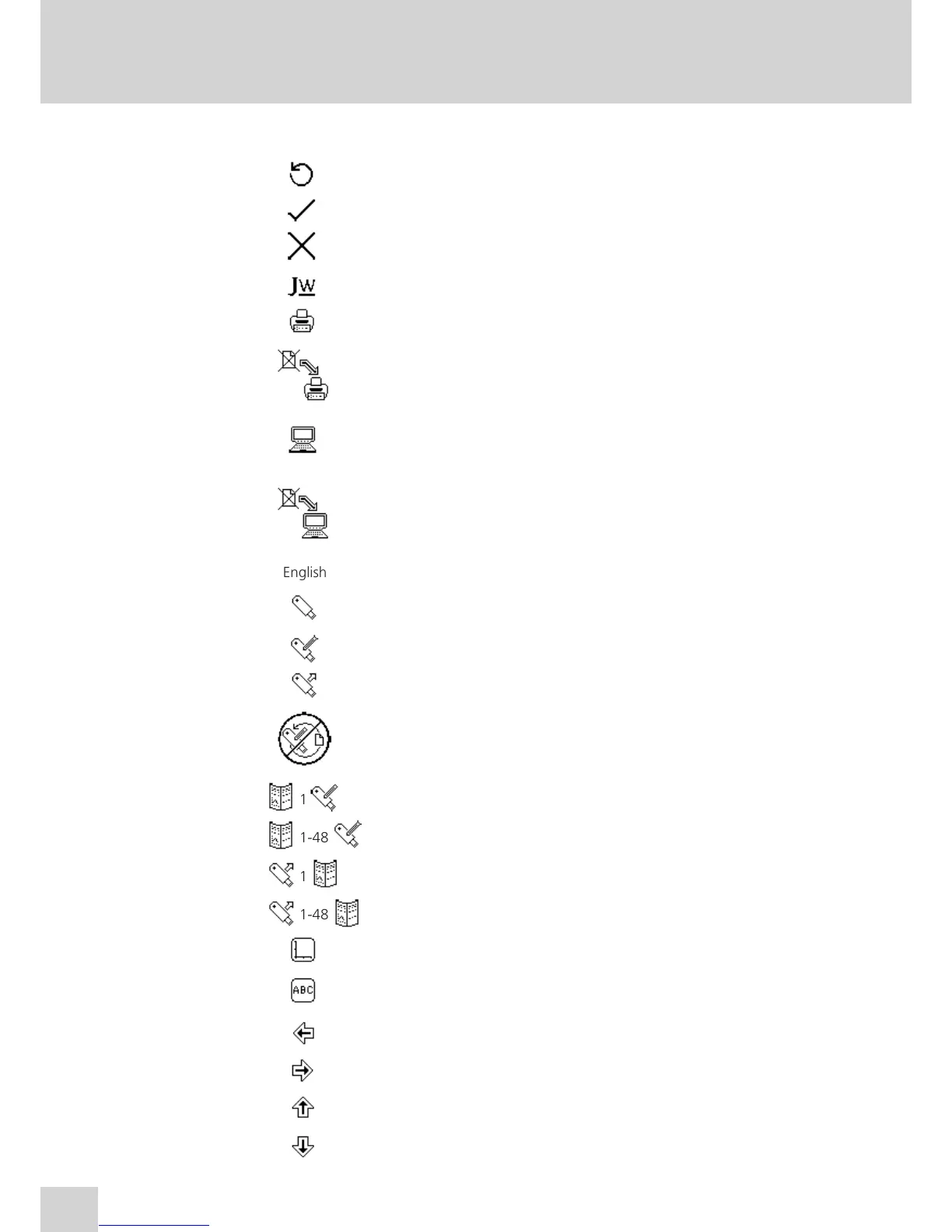
SECTION 15 – Glossary of Icons
Mode Icon Description
Common Back key
Common Tick icon - Done/yes
Common Cross icon – Cancel/no
Common JW icon - Opens expanded operating menu
Common Printer icon - Print/open printer settings
Common No results to send to printer
Common Computer icon - RS232 serial port for connection to an external serial
printer or a computer
Common No results to send to RS232
Common English English icon - Language selection
Common USB memory stick
Common Save to USB memory stick
Common Load from USB memory stick
Common Result already saved to USB memory stick
Common 1 Single method save icon
Common 1-48 1 – 48 method save icon
Common 1 Single method open icon
Common 1-48 1 – 48 method open icon
Common Axis icon – View the result graphically
Common ABC icon – View the results as a text file
Common Arrow icon - Results page down, move left, decrease
Common Arrow icon - Results page up, move right, increase
Common Arrow icon – Move up, increase
Common Arrow icon – Move down, decrease
78


 To Next Page