EasyManua.ls Logo

Jet HVBS-712D - User Manual

Default Icon
32 pages
Print Icon
To Next Page IconTo Next Page
Loading...
Operating Instructions and Parts Manual
Horizontal-Vertical Band Saw
Models HVBS-712, HVBS-712D
JET
427 New Sanford Road
LaVergne, Tennessee 37086 Part No. M-414559
Ph.: 800-274-6848 Edition 4 03/2016
www.jettools.com Copyright © 2015 JET
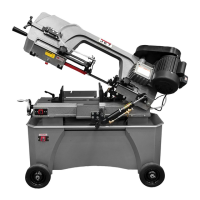
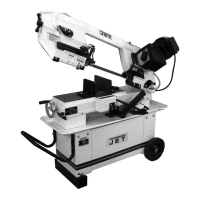
HVBS-712D Deluxe model shown

Questions and Answers

  • B
    Breanna KerrAug 18, 2025
    What to do if my Jet Saw motor will not start, or motor stalls, resulting in blown fuse or tripped breaker?
    • W
      Wesley FullerAug 18, 2025
      If your Jet Saw motor won't start, stalls, and causes blown fuses or tripped breakers, consider these potential causes and solutions: * Too many tools running on one circuit: Reduce the number of tools connected to the circuit. * Short circuit in line cord or plug: Inspect the cord or plug for damaged insulation and shorted wires. * Short circuit in motor or loose connections: Inspect all connections on the motor for loose or shorted terminals or worn insulation. * Incorrect fuses or circuit breakers in the power line: Install correct fuses or circuit breakers.
  • T
    Todd CunninghamAug 20, 2025
    Why does my Jet Saw motor overheat?
    • J
      James HolderAug 20, 2025
      Your Jet Saw motor may overheat due to: * Motor overload: Reduce the load on the motor by increasing the speed or decreasing the feed pressure. * Restricted air circulation: Clean the motor fan with compressed air to restore normal air circulation.
  • J
    Jennifer GarzaAug 23, 2025
    Why is my Jet Saw blade breaking excessively?
    • J
      Jeremiah CraigAug 23, 2025
      Excessive blade breakage in your Jet Saw can be attributed to several factors: * Incorrect blade tension: Adjust the blade tension accordingly. * Incorrect blade speed or downfeed rate: Adjust the blade speed or downfeed rate accordingly. * Workpiece loose in vise: Clamp the workpiece securely. * Blade rubs on wheel shoulder: Adjust blade tracking. * Teeth too coarse for material: Use appropriate blade for the material. * Teeth in contact with workpiece before saw is started: Ensure the blade is running before contact with the workpiece. * Blade guides misaligned: Adjust the blade guides. * Blade too thick for wheel diameter: Use a thinner blade. * Cracking at weld; poor annealing of blade: Replace the blade.
  • M
    Mr. Ronald EstesAug 25, 2025
    How to fix Jet HVBS-712D Saw cuts that are not square?
    • M
      michaelbrownAug 26, 2025
      If your Jet Saw cuts are not square, consider these possible causes and solutions: * Blade not square to vise/material: Adjust the vise square to the blade. * Blade surface not perpendicular to table: Adjust blade guides until perpendicular. * Workpiece shifting in vise: Properly secure the workpiece by tightening vise handles. If the workpiece is irregular-shaped, use appropriate clamping technique or jig. * Low blade tension: Increase tension. * Blade guides out of adjustment: Adjust blade guides. * Blade is worn, cutting crooked: Replace blade. * Feed pressure too great: Reduce feed pressure. * Blade guides incorrectly set: Readjust guide assemblies. * Incorrect blade toothing in relation to workpiece: Check Machinery’s Handbook for recommended blade type.
  • S
    Steven AcostaAug 27, 2025
    How to troubleshoot a Jet HVBS-712D when the motor will not start?
    • V
      valerierobertsAug 28, 2025
      If the motor of your Jet Saw will not start, consider the following potential causes and solutions: * No incoming power: Check the plug connection. If satisfactory, check the breaker or fuse. * Low voltage: Check the power line for proper voltage. * Open circuit in motor or loose connection: Inspect all lead connections on the motor for loose or open connections.
  • J
    james26Aug 30, 2025
    What to do if my Jet Saw finished surface of workpiece is rough, unsatisfactory?
    • K
      Kathy HernandezAug 30, 2025
      If the finished surface of your workpiece from the Jet Saw is rough and unsatisfactory, consider these causes: * Improper blade break-in: Follow proper break-in procedure. * Improper speed or feed rate: Adjust as needed. * Dull or damaged teeth: Replace blade. * Poor weld on blade: Replace or re-weld blade. * Incorrect choice of blade: Check a machinist’s handbook for blade recommendations.
  • A
    Amanda HernandezSep 2, 2025
    Why does my Jet HVBS-712D machine slow down when operating?
    • J
      Jennifer MorganSep 2, 2025
      If your Jet Saw machine slows down during operation, it could be due to: * Excessive feed pressure: Adjust spring tension to reduce feed pressure, or increase speed using belt adjustment. * Belt loose: Tighten belt.
  • R
    Renee CuevasSep 4, 2025
    Why does my Jet Saw blade dull prematurely?
    • G
      Gabrielle HollandSep 4, 2025
      Premature dulling of blade teeth on your Jet Saw can occur due to: * Improper blade break-in: Follow proper break-in procedure. * Excessive blade speed, blade teeth overheating: Decrease speed. * Inadequate feed rate: Adjust cylinder dial setting as needed. * Improper tooth pitch for material: Use proper blade. * Hard spots or scale on material: For scale, reduce speed and increase feed rate. For hard spots, increase feed rate. * Work hardening of material (especially stainless steel): Increase feed rate. * Blade installed backwards: Remove blade and twist inside-out. * Insufficient blade tension: Adjust as needed.
  • W
    William ReillySep 7, 2025
    What causes loud, repetitive noise coming from Jet HVBS-712D Saw machine?
    • B
      bwrightSep 7, 2025
      A loud, repetitive noise from your Jet Saw machine can be caused by: * Pulley setscrews are missing or loose: Inspect setscrews. Replace or tighten if necessary. * Motor fan is hitting the cover: Tighten fan or shim cover. * V-belt is defective: Replace V-belt.
  • K
    Kristin LloydSep 9, 2025
    What causes excessive vibrations in my Jet HVBS-712D Saw?
    • M
      Mary MccannSep 9, 2025
      Excessive vibrations in your Jet Saw can be caused by: * Base on uneven surface: Move to level surface. * Saw blade has cracks: Replace blade immediately. * Too heavy a cut: Reduce feed rate and blade speed.

Summary

1.0 IMPORTANT SAFETY INSTRUCTIONS

2.0 On-off switch padlock

4.0 About this manual

Critical Warning: Read Manual Before Operation

Crucial warning emphasizing the need to read the entire manual before assembly or operation.

6.0 Setup and assembly

6.5 Coolant tank preparation

7.0 Electrical connections

7.2 Voltage conversion

8.0 Adjustments

8.5 Blade replacement

Blade Guard Installation Warning

Critical warning about the necessity of installing the red blade guard after blade replacement.

8.8 Blade tension

8.9 Blade tracking

Blade Tracking Adjustment Warning

Critical warning regarding the risks and requirements for performing blade tracking adjustments.

8.10 Test cut to verify adjustment

8.11 Setting feed rate

8.12 Counterbalance spring

8.13 Blade-to-table squareness

8.14 Auto shut-off adjustment

8.15 Vise positioning (712 D only)

8.16 Vise positioning (712 only)

9.0 Operation

Safety Warning: Bow Securing and Blade Contact

Critical safety warning about securing the bow before loading material and avoiding starting cuts with blade contact.

Safety Warning: Material Handling During Operation

Critical safety warning against loading/unloading during operation and holding workpieces by hand.

9.3 Evaluating cutting efficiency

10.0 User-maintenance

Maintenance Safety Warning: Disconnect Power

Critical warning to disconnect power before performing any maintenance to prevent serious injury.

10.2 Coolant level

11.0 Troubleshooting HVBS-712;712 D Band Saw

11.2 Operational problems

13.0 Electrical Connections - HVBS-712;712 D Band Saw

Jet HVBS-712D Specifications

General IconGeneral
BrandJet
ModelHVBS-712D
CategorySaw
LanguageEnglish

Related product manuals