computer radio control system
EN
2.2.
desired smooth tension.
3. Reconnect transmitter battery pack and reinstall radio back
cover and cover screws.
3.3.5 Throttle stick travel adjustment
The throttle stick travel is adjustable to suit your flying style.
1. Switch off the transmitter and remove the 8 screws that secure the
radio back cover. Next, remove the radio back cover. Be sure to
disconnect the transmitter battery pack connector.
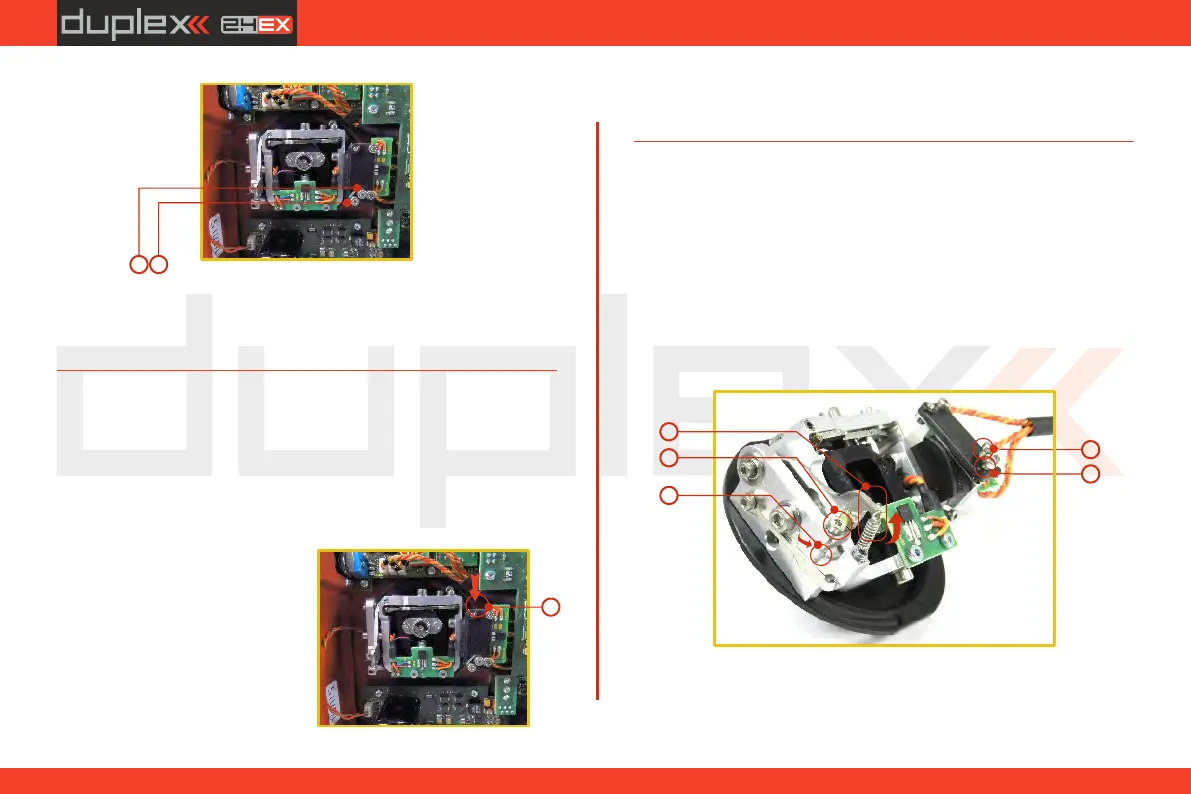
2. Use indicated machine adjustment screws to limit the throttle
stick travel. By turning the screw
clockwise, you will shorten the
throttle stick travel.
3. Reconnect transmitter battery
pack and reinstall radio back
cover and cover screws.
After making a limit the throttle
stick travel you must re-calibrate
DC-24DC-24DC-24
AB
2
DC-24DC-24DC-24
3.3.6 Changing the transmitter mode
The transmitter is equiped with universal multimode gimbals. Both
gimbals are identical and can be adjusted mechanically for modes 1-
5. After mechanical adjustment it is necessary to set a specific
transmitter mode in the menu System – Configuration – Stick mode
1-4.
To change the quad sticks settings, unscrew the back cover of the
transmitter and disconnect the battery connector.
A. Setting the quad stick into the mode without locking the
middle position - gas
E
D
5
5
1
A
C
B
2
3
the transmitter stick in the software menu, see section 9.6.3
–Calibration of Proportional Controls.
1. A. Loosen the screw
2. C. Lift the lever B so as it is possible to arrest the lock
3. C Turn the lock 90° in the direction of the arrow and arrest the
lever in the upper position. B
16



 To Next Page