computer radio control system
EN
4. 4.
9.3.3 Wireless Modes/Trainer
The transmitter RF modules can operate in one of three modes. For a
detailed explanation. (see section 5) The wireless RF setting is
programmed to the memory of individual models (receivers). While
programming a selected model you will need to configure the RF
module settings. The only exception for the system is the “Trainer”
mode. If the particular model has been programmed in Trainer
mode, this setting will not change if the Tx is turned ON or OFF.
For safety reasons, the “Trainer” RF mode will be switched
automatically to “Initial” RF mode when a different model is
selected in the transmitter.
DS/DC radio systems are excellent tools for instructor pilots. Basic
training for a student is not different from flying his own model. Both
the instructor and student have their own JETI transmitters, all
communication between the transmitters is done wirelessly. The
instructor decides when to give control of the model to the student
and when it’s time to step in. The instructor’s primary transmitter RF
module communicates with model and the secondary RF module
communicates with student’s transmitter. The Student’s transmitter,
if set to “Student” mode, disables its secondary RF module and uses
only the primary RF module to communicate with instructor’s
transmitter.
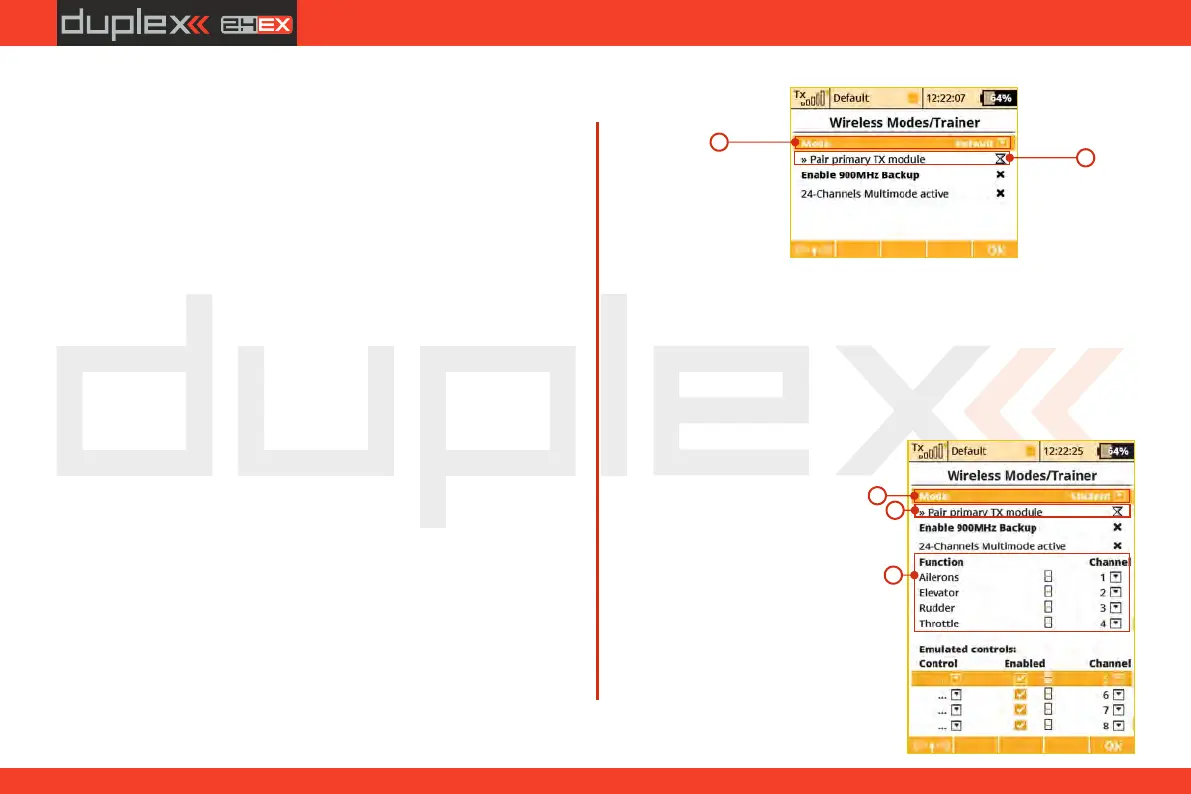
“Default” Wireless Mode
a. Selection
b. Primary RF module bind control menu line
a
b
“Student” Wireless Mode
If student’s transmitter if set to “Student” mode, any dual-rates, mixes
or any other advanced features are disabled in the student’s
transmitter.
a) Mode Selection.
b) Binding initialization of the Instructor transmitter‘s primary RF
module or special wireless “Trainer” module by JETI.
c) Channel function assignment.
a
b
c
102



 To Next Page