computer radio control system
EN
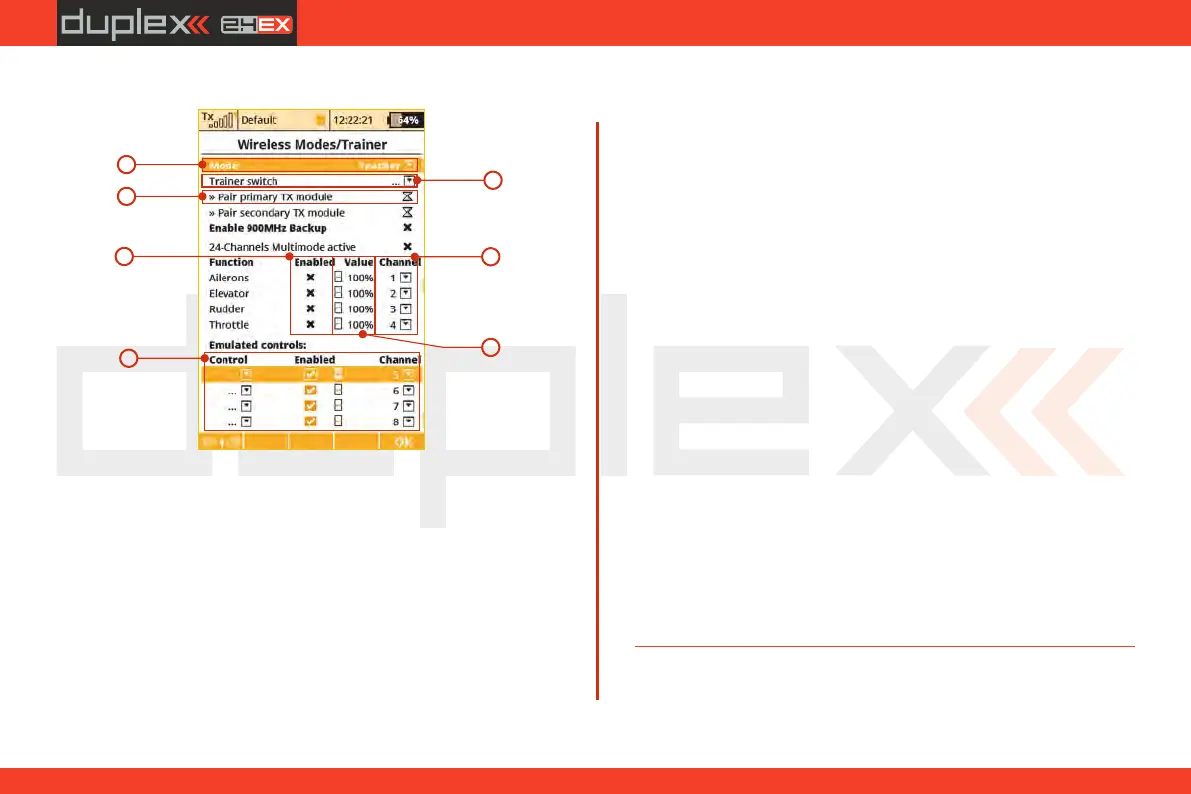
a) Mode Selection.
b) Assigned trainer function switch, when the switch is activated,
control of the model is transferred to the student.
c) Binding initialization of the Instructor transmitter‘s secondary
RF module with student’s transmitter.
d) Channel function assignment. Some or all of the functions can
be controlled by student.
e) Instructor/Student control authority values. This setting limits
the amount of control for the student. If the instructor is
assigned a 60% control value to a particular channel, and
student is assignedonly a 40% value. The instructor can easily
override student’s input and correct the model’s flight.
“Instructor” Wireless Mode
a
b
d
c
f
e
g
f) Assignment for the input channel from the student’s
transmitter to the Control function of the instructor’s
transmitter.
g) The Trainer Mode allows you to directly assign an arbitrary
control (switch, stick, even a logical switch) which will be
emulated for further use in the student's or teacher's
transmitter. The list of emulated inputs is located at the bottom
of the Function list. The behaviour depends on the mode
setting of transmitter:
1) Student mode. Here you can simply assign an arbitrary
control which will directly output its position/value to a
defined channel of the student's transmitter. In the picture, the
proportional control P8 is assigned to the seventh channel. You
can disable the output by un-checking the "Enabled" button.
2) Teacher mode. Here you can decide which controls will be
emulated by any of the student's channels. At the moment the
student takes control of the model, the values of these controls
are fully overwritten by the values of the appropriate student's
channel. In the picture you can see that channel seven
emulates the proportional control P8 and thus all functions
that rely on this control knob. With this option, the student may
switch the flight modes, operate the Butterfly function directly
etc.
4. 4.
103



 To Next Page