computer radio control system
EN
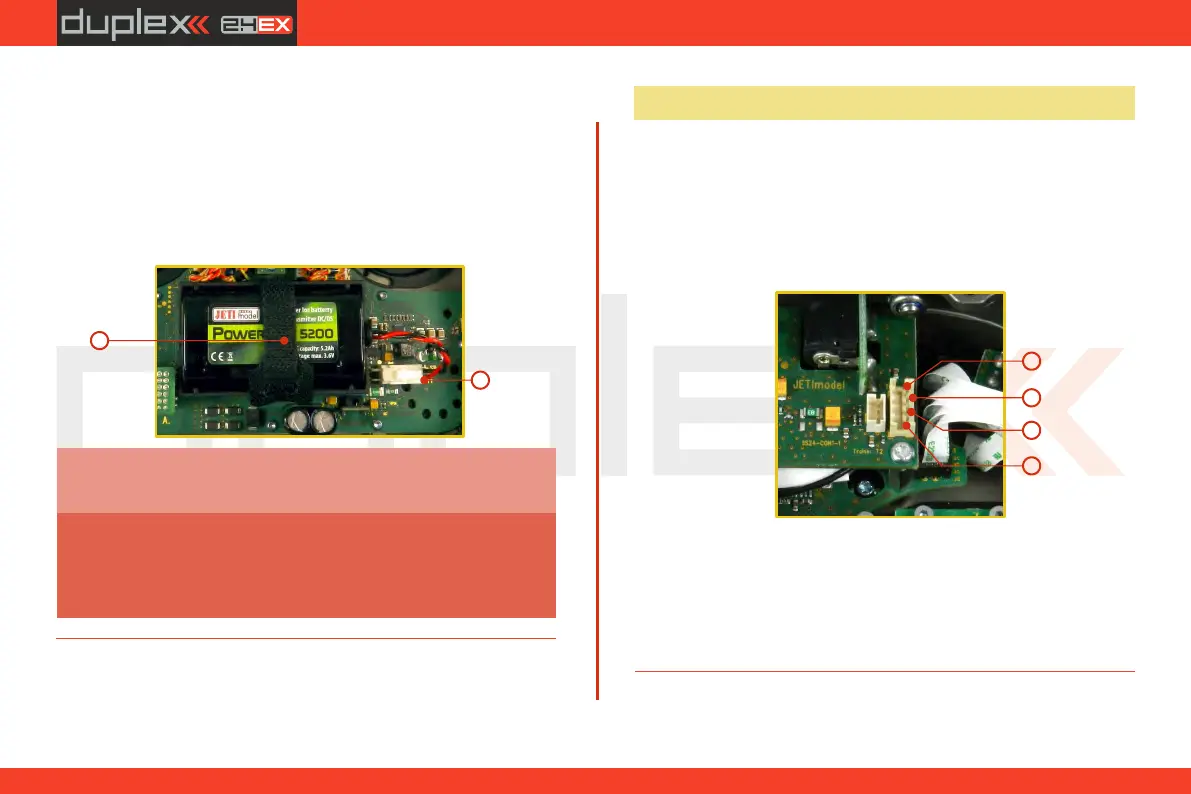
4.6.2 Battery Replacement
Should you decide to replace the transmitter battery, please follow
these steps:
1. Switch off the transmitter and remove the 8 screws that
secure the radio back cover. Next, remove the radio back cover.
2. Disconnect the transmitter battery connector.
3. Loosen the battery fastening strap and remove the battery.
DS-24 transmitters should only be operated only
with original or manufacturer approved battery
packs. The use of other battery packs will void the
warranty.
Warning:
If the transmitter battery has been disconnected for
longer than 1 minute, the time and date will be deleted.
Note:
2.2.
3
2
4.7 PPM Input/Output Connector
The PPM output is accessible via connector labeled "B“. This
connector features the non-stabilized battery voltage output in the
range of 3.2V - 4.2V (max. 1A) which can be used as power supply for
the connected HF module as well as for the PPM signal output. The
transmitter output functions are in the form of a standard PPM
signal.
1. PPM input (3V logics)
2. Positive (+) pin
3. Negative (-) pin
4. PPM signal output (3V logics, configurable in
„System->Configuration”)
3
4
2
1
36



 To Next Page