Need help?
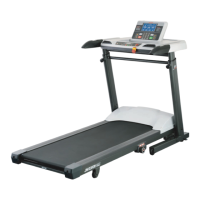
Do you have a question about the JKEXER AeroWork 897 and is the answer not in the manual?
Critical safety precautions regarding electrical supply, unattended operation, and user conduct.
Important user precautions for exercise, health, and proper treadmill use.
Ensures safe operation by explaining proper grounding and outlet requirements.
Details the importance, frequency, and process of lubricating the running deck.
Key safety notes and basic information before operating the treadmill.
Instructions for initiating manual treadmill operation using the master computer.
Guide to selecting and using pre-programmed workout routines (P1-P12).
Instructions for using heart rate control programs (H1-H3) for customized workouts.
Detailed remarks and operation for HRC programs (H1, H2, H3).
Explains the meaning of various indicators and data displayed on the master computer.
Details the function and usage of each button on the master computer console.
Lists common error codes and provides solutions for troubleshooting issues.
 General
| Motor | 2.5 HP |
|---|---|
| Incline | 0 - 12% |
| Display | LCD |
| Heart Rate Monitoring | Hand pulse |
| Features | Foldable |

 To Next Page