Need help?
Do you have a question about the JKEXER M-POWER 870 and is the answer not in the manual?
Critical safety warnings regarding electrical shock, unattended use, and safe operation.
Precautions for use, including medical advice, proper usage, and environmental considerations.
Rules for safe operation, including footwear, garment choices, and body positioning.
Proper grounding procedures to prevent electric shock and ensure correct operation.
Steps to follow before starting a treadmill workout for safety and proper setup.
Actions to take after completing a treadmill workout, including noise checks.
Explains the importance of lubrication for treadmill belt and deck longevity.
Provides the recommended schedule for lubricating the treadmill running deck.
Details the approved lubricants and their specifications for treadmill maintenance.
Step-by-step guide on applying lubricant to the treadmill running deck.
Instructions for attaching the front posts to the main frame using bolts.
Guidance on connecting and mounting the computer console to the front posts.
Steps for securing the console and connecting computer cables.
Instructions for tightening all previously installed bolts after assembly.
Final step of plugging in the power cable for the treadmill to operate.
Explanation of the speed indicator bar and its units.
Details on displays for Sex, Time, Height, Incline, Age, Speed, and Weight.
Explanations for Program, BMI, Distance, METs, Calories, BMR, Pulse, Level, and Recovery displays.
Describes the display for workout programs and Body Mass Index calculation.
Details the display for distance covered and Metabolic Equivalents (METs).
Explains the display for calorie consumption and Basal Metabolic Rate (BMR).
Information on displays for heart rate, workout level, and heart rate recovery.
Explanation of the incline/speed dot matrix and the finishing percentage bar.
Explains the function of speed selection and target setting buttons.
Details buttons for Profile, HRC, User, and Edit User programs.
Explains the function of Speed, Incline, Start, Pause, and Reset buttons.
Describes Enter, Recovery, and related remarks for data input and feedback.
Step-by-step guide for entering user Gender, Age, Height, and Weight.
Procedure for inputting the user's age into the console.
Procedure for selecting the user's gender (Male/Female).
Procedure for inputting the user's height in centimeters.
Procedure for inputting the user's weight in kilograms.
How to begin immediate training with customizable speed and incline.
Guide to selecting and using pre-programmed workout routines.
How to set countdown workouts for specific durations, distances, or calories.
Instructions for creating and using personalized workout profiles.
Using Heart Rate Control programs for workouts based on heart rate zones.
Specific notes and behavior for HRC speed-controlled workouts.
Specific notes and behavior for HRC incline-controlled workouts.
Specific notes and behavior for HRC combined speed/incline workouts.
Formulas and levels for calculating maximum and target heart rates.
Information on navigating between Sport Data and Body Data displays.
Details on using the console's shelf for devices and its ports.
Visual representation of incline levels for programs P1 through P4.
Visual representation of speed levels for programs P1 through P4.
Detailed table showing speed and incline settings for programs P1 through P4.
Visual representation of incline levels for programs P5 through P8.
Visual representation of speed levels for programs P5 through P8.
Detailed table showing speed and incline settings for programs P5 through P8.
Visual representation of incline levels for programs P9 through P12.
Visual representation of speed levels for programs P9 through P12.
Detailed table showing speed and incline settings for programs P9 through P12.
Step-by-step guide on folding the treadmill for compact storage.
Instructions on safely unfolding the treadmill for use.
Procedure for centering the running belt using adjustment bolts.
Steps to increase belt tension if it slips on the rollers.
Instructions for cleaning the treadmill's external components and surfaces.
Guidance on checking that all screws and wiring are secure.
Recommendations for storing the treadmill in a clean, dry environment.
Steps for safely moving the treadmill after folding.
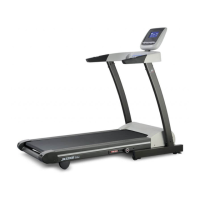
 General
| Programs | 12 preset programs |
|---|---|
| Display | LCD display |
| Foldable | Yes |
| Heart Rate Monitoring | Hand Pulse |
| Motor Power | 3.0 HP |

 To Next Page