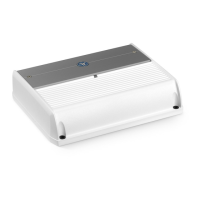
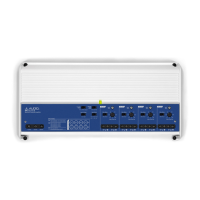
13.96 in
355 mm
2.05 in
52 mm
13.34 in
339 mm
6.93 in
176 mm
3.67 in
93 mm
CONNECTION GUIDE
800W Full-Range 8-Channel Class D Marine
Amplier with Integrated DSP
with
1
2
3
4
5 6 7
Thank you for purchasing a JL Audio amplifier for your marine sound system.
Your amplifier has been designed and manufactured to exacting standards in order to ensure years of musical
enjoyment in your vessel. For maximum performance, we highly recommend that you have your new amplifier installed
by an authorized JL Audio dealer. Your authorized dealer has the training, expertise and installation equipment to ensure
optimum performance from this product. Should you decide to install the amplifier yourself, please take the time to read
this manual thoroughly to familiarize yourself with its installation requirements and setup procedures.
If you have any questions regarding the instructions in this manual or any aspect of your amplifier’s operation, please
contact your authorized JL Audio dealer for assistance. If you need further assistance, please contact the JL Audio
Technical Support Department at technical@jlaudio.com/support.
Installation Applications
This amplifier is designed for operation with 12 volt DC, negative-ground electrical systems. Using this product in vessels
with positive ground and/or voltages other than 12V DC may result in damage to the product and will void the warranty.
This product is not certified or approved for use in aircraft.
Planning Your Installation
It is important that you take the time to read this manual thoroughly and that you plan your installation carefully. It is
very easy to damage electrical systems in modern vessels. Never assume that you have found appropriate wires without
consulting a reliable wiring diagram or without analyzing using proper test equipment. If you are uncomfortable or
unfamiliar with diagrams or testing methods, please enlist the services of your authorized JL Audio dealer to perform
the installation. Your authorized dealer has the training, expertise and installation equipment to ensure optimum
performance from this product.
The following are some considerations that you must take into account when planning
your installation.
Safety Considerations
• Install your amplifier in a dry, well-ventilated location that does not interfere with factory installed systems.
• This product should never be submerged under water or subjected to high-pressure water spray.
• Do not install where it will be directly exposed to the elements, or in the engine compartment, or in any areas of
extreme heat. Areas exposed to a heater or hot air should also be avoided.
• When selecting a mounting location, consider the orientation of the amplifier and its associated connections.
If possible, position the amplifier vertically, with all connections pointing downward. Wiring and cables
should be routed to direct potential condensation and moisture away from the amplifier.
• Securely mount the amplifier so that it does not come loose in the event of a collision or sudden jolt, or as a result
of repeated vibrations during normal operation.
• Check before drilling to make sure that you will not be drilling into an exterior panel/hull, fuel tank, fuel line,
wiring harness, or other vital system.
• Do not run system wiring outside or underneath the vessel. This is an extremely dangerous practice, which can
result in severe damage/injury.
• Protect all system wires from sharp edges by carefully routing them, tying them down and using grommets and
loom, where appropriate.
• Secure all wiring as needed, using cable ties or wire clamps to protect them from moving parts and sharp edges.
1
Power Connector
The MV800/8i’s “+12 VDC” and “Ground” connections are designed to accept up to 2 AWG copper wire. Note: Copper Clad
Aluminum (CCA) wire is not recommended. Tinned copper power wire is the best choice for marine installations. 4 AWG is the
minimum copper wire size for this amplifier.
To connect the power, ground and remote turn-on wires to the amplifier, back out the set screws on the connector using
the supplied hex wrenches. Strip back 3/8 inch (10 mm) of insulation from the end of each wire and insert the bare wire
into the receptacle on the power connector plug, seating it firmly so that no bare wire is exposed. While holding each
wire in place, tighten each set screw firmly, taking care not to strip the head of the screw. Install the power connector by
plugging it into the amplifier’s power connector receptacle, pushing firmly.
A. +12 VDC: Run copper wire from the positive (+12V) battery post to the amplifier mounting location. If additional
amplifiers are being installed, run the appropriate gauge copper wire for the combined, maximum current draw, and
install a fused distribution block near the amplifiers.
B. An appropriate fuse or ignition-protected circuit breaker (sold separately) at the main power wire(s) is vital for vessel
safety. This must be installed within 7 inches (18 cm) of the battery post connection or in compliance with marine
industry standards. If this is the only device connected to this main wire, use a 80 A value. Do not install the fuse or
close the circuit breaker until the power wire has been securely connected to the amplifier and all other connections
have been made.
C. Ground: This connection should be made to the NEGATIVE battery post. Alternatively, an appropriately equipped and
positioned DC ground bus bar near the battery may be used. All ground connections (source unit and amplifiers)
should be made at the same location.
D. Remote: This connection should be made to the source unit’s positive (+12V) remote turn-on output. If your source
unit does not have a dedicated remote turn-on output, the amplifier’s remote turn-on connection can be connected
to +12V via a switch that derives power from an ignition-switched circuit.
2
Input Section
Eight female RCA jacks feed a differential-balanced input section, providing a high degree of input flexibility, and retaining
superior noise rejection. This type of input architecture also allows the MV800/8i to cleanly accept any analog audio signal
up to 16 VRMS, without using a line-output converter.
3
Pre-Outs
Four female, RCA jacks deliver line-level, analog audio outputs (Max 4 V RMS) that are compatible with most types of
aftermarket equipment. These are configured with the TüN
™
Software Interface.
Product Description
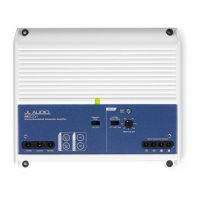
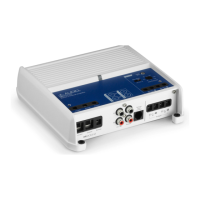
The MV800/8i is an eight-channel, full-range Class D marine amplifier equipped with NexD2™, the second generation of JL
Audio’s high-speed switching technology. It is engineered to deliver reference-grade audio amplification with outstanding
efficiency while also incorporating unprecedented processing power. Instead of traditional analog processing controlled by
knobs and switches, MVi amplifiers feature an integrated DSP (Digital Signal Processor). The amplifier and its integrated DSP
are configured using an external device (PC, Tablet or Phone), with the appropriate JL Audio TüN™ application installed.
(See What is TüN? section for more info.)
What is Included
(1) Amplifier (4) Mounting Screws
(1) Power Connector (1) 2.5 mm Hex Wrench
(4) Speaker Output Harnesses (1) 3 mm Hex Wrench
(1) USB A/B Cable (6 ft./1.8 m) (1) Connection Guide
Cooling Efficiency Considerations
The outer shell of your JL Audio amplifier is designed to remove heat from the amplifier circuitry. For optimum cooling
performance, this outer shell should be exposed to as large a volume of air as possible. Enclosing the amplifier in a
small, poorly ventilated chamber can lead to excessive heat build-up and degraded performance. If an installation calls
for an enclosure around the amplifier, we recommend that this enclosure be ventilated with the aid of a fan. In normal
applications, fan-cooling is not necessary. When mounting the amplifier in an enclosed compartment, make sure there is at
least 1 inch (2.5 cm) of space above the amplifier’s outer shell to permit proper cooling.
Mounting Considerations
MV amplifiers are equipped with keyhole style
mounting holes to simplify installations in confined
spaces or vertical-mount applications. Mounting screws
may be preinstalled, allowing amplifier connections
to be made prior to securing in its final location. See
diagram at right.
When selecting the installation location, consider
the mounting orientation of the amplifier and its
associated connections. If possible, position the
amplifier vertically, with all connections pointing
downward. Wiring and cables should be routed to
direct potential condensation and moisture away
from the amplifier. When installed in this manner, the
amplifier achieves an IPX2 water-resistance rating.
4
Speaker Output Harnesses
Connect the speaker output leads to the corresponding speaker wires. These harnesses and their companion cables are
equipped with water-resistant connectors for maximum connection integrity in marine environments.
5
JLid-COMM
Connect optional accessories (MVi-HUB, M-DRC-50, VXi-BTC, MVi-DRCADAPT, etc.) to this port.
6
USB
This USB A/B port permits connection to a computer for configuration and tuning, using TüN™ Software.
7
Reset Buttons
Use a small pin to perform the following:
(A) Factory Reset (wipe memory, reboot amp) - Press and hold the button for 7 seconds. All user settings will be
erased and the amplifier will revert to its factory settings!
(B) Reboot Amplifier - Press and release the button. Previous user settings will be retained.
LED Status/Condition Reporting
LEDs located on the chassis top and connection panel are used to communicate amplier status and condition. Refer to the
table below for the location and meaning for each behavior.
LED / Location Behavior Status/Condition›
LED / Amplier Top
Flashing Blue Critical Voltage (too low)
Flashing Red Critical Temperature (too hot)
Flashing Yellow Excessive Output Current (low impedance/short)
Upper Left LED / JLid-COMM Port
Green Detecting JLid™ Device
Blue JLid™ Connection Success
Yellow Invalid JLid™ Device
Flashing Red Excessive Current on JLid Port
Upper Right LED / JLid-COMM Port
Flashing Red
Critical Voltage/Temperature
Excessive Remote Output Current
Green Active Connection with TüN™ Software

 Need help?
 General

 To Next Page