EasyManua.ls Logo

Jofemar vision multiseller - Page 7

Jofemar vision multiseller
20 pages
Print Icon
To Next Page IconTo Next Page
To Previous Page IconTo Previous Page
Loading...
Page 6 of 20
Page 7 of 20
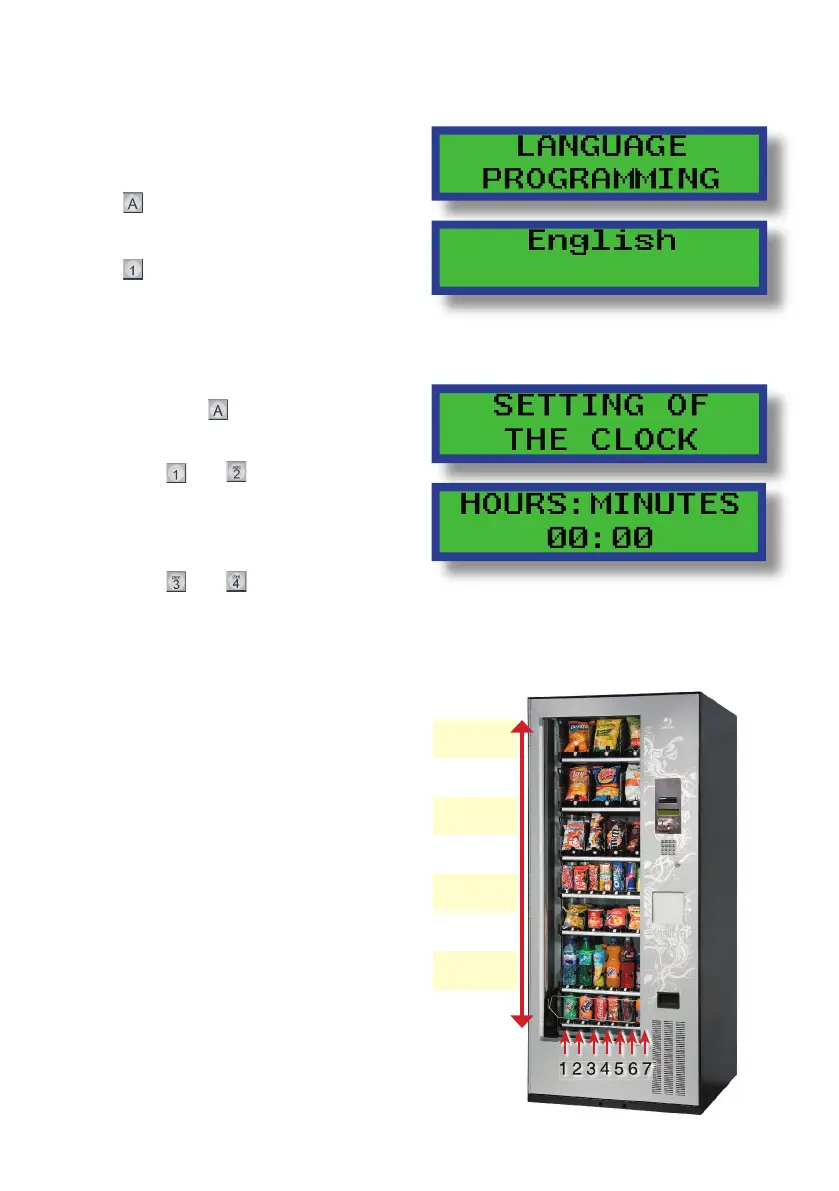
Numeration of the trays and channels:
The trays are numbered from bottom # 11
to the top #18
The channel connectors are numbered
from left to the right #1 through #7
Language selection:
Scroll through the programming options
until you reach option “32” “Language
Programming”
Press
to visualize the program
language
Press
to change to the desired
language
Scroll through the programming options
until you reach option “05” “Setting of the
clock” and press
-Set the time:
Buttons
and
:
They scroll
through the hours, minutes, numbers
of the day, year, day of the week and
type of time as AM-PM or 24 hours

Buttons
and
:
To change the
data .
Set the clock:
181-187
171-177
161-167
151-157
141-147
131-137
121-127
111-117
1 2 3 4 5 6 7

Related product manuals