9
LP69910 (12/07/2020) 3 CU FT GATOR FERTILIZER SPREADER
Determine Vehicle Load Capacity
Use the vehicle’s Operator’s Manual to determine vehicle
load capacity.
Use Correct Tires and Ination
See specication section of this operators manual for
spreader weight
See tire descriptions and ination pressures for load
conditions in the specications section of the vehicles
operator’s manual.
Operation
CAUTION: Avoid Injury! Overloading the
vehicle causes loss of control and causes
serious injury or death.
• Do not allow the Gross Vehicle Weight
(GVW) to exceed the Gross Vehicle Weight
Rating (GVWR) of the vehicle.
• Remove excess weight before operating
vehicle.
Note: Optional equipment and attachments
that are not standard equipment reduce your
cargo box capacity; so they must be included
when determining gross vehicle weight.
CAUTION: Help prevent severe bodily
injury or death, failure to observe the
recommendations in the vehicle operator’s
manual may result in loss of stability and
operator control.
Spreader Components
Hopper 3 cu. ft. capacity, high density
polypropylene molded hopper
Spinner Motor Variable speed 12V DC motor drives a
12in spinner disk to distribute material
Gate Motor 12V DC Actuator controls the gate
Controller 12V DC motor driver controls the
spinner, and motor
Display 2.4 in. monochrome OLED with 7
buttons
Electric gate control (Open/Close)
Variable speed spinner for spread width control
Adjustable spread pattern for various materials
Barrier shield
Detailed error/diagnostic message
Spreader Features
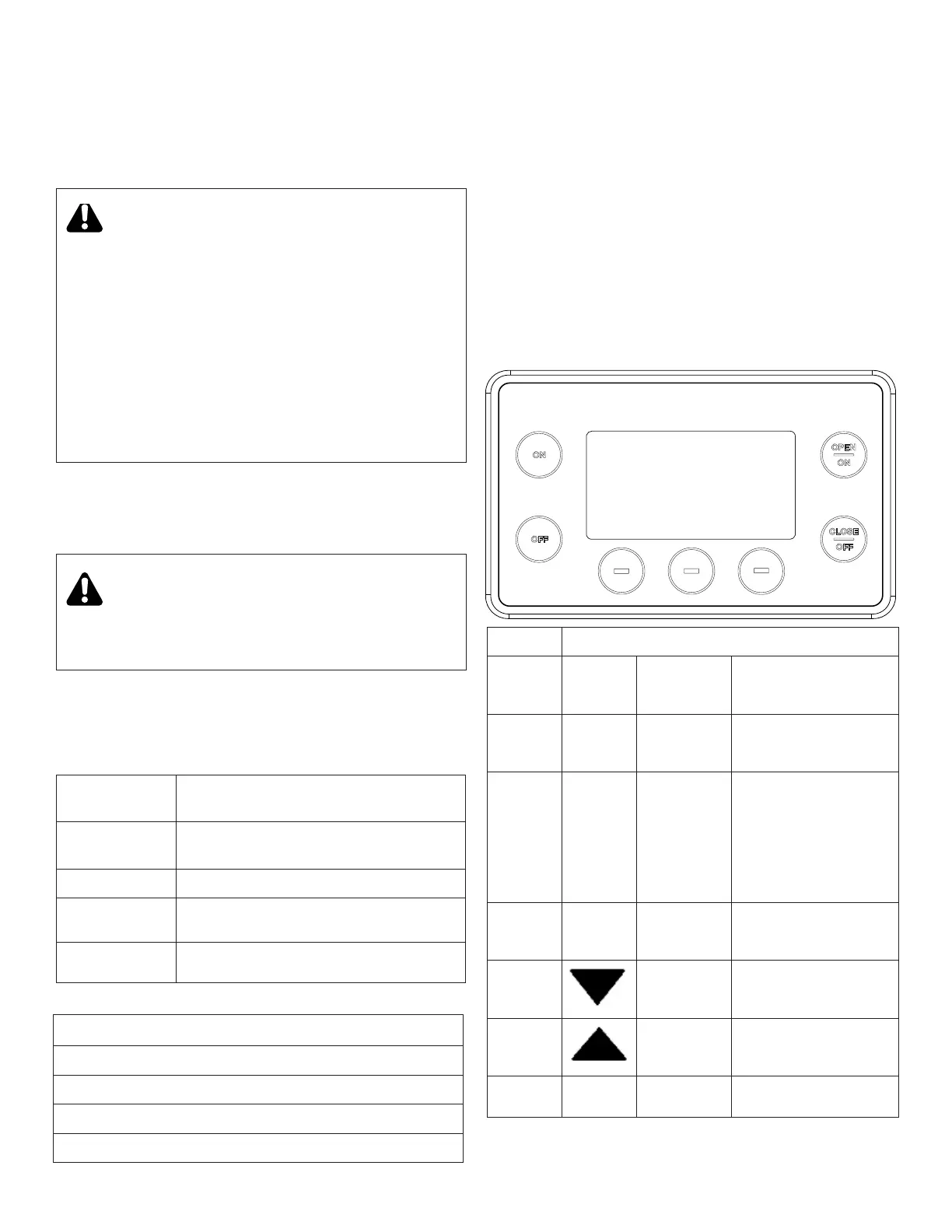
Turning On Display
The vehicle key must be in the “On” or “Run” position for
the display to turn on.
When turned on, a splash screen will appear as the
software loads. The operation page will appear when
loading is complete. The spreader is now ready to operate.
Button # Button Functions
1 ON Spinner/
Auger On
Press the “ON”
button to turn on the
spinner.
2 OFF Spinner/
Auger Off
Press the “OFF”
button to turn off the
spinner.
3 OPEN/
ON
Gate Open/
Vibe ON
Press the “OPEN”
button to open the gate
/.
Press the “ON” button
to turn on the vibe.
4 CLOSE/
OFF
Gate
Close/Vibe
OFF
Press the “CLOSE”
button to close the
gate /
5 Down
Arrow
Press to decrease
the speed of the
spinner/auger.
6 Up Arrow Press to increase the
speed of the spinner/
auger.
7 MENU Menu
Button
Press to enter the
menu.
Navigation
Control the spreader using the buttons on the display.
Button functionality is described in the table below and
varies by screen.


 To Next Page