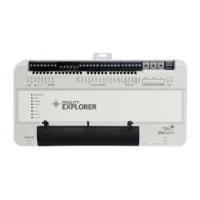
Figure 2: F4-SNC16121-0x
Table 1: Physical features of the SNC25151-0x and
SNC16121-0x
Callout Physical features
1
Binary Outputs (BO) removable terminal
blocks. See Connecting input and output
terminals for more information.
2
Configurable Outputs (CO) removable
terminal blocks. See Connecting input and
output terminals for more information.
3
Analog Output (AO) removable terminal
blocks. See Connecting input and output
terminals for more information.
4
Rotary switch dials: controller number. Ships
from the factory at setting 000. See Rotary
switch dials for more information.
5
Supply power removable terminal block:
gray terminals; 24 VAC, Class 2.
6
Two Universal Serial Bus (USB) 2.0 host type
A ports.
USB-1 (top port): Any Johnson Controls
approved USB device can be connected to
the top port.
USB-2 (bottom port): Any non-wireless,
Johnson Controls approved USB device can
be connected to the bottom port.
Note: There is one micro-USB port that
is reserved for future use.
7
Sensor/Actuator (SA) Bus port: RJ12 6-Pin
Modular Jack.
Table 1: Physical features of the SNC25151-0x and
SNC16121-0x
Callout Physical features
8
Field Controller (FC) Bus port: RJ12 6-pin
Modular Jack.
9
Field Controller (FC) Bus removable terminal
block: blue terminal. See FC Bus terminal
block for more information.
10 End-of-Line (EOL) switch.
11
Sensor Actuator (SA) Bus removable
terminal block: brown terminal. See SA Bus
terminal block for more information.
12
Binary Input (BI) removable terminal blocks.
See Connecting input and output terminals
for more information.
13 SNC input terminal blocks cover
14
Universal Inputs (UI) removable terminal
blocks. See Connecting input and output
terminals for more information.
15
Two active Ethernet ports, 1000/100/10
Mbps; 8-pin RJ45 connector, labeled ETH-1
(top) and ETH-2 (bottom).
16
Multi-color LED status indicators. See LED
status indicators for more information.
17
Reset button. See Reset button for more
information
18
Recovery button. See Recovery button for
more information.
F4-SNC Installation Guide2






 To Next Page