EasyManua.ls Logo

Johnson Controls F4-CVM03050-0 - User Manual

Johnson Controls F4-CVM03050-0
36 pages
Print Icon
To Next Page IconTo Next Page
Loading...
F4-CVM VAV Terminal Equipment
Controllers Installation Instructions
Application
The CVM03050 equipment controllers are designed for variable air volume (VAV) box applications.
CVM03050 controllers operate on an RS-485 BACnet
®
MS/TP bus as BACnet Advanced Application
Controllers (B-AACs) and integrate into Johnson Controls
®
and third-party BACnet systems.
CVM03050 controllers feature an integral damper actuator, a digital Differential Pressure
Transmitter (DPT) sensor, and a 32-bit microprocessor. The CVM03050-0P model features an
integral potentiometer to sense actual VAV box damper position. These controllers also include an
integral real-time clock, which enables the controllers to monitor and control schedules, calendars,
and trends, and operate for extended periods of time as stand-alone controllers when offline
from the Facility Explorer
®
system network. These controllers connect easily to the wired and
wireless network sensors for zone and discharge air temperature sensing. Their small package
size facilitates quick field installation and efficient use of space without compromising control
performance.
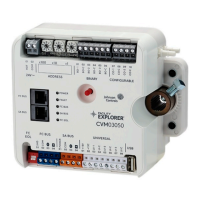
Figure 1: F4-CVM3050
Communications protocols
The CVM03050 controllers can communicate using BACnet MS/TP, N2, or wireless Zigbee
®
. By
default, the CVM controllers communicate using the BACnet MS/TP protocol. The BACnet protocol
is a standard for ANSI, ASHRAE, and the International Standards Organization (ISO) for building
controls.
Part No. 24-10143-01809 Rev. B
2019-05-17
(barcode for factory use only)
F4-CVM03050-0, F4-CVM03050-0P
*241014301809B*

Other manuals for Johnson Controls F4-CVM03050-0

Questions and Answers

  • E
    Edward HughesAug 10, 2025
    Why is my Johnson Controls Controller OFF?
    • N
      Nathaniel MooreAug 10, 2025
      If your Johnson Controls Controller is OFF, it might be due to a shorted transformer, a polarity issue with a 24 VAC powered sensor, or a polarity issue with an SA Bus device. First, ensure the polarity of ~24 V COM / UI-C / + 15VC/SA BUS COM on the controller, auxiliary devices, and I/O is consistent. Second, make sure that the BO-1, BO-2, and BO-3 terminals of binary outputs are not connected to ~24 VAC COM, and verify that BO-C terminals are not connected to ~24 VAC HOT, as these terminals are internally sourced. Next, use an ohm-meter to verify that the short circuit has been resolved. Finally, reset the breaker/fuse or replace the transformer, preferably with a model that utilizes a resettable circuit breaker for easier troubleshooting.
  • K
    Kim WagnerAug 17, 2025
    What to do if the Johnson Controls F4-CVM03050-0 Controller configurable output in analog mode is invalid, showing 0 V when it should be 0–10 V?
    • A
      Alicia OrozcoAug 17, 2025
      If the 0–10 V output of your Johnson Controls Controller in analog mode is set to 10–100%, but you are reading 0 V at the output terminals, there could be a power polarity mismatch between the connected device and the configurable output. To resolve this, ensure that the polarities of ~24 V COM/CO-C match and that the connected end device uses the same polarity.
  • C
    Christopher NashAug 25, 2025
    How to fix an undesirable offset of up to 1 V in the 0–10V output of a Johnson Controls F4-CVM03050-0?
    • C
      Cody MurrayAug 25, 2025
      If the 0–10V output of your Johnson Controls Controller configurable output has an undesirable offset of up to 1 V, it's possible that the CO-C terminal is not connected. To fix this, connect the CO-C terminal of the configurable output to the common of the connected end device.
  • T
    Todd SmallSep 1, 2025
    How to fix a Johnson Controls Controller that is OFF?
    • A
      Ann Ramirez MDSep 1, 2025
      If the Johnson Controls Controller is OFF, it could be due to several reasons. First, a shorted transformer might be the cause. Second, a 24 VAC powered sensor or SA Bus device might not be wired with the same polarity as the controller. To resolve this, ensure the polarity of ~24 V COM / ICOM / + 15VCOM/SA BUS COM on the controller, auxiliary devices, and I/O is consistent. Also, make sure that OUT1-OUT3 terminals of binary outputs are not connected to ~24 VAC COM, and verify that OCOM1-OCOM3 are not connected to ~24 VAC HOT, as these terminals are internally sourced. Use an ohm-meter to verify and resolve any short circuits. Finally, reset the breaker/fuse or replace the transformer.

Summary

Controller Overview and Communications

VAV Box Controller Application

Details the CVM03050 controller's design for VAV box applications and its features.

Communication Protocols and Compliance

Explains communication protocols (MS/TP, N2, Zigbee) and emissions compliance.

Installation and Mounting

Installation Guidelines and Parts

Provides guidelines for safe installation, handling, and lists included parts.

Mounting Procedures and Tools

Details how to securely mount the controller and lists required materials.

Physical Features

Controller Physical Features

Displays the physical features of the CVM03050 controller with descriptions.

Wiring and Connections

Terminal Blocks, Ports, and Bus Wiring

Explains wiring for terminal blocks, ports, FC/SA buses.

Supply Power Wiring

Details how to connect the 24 VAC supply power to the controller.

Termination Diagrams

Illustrates termination diagrams for various input and output devices.

Setup, Configuration, and Commissioning

Configuring Communications and Device Address

Instructions for configuring protocols, switching modes, and setting device addresses.

EOL Switch and Commissioning

How to set the EOL switch and commission the controller.

Troubleshooting and Specifications

LED Status and Troubleshooting Guides

Overview of LED indicators, general troubleshooting, and specific issue resolution.

Product Information and Specifications

Lists product codes, accessories, and detailed technical specifications.

Johnson Controls F4-CVM03050-0 Specifications

General IconGeneral
BrandJohnson Controls
ModelF4-CVM03050-0
CategoryController
LanguageEnglish

Related product manuals