14 FX Supervisory Controller Installation Instructions
FX-20/FX-60 or
last NDIO-16.
Remove cover
120 or 240 VAC
50-60 Hz
Single Phase
FIG:LnePwrModWrng
Earth Ground
L N
Line
Neutral
6-pin
connector
not used.
AC Input
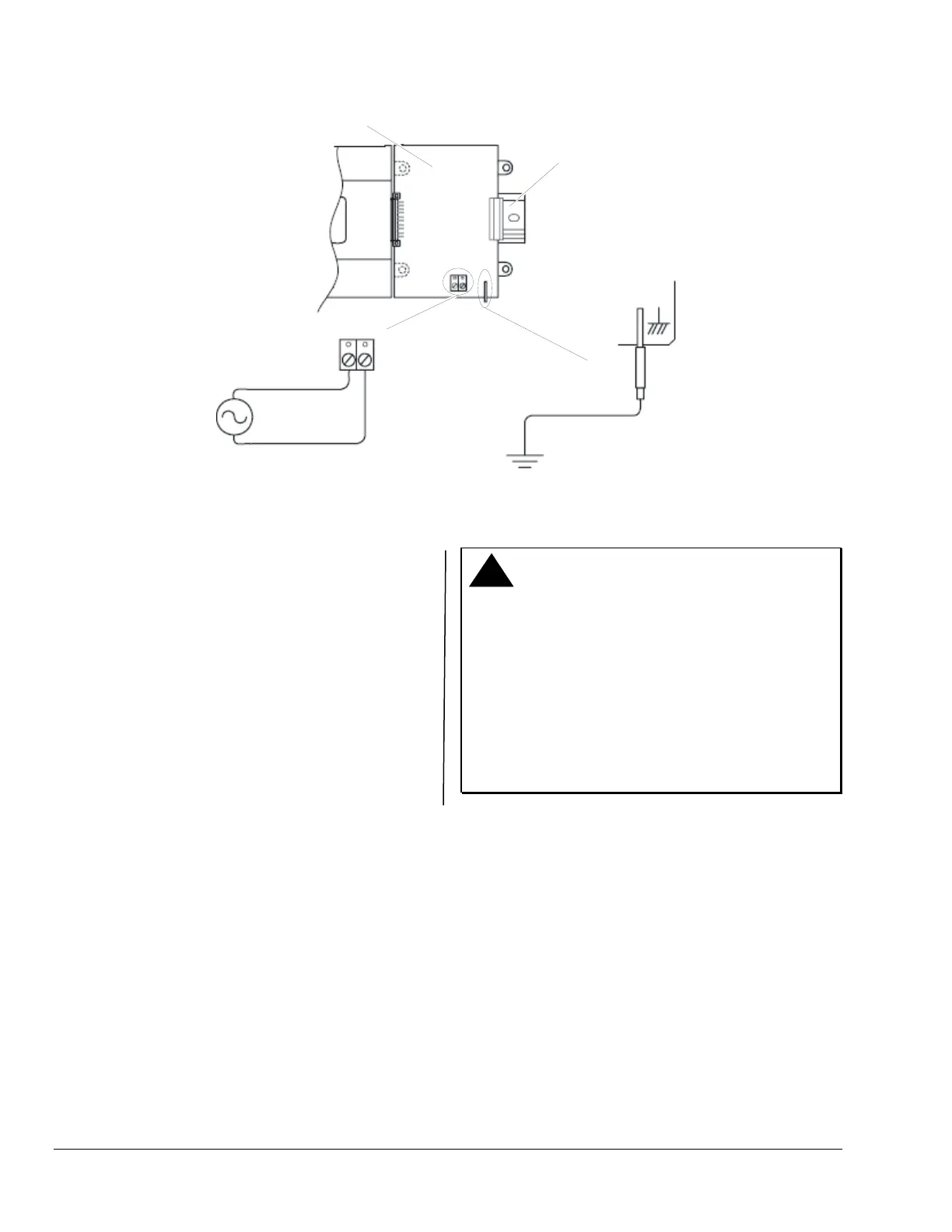
Figure 8: LP-FXPM263-0 Line Voltage Power Module Wiring Connections
To wire the DIN rail mount line voltage power module,
see Figure 8 and follow these instructions:
1. Remove power from the AC circuit being wired to
the power module.
2. Remove the power module cover by pressing in
the 4 tabs on both ends of the unit, and lifting the
cover off. If the power module is plugged into the
FX20/FX60 or an NDIO16, you may need to slide
it away to access the cover tabs.
3. Connect the supplied earth grounding wire to a
nearby grounding point (see Figure 8).
4. Make AC circuit connections line (mains) and
neutral to the terminals labeled INPUT PWR.
5. Replace the cover on the power module.
6. Make sure that all modules in the assembly are
firmly connected together and secured.
!
CAUTION: Risk of Property Damage.
Do not apply power to the system before checking
all wiring connections. Short circuited or improperly
connected wires may result in permanent damage to
the equipment.
MISE EN GARDE: Risque dégâts matériels.
Ne pas mettre le système sous tension avant d'avoir
vérifié tous les raccords de câblage. Des fils formant
un court-circuit ou connectés de façon incorrecte
risquent d'endommager irrémédiablement
l'équipement.











 To Next Page