EasyManua.ls Logo

Johnson Controls Facility Explorer FX60 - User Manual

Johnson Controls Facility Explorer FX60
22 pages
Print Icon
To Next Page IconTo Next Page
Loading...
Installation Instructions
Issue Date April 9, 2014
© 2014 Johnson Controls, Inc.
1
Part No. 24-10174-77, Rev. D www.johnsoncontrols.com
FX20/FX60 Supervisory Controllers
Installation Instructions
Application
The FX20 and FX60 are Web-based supervisory class
controllers in the Facility Explorer product family. The
FX20/FX60 manages networks of field controllers
using open communication protocols, such as N2,
L
ONWORKS®, and BACnet® protocols.
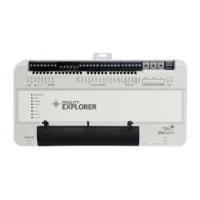
Figure 1: FX60 Supervisory Controller
North American Emissions Compliance
United States
This equipment has been tested and found to comply
with the limits for a Class A digital device pursuant to
Part 15 of the FCC Rules. These limits are designed to
provide reasonable protection against harmful
interference when this equipment is operated in a
commercial environment. This equipment generates,
uses, and can radiate radio frequency energy and, if
not installed and used in accordance with the
instruction manual, may cause harmful interference to
radio communications. Operation of this equipment in
a residential area is likely to cause harmful
interference, in which case the user will be required to
correct the interference at his/her own expense.
Canada
This Class (A) digital apparatus meets all the
requirements of the Canadian Interference-Causing
Equipment Regulations.
Cet appareil numérique de la Classe (A) respecte
toutes les exigences du Règlement sur le matériel
brouilleur du Canada.
Installation
Parts Included
Unpack the FX20/FX60 and accessories
(power module, option cards), if ordered. Inspect the
contents of the packages for damaged or missing
components. If damaged, notify the appropriate carrier
and return any damaged components for repair or
replacement.
Included in this package are the following items:
FX Supervisory Series controller
Hardware bag containing a grounding wire with
quick disconnect 0.187 in. (4.75 mm) female
connector.
Power module (if ordered). The power module
may be one of the following:
LP-FXPM24-0
(24 VAC, DIN rail mountable)
LP-FXPM263-0
(90-263 VAC, DIN rail mountable)
LP-FXPMUS-0
(90-240 VAC, with U.S. wall adapter)
LP-FXPMEU-0
(90-240 VAC, with European wall adapter)
LP-FXPMUK-0
(90-240 VAC, with U.K. wall adapter)
Communication cards (if ordered)
LP-FXLONFTT-1
LP-FXRS232-0
LP-FXRS485-0
LP-FXMDM-0
LP-FXWTC-0
Expansion Input/Output (NDIO) Modules
(if ordered)
LP-FXNDIO16-0
LP-FXNDIO34-0
LP-FXRIO16-0

Question and Answer IconNeed help?

Do you have a question about the Johnson Controls Facility Explorer FX60 and is the answer not in the manual?

Summary

Installation

Parts Included

Lists all components included in the FX20/FX60 package.

Materials and Special Tools Needed

Safety Precautions

Critical Safety Warnings

Covers electric shock, conductor usage, environment, and operational control safety.

Static Discharge Precautions

Static Discharge Handling

Precautions for handling electronic components to prevent static discharge damage.

Mounting and Installation

Option Card Installation

Mounting Option Cards

Wiring and Grounding

Wiring Connections

Instructions for connecting communication cables and power.

Grounding Procedure

Details on connecting the earth ground for safety and interference protection.

Power Wiring

Power Sources and Application

Details approved power sources and methods for applying power to the FX20/FX60.

Power Module Specifics

LP-FXPM24-0 Power Module Wiring

LP-FXPM263-0 Power Module Wiring

LP-FXPM263-0 Wiring Procedure

Communications Wiring

RS-485 and USB Ports

Setup and Adjustments

Default Properties

Lists default IP address, subnet mask, gateway, and login credentials.

Powerup and Initial Checkout

Procedures for powering up the unit and performing initial verification.

Backup Battery Connection

Operation and Status LEDs

Initial Operation and Powering

Steps for applying power and initial operational notes.

Checking Status LEDs

Interpreting the Status and Beat LEDs for system status.

Status LED Indicators

Niagara^x Software Setup

Software Installation Overview

Outlines the pre-configured Niagara build and initial setup requirements.

Initial Setup and Connectivity

Steps for providing power and establishing network connectivity for initial setup.

IP Address Configuration

Changing IP Settings

Step-by-step guide to modify the controller's IP address and subnet mask.

Platform Daemon Credentials

Station Backup and Restore

Replacing the Battery

Replacing the FX20;FX60 Unit

Summary

Installation

Parts Included

Lists all components included in the FX20/FX60 package.

Materials and Special Tools Needed

Safety Precautions

Critical Safety Warnings

Covers electric shock, conductor usage, environment, and operational control safety.

Static Discharge Precautions

Static Discharge Handling

Precautions for handling electronic components to prevent static discharge damage.

Mounting and Installation

Option Card Installation

Mounting Option Cards

Wiring and Grounding

Wiring Connections

Instructions for connecting communication cables and power.

Grounding Procedure

Details on connecting the earth ground for safety and interference protection.

Power Wiring

Power Sources and Application

Details approved power sources and methods for applying power to the FX20/FX60.

Power Module Specifics

LP-FXPM24-0 Power Module Wiring

LP-FXPM263-0 Power Module Wiring

LP-FXPM263-0 Wiring Procedure

Communications Wiring

RS-485 and USB Ports

Setup and Adjustments

Default Properties

Lists default IP address, subnet mask, gateway, and login credentials.

Powerup and Initial Checkout

Procedures for powering up the unit and performing initial verification.

Backup Battery Connection

Operation and Status LEDs

Initial Operation and Powering

Steps for applying power and initial operational notes.

Checking Status LEDs

Interpreting the Status and Beat LEDs for system status.

Status LED Indicators

Niagara^x Software Setup

Software Installation Overview

Outlines the pre-configured Niagara build and initial setup requirements.

Initial Setup and Connectivity

Steps for providing power and establishing network connectivity for initial setup.

IP Address Configuration

Changing IP Settings

Step-by-step guide to modify the controller's IP address and subnet mask.

Platform Daemon Credentials

Station Backup and Restore

Replacing the Battery

Replacing the FX20;FX60 Unit

Johnson Controls Facility Explorer FX60 Specifications

General IconGeneral
BrandJohnson Controls
ModelFacility Explorer FX60
CategoryController
LanguageEnglish

Related product manuals