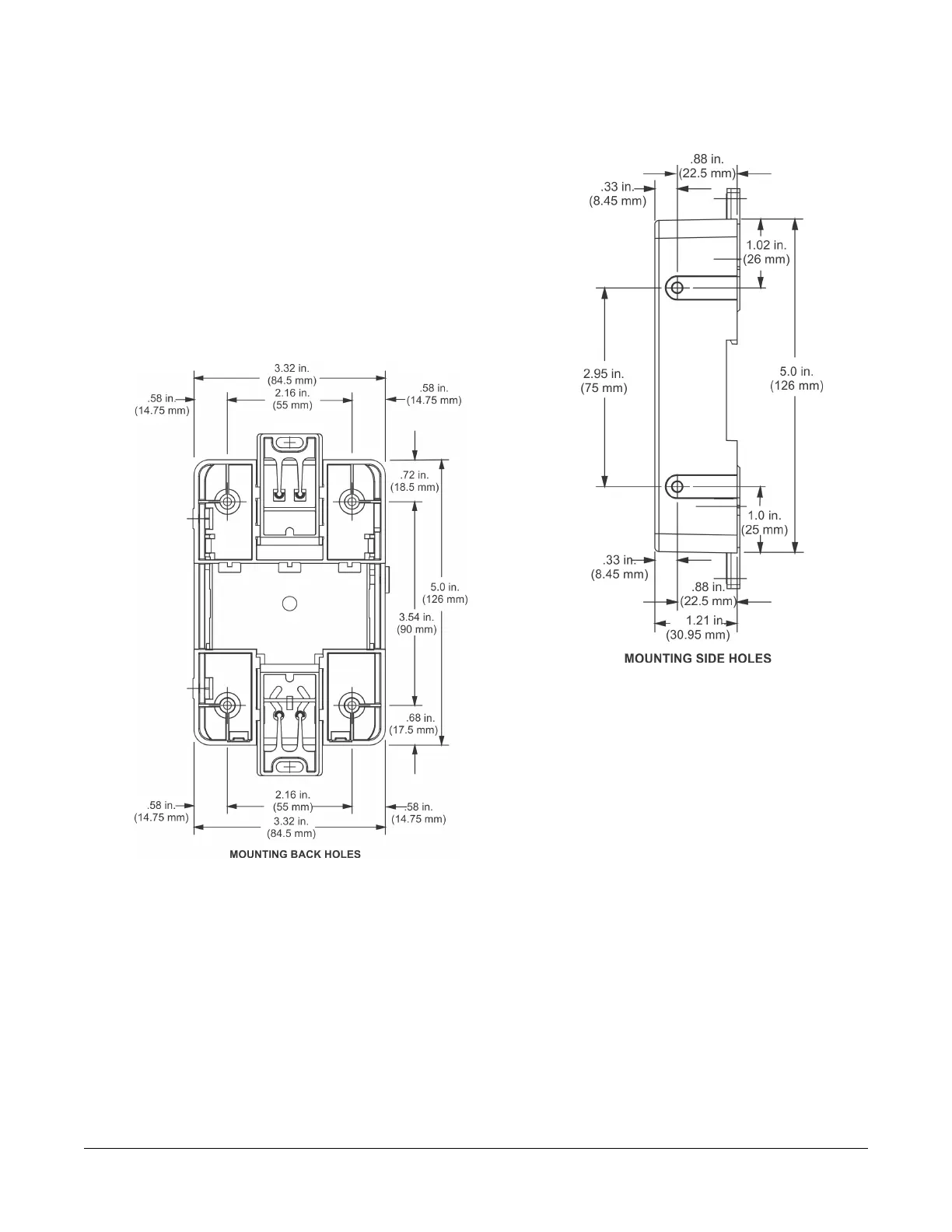
To mount the bracket on a flat surface (such as a wall):
1. Pull the bottom mounting clip outward to the extended
position.
2. Mark mounting hole locations on the wall using the
dimensions shown in Figure 7, Figure 8, or Figure 9;
or hold the bracket against the wall and mark the hole
locations through the mounting clips.
Note: The position of the location holes depends on
whether the bracket is mounted horizontally
or vertically.
Figure 7: Mounting Holes, Flat Mounting
Note: The screw holes on the MAP Gateway can
accommodate M3.5 and #6 screws.
Figure 8: Mounting Holes, Side Mounting
Note: The screw holes on the MAP Gateway can
accommodate M3.5 and #6 screws.
5Mobile Access Portal Gateway Installation Instructions







 To Next Page