The Mobile Access Portal (MAP) Gateway is an alternative local display solution or a temporary portable commissioning device designed to facilitate interaction with building automation equipment controls using smart devices (smartphones, tablets, or laptops) with Wi-Fi capabilities. It serves web pages through a built-in Wi-Fi access point or a tethered Ethernet connection, allowing users to view and edit equipment controller configuration parameters, setpoints, schedules, and alarms via a browser without requiring a dedicated application.
The MAP Gateway is compatible with various field controllers, including Metasys, Facility Explorer, and BCPro systems. It also supports Smart Equipment rooftop units with unit control boards (UCBs) and TEC3000 Series Thermostats.
Important Technical Specifications:
- Product Code: YK-MAP1810-0E (Extended temperature rated MAP Gateway, includes MAP Gateway, field bus adapter, and mounting bracket).
- Power Consumption: From SA/FC bus: 15 VDC at 2.7 VA maximum.
- Ambient Temperature Conditions:
- Operating: -30°C to 70°C (-22°F to 158°F)
- Operating Survival: -30°C to 70°C (-22°F to 158°F)
- Non-Operating: -40°C to 70°C (-40°F to 158°F)
- Ambient Humidity Conditions:
- Storage: 5% to 95% RH 30°C (86°F) maximum dew point conditions
- Operating: 5% to 95% RH, 30°C (86°F) maximum dew point conditions
- Wireless Local Area Network (WLAN) Transmission Power (Typical):
- +14.5 dBm, 54 Mbps
- +12.5 dBm, 65 Mbps
- WLAN Receiver Sensitivity (Typical):
- -76 dBm, 10% packet error rate (PER), 54 Mbps
- -73 dBm, 10% PER, 65 Mbps
- Transmission Speeds:
- Wireless Communication: 2.4 GHz ISM bands, 802.11 b/g/n, 11/22/54 Mbps
- Serial Communication (SA/FC Bus): 9600, 19.2k, 38.4k, or 76.8k bps (Note: For MAP versions 4.0 or earlier connected to an FC bus, 38.4k bps MSTP baudrate is recommended).
- Ethernet Communication: 10 Mbps, 100 Mbps
- Wi-Fi Transmission Range (Typical):
- Indoors: 30 m (100 ft) line-of-sight; typical indoor range with obstacles is 15 m (50 ft).
- Outdoors: 91 m (300 ft) line-of-sight.
- WLAN Range Performance: 0-50 ft = Excellent, 50-100 ft = Good, 100-300 ft = Weakest, approaching out of range.
- Wi-Fi Wireless Security: WPA2-PSK TKIP, WPA2-EAP-PEAP, WPA2-EAP-TLS.
- Network and Serial Interfaces:
- One SA/FC port (6-pin port; connects with ZFR1820/1823, extendable to 30 m (100 ft)).
- One USB port (Micro-B port; 2.0; supports Open Host Controller Interface [Open HCI] specification).
- One Ethernet port (8-pin RJ-45 jack; maximum cable length 100 m (328 ft)).
- Dimensions (H x W x D):
- Unit alone: 120 x 70 x 24.5 mm (4-23/32 x 2-3/4 x 31/32 in. when used vertically).
- Unit in shell: 128 x 75 x 29.5 mm (5-1/32 x 2-61/64 x 1-5/32 in. when used vertically).
- Housing: White Acrylonitrile butadiene styrene (ABS) bracket, plenum-rated.
- Weight:
- MAP Gateway alone: 0.10 kg (0.22 lb)
- MAP Gateway in shell: 0.15 kg (0.33 lb)
- Note: Weights do not include peripheral components such as cables, lanyard, or an external power supply.
- Web Browser Requirements:
- Computers: Google Chrome™ 54 and above (preferred), Windows Internet Explorer® 11, Apple®Safari® 8 and above.
- Handheld Devices: iOS version 8.0 or later (Apple® iPhone® or iPod touch®), Android™ versions 5.1 or later, or Google Chrome 54 or above.
- Purpose of control: Operating control.
- Construction of control: Suffix field "V" digits (S, C, E).
- Type of mounting: Independently mounted, Free Standing / Hand Held.
- TYPE 1 or TYPE 2 action: TYPE 1.
- External Pollution Situation: Pollution Degree 2.
- Rated impulse voltage: 330 V.
- 15 VDC External Power Supply (Terminal J4): SELV; Class 2 or LPS (Limited Power Source) ITE Equipment Power Supply.
- Terminal J1: Intended for connection to Johnson Controls field controllers supporting the standard JCI SA Bus implementation.
Usage Features:
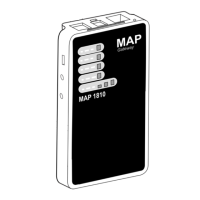
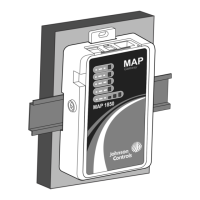
The MAP Gateway is available in two configurations: portable and stationary.
- Portable Use: When used as a portable device, the MAP Gateway should be housed in its supplied protective shell and can be carried with a lanyard. It is not designed for prolonged outdoor use. Users should maintain at least 20 cm separation from the built-in antenna.
- Stationary Use: For permanent installations, the MAP Gateway can be mounted directly to a wall or DIN rail using the provided mounting cradle. Mounting options include vertically (upright and flush), horizontally (sideways and flush), or perpendicularly to the wall to optimize wireless signal strength and minimize spatial constraints. A locking screw secures the unit into the mounting bracket.
- Power Supply: Power can be supplied via the SAB (sensor/actuator bus), FCB (field controller bus), a supplied external power supply, or a micro USB port.
- Connectivity:
- SA/FC Port: Connects to the RS-485 FC/SA bus via a 6-pin modular jack and cable assembly. The MAP Gateway has a dedicated MS/TP bus address of 03.
- USB Port: A 5-pin, Micro-B peripheral serial port for substantial software updates using the MAP Update Tool. Not designed for constant use.
- Ethernet Port: An 8-pin RJ-45 jack for tethered connections.
- Accessing Smart Equipment: When physically connected to an MS/TP network, the MAP Gateway allows access to Smart Equipment devices. It can connect through the SA bus (accessing the SE device and all SE devices on that device's FC bus when FcBusMode is set to Wired Field Bus) or through the FC bus (accessing SE devices on that FC bus only when the FC bus protocol is BACnet MSTP).
- Wi-Fi Network Connection: Users connect to the MAP Gateway's Wi-Fi network using default credentials provided on a sticker. The browser interface is accessed via
https://mapgwy.com or 192.168.142.1. Upon first login, users must change the Admin password and Wi-Fi passphrase.
- Reset Functions: The device features a reset button on the back for two functions:
- Network Reset: Resets Wi-Fi and Ethernet settings to factory defaults. Activated by pressing and holding for 2 seconds, then releasing within 3 seconds, and pressing again to confirm.
- Reset to Factory Defaults: Resets all unit settings, including user profiles and the SSL certificate, to factory defaults. Activated by pressing and holding for 6 seconds until the Fault LED shows Fast Flicker, then releasing within 3 seconds, and pressing again to confirm.
- Status Indication LEDs: The MAP Gateway uses LEDs to communicate functional states:
- Power (Green): On Steady (power supplied), Off (no power).
- Fault (Red): Off (no faults/normal operation), On Steady (missing hardware/software, reset in progress), Slow Flicker (software upgrade), Medium Flicker (startup sequence), Fast Flicker (fault).
- SA/FC Bus (Green): Off (receiving data), On Steady (transmitting data), Flicker (data being transmitted).
- Ethernet (Green): Off (communication not established), On Steady (communication established), Flicker (data transmission).
- Wi-Fi (Yellow): On Steady (Wi-Fi strength indicated by number of lit LEDs: 1 LED = weak, 3 LEDs = excellent), Off (no Wi-Fi signal).
- LED Test Sequence at Startup: Upon connecting power, the Power LED turns on, the Fault LED flashes for ~40 seconds then turns off, and the Wi-Fi LEDs light up in succession (scanning).
Maintenance Features:
- Software Updates: The MAP Gateway supports software updates to enable feature enhancements. These are typically performed via the USB port using the MAP Update Tool.
- Self-Test: During startup, the unit automatically initiates a self-test to verify proper operation.
- No Periodic Field Maintenance: The MAP Gateway does not require periodic field maintenance.
- Non-Serviceable Product: The MAP Gateway is not a serviceable product; if it fails to operate within specifications, it should be replaced. Users should not open the housing as there are no user-serviceable parts inside.
- Troubleshooting: The manual provides a troubleshooting guide for common issues like not being redirected to the login page, data not displaying after a controller upgrade, SSL certificate re-installation prompts, and power issues when connecting to an LC IOM.

 Need help?
 General





 To Next Page