WARNING
Risk of Electric Shock.
Disconnect or isolate all power supplies before making electrical connections. More than one
disconnection or isolation may be required to completely de-energize equipment. Contact with
components carrying hazardous voltage can cause electric shock and may result in severe personal
injury or death.
Risque de décharge électrique.
Débrancher ou isoler toute alimentation avant de réaliser un branchement électrique. Plusieurs
isolations et débranchements sont peut-être nécessaires pour -couper entièrement l'alimentation
de l'équipement. Tout contact avec des composants conducteurs de tensions dangereuses risque
d'entraîner une décharge électrique et de provoquer des blessures graves, voire mortelles.
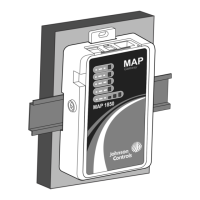
Figure 11: MAP Gateway with Sample External Power Supply
Operation
Accessing Smart Equipment Using the MAP Gateway
When the MAP Gateway is physically connected to an MS/TP network, users can have access to
Smart Equipment devices. The MAP Gateway can connect through the SA bus or through the FC
bus.
Through the Sensor Actuator (SA) Bus
If the MAP Gateway is connected through the SA bus (for example, point A on Figure 12), it can
access the SE device and all SE devices on that device's FC bus when the FcBusMode is set to Wired
Field Bus (BACnet MSTP) in the UCB display menu of the units connected to the FC bus network.
You can connect the MAP Gateway through the local SA Bus jack on the equipment control board.
Or, if a Net Sensor is installed, you can connect the MAP Gateway directly to the RJ-12 jack on the
Net Sensor.
Through the Field Controller (FC) Bus
17Mobile Access Portal Gateway Installation Guide







 To Next Page