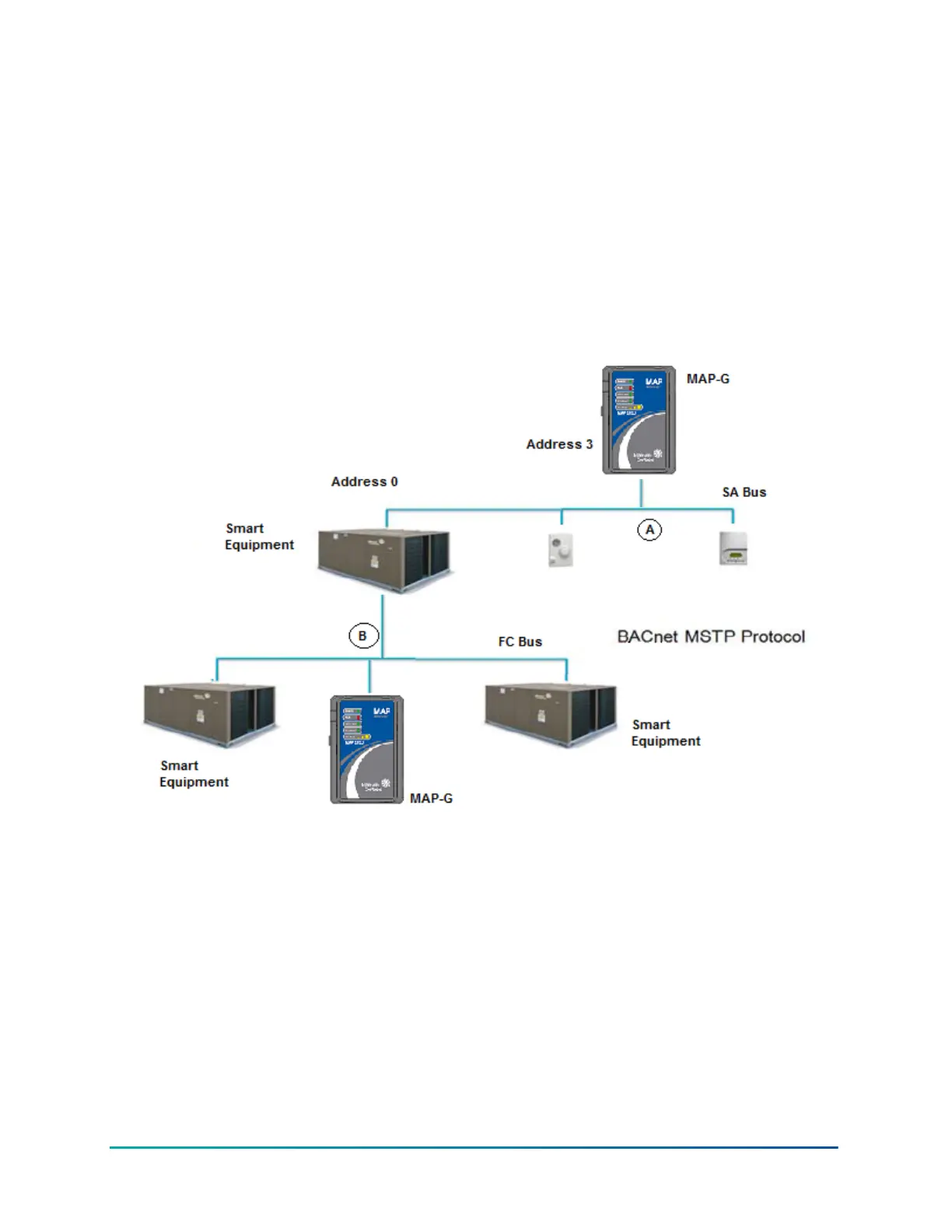
If the MAP Gateway is connected through the FC bus (point B on Figure 12), it has access to
SE devices on that FC bus only when the FC bus protocol is BACnet MSTP. For individual units
connected to the FC bus network, the FcBusMode is set to Wired Field Bus (BACnet MSTP) in the
UCB display menu. The MAP Gateway can be connected to the FC bus through the RJ-12 connector
on the Field Bus card of the smart equipment. Or, using an RJ-12 to Terminal Block Adapter (MP-
STAFBA-0), you can connect the MAP Gateway directly to the field bus.
To interact with a device or product on the network (to view devices, setpoints, or view alarms),
users select the device using a web-enabled device that is connected to the MAP Gateway Wi-Fi
network. To use the network, users must have a web-enabled device that uses a supported Internet
browser. For information on connecting to the network, see Connecting to the MAP Gateway Wi-Fi
Network.
Figure 12: Accessing Smart Equipment
Mobile Access Portal Gateway Installation Guide18







 To Next Page