©2017 Johnson Level & Tool 5
5. Using the Product
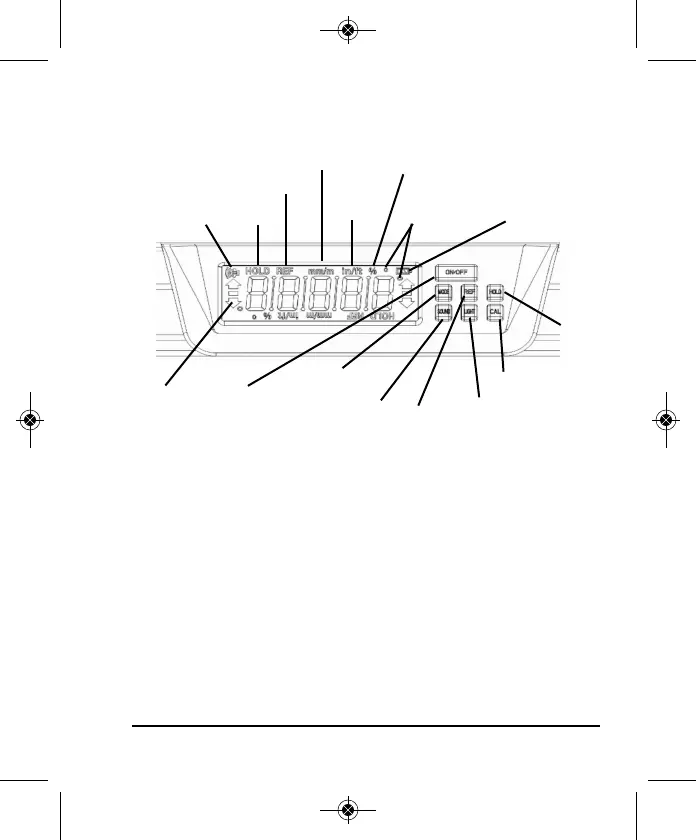
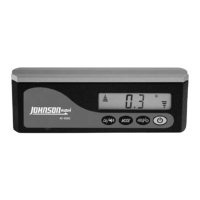
Key Guide
ON/OFF Button
Push this button once to turn on the digital level. Push this button
again to turn the digital level off.
Mode Button
Push this button once to switch from one unit of measure to another.
This controls which unit of measure your digital level will measure in.
Your level has the capability to measure in degrees, percentage of
slope, inches/feet in fractions, inches/feet in decimal and millimeters/
meters. A symbol at the top of the LCD will show which unit of
measure you are currently in.
Direction
Arrow Symbol
On/Off Button
Mode Button
Sound Button
Reference
Button
Hold
Button
Calibrate Button
LCD Backlight
Button
Sound Symbol Hold Symbol
Percent Symbol
Reference Symbol
Degree Symbol
Battery Symbol
inch/feet
Symbol
millimeters/
meter Symbol
1870i-English_Manuals 3/22/17 1:58 PM Page 5



 To Next Page