12 ©2012 Johnson Level & Tool - Rev. 2
Horizontal Calibration
1. Press and hold the ZERO key for 3-plus seconds, unit will beep once.
When the LCD shows -0-, it means the instrument has already
entered the calibration status.
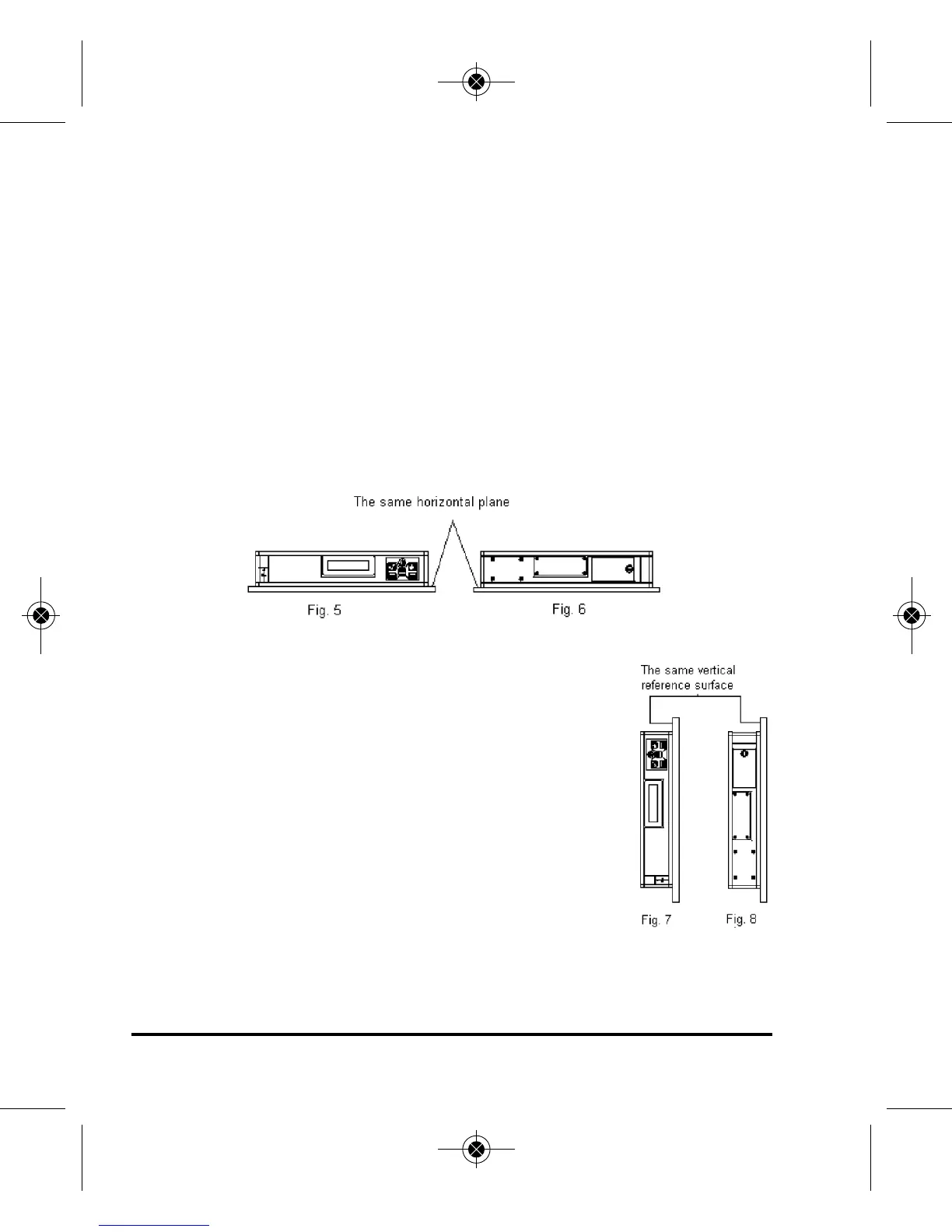
2. Place the laser digital level on the horizontal reference surface, as
shown in figure 5, after 10 seconds, press the ZERO again, and the
LCD shows -1-.
3. Turn the laser digital level 180 degrees, as shown in figure 6, and
after 10 seconds, press the ZERO key again, and the LCD shows -2-.
Wait for 2 seconds, and the laser digital level will show the angle
reading. The horizontal calibration is now completed.
Vertical Calibration
1. Press and hold the ZERO key for 3-plus seconds,
unit will beep once. When the LCD shows -0-, it
means the instrument has already entered the cali-
bration status.
2. Place the laser digital level on the vertical reference
surface, as shown in figure 7, after 10 seconds,
press the ZERO again, and the LCD shows -1-.
3. Turn the laser digital level 180 degrees, as shown in
figure 8, and after 10 seconds, press the ZERO key
again, and the LCD shows -2-. Wait for 2 seconds, and the laser
digital level will show the angle reading. The vertical calibration is
now completed.
5821H-English_Manuals 5/2/12 8:04 AM Page 12



 To Next Page