12 ©2016 Johnson Level & Tool - Rev. 2
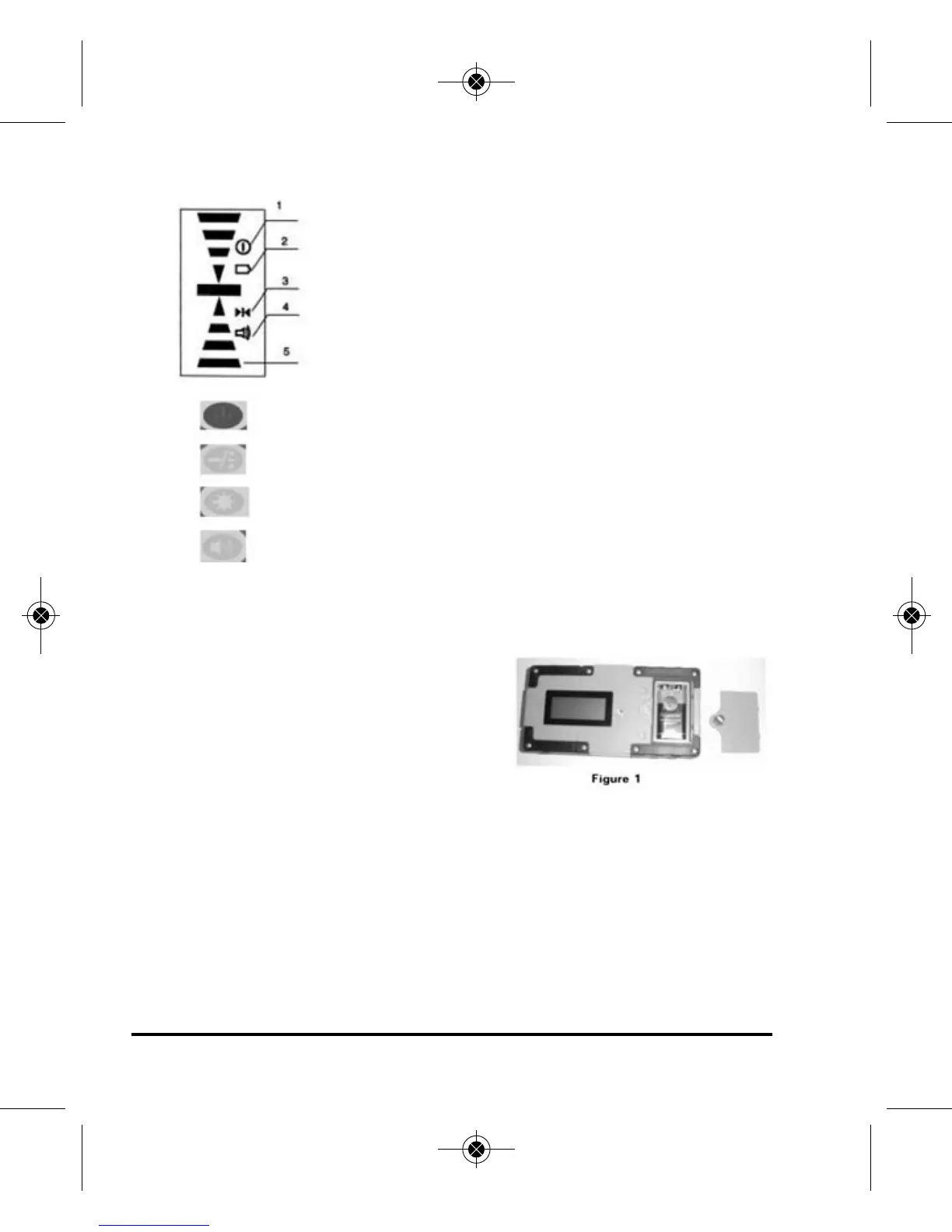
(b) Display
1. Power on symbol
2. Low battery indicator
3. Fine/Coarse symbol
4. Beeper symbol
5. Position indication arrows
Power Key: Turn on/off the power
Fine/Coarse Accuracy Key: Switch detecting accuracy
LED Key: Turn on/off the LCD’s light
Volume Key: Cycles between high, low and off
3. Operation Guide
(a) Battery Installation
• Open the battery cover door by
turning the battery cover screw
counter-clockwise. Put the battery
into the battery case noting the
polarity shown in the battery compartment.
• Put the battery cover door back, and tighten the screw.
Note: 1) Remove the battery when the unit is being stored for a long time.
2) When the low battery indicator is displayed, change the
battery soon.
1625i-English_Manuals 12/28/16 9:41 AM Page 12



 To Next Page