Need help?
Do you have a question about the Johnson 40-6705 and is the answer not in the manual?
Instructions for removing the old battery cover, inserting new AAA batteries, and replacing the cover.
Steps to prepare the detector including battery insertion, clamp attachment, and powering on.
Explains LED indicators for startup, low battery, exhausted battery, and failure to power on.
Steps for positioning, moving, and locating the laser beam with the detector.
How to read grade position using the detector with or without a grade rod.
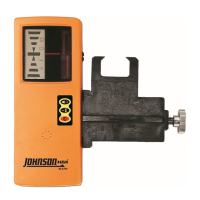
The Johnson 40-6705 Laser Detector is a versatile tool designed to locate red beam (635/650nm) rotary lasers, making it ideal for both outdoor and indoor job sites where the laser beam might be difficult to see with the naked eye. Its primary function is to provide visual and audio cues to help users quickly and easily find the laser beam and determine its grade position.
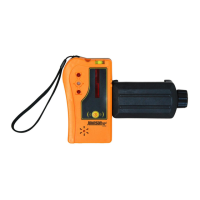
The core function of this device is to detect laser beams from rotary lasers and indicate their position relative to the detector. It achieves this through a detection window that senses the laser light. Once a laser beam is detected, the device uses an ultra-bright LED display and audio alerts to guide the user to the exact grade position. The LED display features distinct indicators: a bottom red LED for "MOVE UP," a top red LED for "MOVE DOWN," a center orange LED for "NEAR GRADE," and a center green LED for "ON GRADE." These visual cues, combined with the audio alerts, provide clear and immediate feedback to the user, simplifying the process of locating and maintaining the desired grade.
The detector is designed for simple one-button operation, ensuring quick setup and ease of use. It can be used in conjunction with a grade rod, where the top edge of the grade rod clamp acts as the grade position indicator, allowing users to read the grade directly from the rod. Alternatively, for standalone use without a grade rod, the grade position can be read from an indicator on the detector's housing. A convenient indent in the housing facilitates marking the grade position directly on a work surface with a pencil, marker, or other tool.
Getting started with the Johnson 40-6705 Laser Detector involves a few straightforward steps. First, the included AAA batteries must be inserted into the battery housing, following the indicated polarity. The battery cover is designed for easy removal and replacement by gently depressing an arrow and sliding. Once powered, the detector can be attached to the included clamp if a grade rod is being used, or the clamp can be removed for standalone operation. The device is turned on and off with a single power button.
When operating the detector, it's crucial to position the detection window facing the laser, ensuring no obstructions, including the user's own body, are between the detector and the laser. Users should be mindful of potential laser reflections from surfaces like windows or trucks, as these can cause erroneous signals. For rotary lasers with multiple rotational speed options, using the highest speed is recommended to facilitate easier laser beam location. The detector should be moved perpendicularly to the plane of the laser light until it begins to locate the beam, at which point it will beep and the LEDs will illuminate. The LEDs then guide the user to move the detector in the appropriate direction until the "ON GRADE" position is achieved.
The detector is equipped with a 6-minute auto-off timer, which automatically powers off the device after 6 minutes of inactivity (no buttons pressed or laser signals received). This feature helps conserve battery life.
The Johnson 40-6705 Laser Detector is built with durability in mind, featuring dust and rain-resistant construction, making it suitable for various job site conditions.
Battery management is a key aspect of the device's maintenance. It operates on two AAA batteries and offers an impressive 45-hour battery life. The detector includes a low-battery indicator system to help users diagnose and address battery-related issues promptly. Upon startup, the center LED will flash red/green, accompanied by a single beep, confirming successful startup. If the bottom LED flashes red continuously, it indicates that the batteries are low and will soon require replacement. Should the detector beep twice and power off, it signifies that the batteries are completely exhausted and need immediate replacement. If the device fails to power on, it's likely due to fully exhausted batteries.
To prolong the life of the detector and prevent corrosion, it is recommended to remove the batteries if the device will not be used for an extended period, approximately three months or longer. This simple step helps maintain the internal components and ensures the detector remains in optimal working condition for future use.
 General
| Model | 40-6705 |
|---|---|
| Category | Measuring Instruments |
| Type | Digital Multimeter |
| Display | LCD |
| Power Source | 9V Battery |
| Units of Measure | Volts, Amps, Ohms |
| Measurement Functions | DC Voltage, AC Voltage, DC Current, Resistance |
| DC Current Range | 10A |

 To Next Page